
Vib3Craft
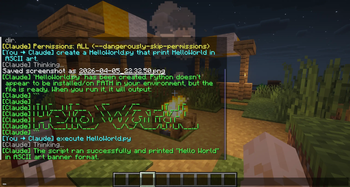
Vib3Craft is a Minecraft Fabric mod that lets you chat with Claude AI and run Claude Code directly from in-game chat, with support for setting working directories, file permissions, and multi-step coding tasks on your PC all without leaving Minecraft.
Screenshots
About this Mod
VibeCraft
Vibe code without ever leaving your favourite game.
Write code, review PRs, and ship features — all from your favourite in-game location.
Why alt-tab to a terminal when you can code from a mountaintop in Minecraft?
VibeCraft puts Claude Code directly inside your game. Point it at any project on your PC, give it permissions, and let it work — while you mine, build, or just vibe.
What can it do?
- Chat with Claude AI without leaving the game
- Point Claude at any folder on your PC and have it read, write, and edit files
- Run multi-step coding tasks — Claude chains tool calls automatically
- Full Claude Code CLI toolset: file read/write, bash, search, and more
- Optional direct Anthropic API route with in-game terminal command approval
Commands
| Command | Description |
|---|---|
/claude <message> |
Chat with Claude (uses local Claude Code CLI) |
/claude api <message> |
Chat via Anthropic API (requires API key) |
/claude setdir <path> |
Point Claude at a project folder |
/claude dir |
Show current working directory |
/claude allow <tools> |
Grant Claude specific tool permissions |
/claude deny |
Revoke all permissions |
/claude clear |
Reset conversation, directory, and permissions |
/claude yes / /claude no |
Approve or deny a proposed terminal command |
/claude setkey <key> |
Save your Anthropic API key |
Examples
Just vibe and chat
/claude What's the best way to find ancient debris?
/claude Write me a haiku about creepers
Start a new project from your base
/claude setdir C:\Users\hungm\Documents\MyApp
/claude allow Write,Edit,Read
/claude Create a REST API with Express.js and basic CRUD routes
Review and fix code while building
/claude setdir C:\Users\hungm\Documents\HelloWorld
/claude allow Read,Edit
/claude Review all my Java files and fix any bugs you find
/claude Add unit tests for the login class
Explore a codebase safely
/claude setdir C:\Users\hungm\Documents\BigProject
/claude allow Read,Glob,Grep
/claude How does authentication work in this project?
/claude Where are the API routes defined?
Full send — let Claude do everything
/claude setdir C:\Users\hungm\Documents\MyApp
/claude allow all
/claude Scaffold a full Next.js app with Tailwind and a login page
Use the API route for terminal control
/claude setkey sk-ant-api03-...
/claude api Check my disk space and list the 5 largest folders on C:\
Claude will propose each command and wait for your approval:
[Claude] wants to run this command:
  > dir C:\ /s /o-s
Type /claude yes to allow or /claude no to deny
Permissions
Control exactly what Claude is allowed to do:
| Permission | Effect |
|---|---|
Read,Glob,Grep |
Read-only — safe for exploring |
Read,Write,Edit |
File creation and editing, no shell |
Read,Write,Edit,Bash |
Full coding including running builds |
all |
No prompts — Claude acts freely |
/claude allow Read,Edit       — files only, no shell
/claude allow all             — full trust mode
/claude deny                  — lock it back down
Requirements
- Minecraft 1.21 – 1.21.11 (Fabric)
- Fabric Loader 0.18.6+
- Fabric API
- Claude Code CLI installed and in your PATH
Code from your castle. Ship from your survival world. Vibe from anywhere.
Available Versions
How to Install Vib3Craft on Your Server
Order Server
Order a Minecraft Java server with at least 3 GB RAM (4 GB recommended).
Set fabric Loader
In the panel under "Egg", select the fabric loader and matching Minecraft version (1.21.11).
Install Mod
Open the mod browser in the dashboard and search for "Vib3Craft". Click "Install" – done! Alternatively, upload the .jar via SFTP to the /mods folder.
Compatibility
Mod Loaders
Minecraft Versions
1.21.11, 1.21.10, 1.21.9 (+9 more)
Server-side
✗ UnsupportedRecommended RAM
4 GB(min. 3 GB)Frequently Asked Questions
Vib3Craft server crashes on startup – what to do?
Most common cause: wrong fabric version or insufficient RAM. Check the server log (latest.log) for "OutOfMemoryError" or "Mixin" errors. With Mado Hosting: ensure at least 3 GB RAM is allocated and the loader matches the mod version (1.21.11). You can switch loaders with one click in the panel.
Is Vib3Craft compatible with fabric?
Vib3Craft officially supports fabric for Minecraft 1.21.11, 1.21.10, 1.21.9. The Mado dashboard automatically detects incompatible loader combinations.
Server lagging with Vib3Craft – how to optimize performance?
Recommended RAM: 4 GB (per 8 players). Use /spark profiler to check if Vib3Craft consumes the most tick time. Common fixes: reduce server view-distance to 8-10, install "performant" or "starlight" as supplementary mods on Forge. With Mado Hosting, your server runs on NVMe SSDs with dedicated CPU cores for minimal latency.
Similar Mods




![[ETF] Entity Texture Features](https://cdn.modrinth.com/data/BVzZfTc1/af683d206d50b05258d865b0d6e4aa2f2cee12f2_96.webp)
![[EMF] Entity Model Features](https://cdn.modrinth.com/data/4I1XuqiY/6e5bbd0d06b1741bfdab6c0cfab6de8fdaf0064c_96.webp)
Rent Modded Server
Install Vib3Craft with just one click on your server.