
Video Player
This mod allows the playback of videos in the user interface (GUI), you can play videos for all connected users.
Screenshots
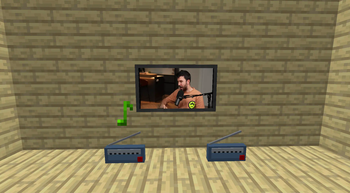
About this Mod
🎬 Video Player Mod
✨ Revolutionize Your Minecraft Experience! ✨
The Video Player Mod lets you play videos, music, and international radio directly within the Minecraft GUI. Whether you're hosting a server or playing solo, this mod brings your favorite content straight to your game!
🔊 Key Features
- 🎵 Music & International Radio: Tune in to your favorite stations or play music directly via URLs.
- 📺 TV in Minecraft: Place TV models and enjoy video playback within the game world.
- 🖥️ Fullscreen Video Playback: Immerse yourself with videos in fullscreen, perfect for sharing content across all connected players.
- 🎶 Background music Immerse yourself with custom sounds or music that can be shared across all connected players.
🛠️ Customizable Commands
/playvideo: Simple and effective. Play videos with basic options like volume and control locks.
/playgovideo: Advanced command with customizable screen modes, positions, and fade effects.
/playmusic: Play music or radio streams with customizable volume and control options.
/stopvideo: Stop the actual videos of the players that you want.
/stopmusic: Stop the actual musics of the players that you want.
📜 How to Use Commands
1. /playvideo <TARGETS/PLAYER> <VOLUME> <URL> [<control_blocked>] [<can_skip>]
This command allows you to play a video for the specified players with customizable options:
- 🎯 TARGETS/PLAYER: Specify the player(s) who will see the video. Example: @a for all players.
- 🔊 VOLUME: Set the volume level (0-100).
- 🌐 URL: The video URL to be played (e.g., YouTube link).
- 🚫 control_blocked: (Optional) Block fast forward/rewind controls. Default is false.
- ⏭️ can_skip: (Optional) Disable SHIFT + ESCAPE to prevent skipping. Default is true.
Example: /playvideo @a 100 https://www.youtube.com/watch?v=C0DPdy98e4c
Plays the video for all players at maximum volume.
2. /playgovideo <TARGETS/PLAYER> <VOLUME> <URL> <MODE> [<control_blocked>] [<can_skip>] [ONLY IN MODE 1 -> <position>] [<option_mode _in option_secs_in option_mode_out option_secs_out>]
This advanced command offers more customization:
- 🎯 TARGETS/PLAYER: Specify the player(s) who will see the video.
- 🔊 VOLUME: Set the volume level (0-100).
- 🌐 URL: The video URL to be played.
- 🖥️ MODE: Choose 0 for fullscreen or 1 for partial screen (under development).
- 🚫 control_blocked: (Optional) Block fast forward/rewind controls.
- ⏭️ can_skip: (Optional) Disable SHIFT + ESCAPE.
- 📍 position: (Mode 1 only) Customize the video position (under development).
- 💨 option_mode & option_secs: Define fade-in and fade-out effects with specified durations.
Example: /playgovideo @a 100 https://www.youtube.com/watch?v=C0DPdy98e4c 0 false true 0 5 1 3
Plays the video in fullscreen with a 5-second fade-in and a 3-second fade-out for all players.
🎮 Intuitive Controls
- 🚪 Close Video: SHIFT + ESCAPE
- ⏩ Forward/Rewind: SHIFT + RIGHT/LEFT ARROW
- ⏯️ Pause: SHIFT + SPACE
- 🔊 Adjust Volume: UP/DOWN ARROW
- 🔇 Mute: M
🎥 Demo & Support
Found a bug? Report it on GitHub or join the discussion on Discord!
👥 Credits & Contributions
You are free to use this mod in modpacks. Special thanks to SrRapero720 for development support, and anarkh_angel for the TV models.
</a>
💰 Support & Donations
If you love this mod, consider supporting via PayPal. Every contribution helps!
©️ Copyright
VideoPlayer Mod © Goedix. All rights reserved.
Available Versions
How to Install Video Player on Your Server
Order Server
Order a Minecraft Java server with at least 3 GB RAM (4 GB recommended).
Set fabric Loader
In the panel under "Egg", select the fabric loader and matching Minecraft version (1.20.6).
Install Mod
Open the mod browser in the dashboard and search for "Video Player". Click "Install" – done! Alternatively, upload the .jar via SFTP to the /mods folder.
Compatibility
Mod Loaders
Minecraft Versions
1.20.6, 1.20.5, 1.20.4 (+14 more)
Server-side
✓ RequiredRecommended RAM
4 GB(min. 3 GB)Frequently Asked Questions
Video Player server crashes on startup – what to do?
Most common cause: wrong fabric version or insufficient RAM. Check the server log (latest.log) for "OutOfMemoryError" or "Mixin" errors. With Mado Hosting: ensure at least 3 GB RAM is allocated and the loader matches the mod version (1.20.6). You can switch loaders with one click in the panel.
Is Video Player compatible with fabric and forge?
Video Player officially supports fabric, forge for Minecraft 1.20.6, 1.20.5, 1.20.4. Note: Forge and Fabric mods are NOT cross-compatible – pick one loader and stick with it. The Mado dashboard automatically detects incompatible loader combinations.
Server lagging with Video Player – how to optimize performance?
Recommended RAM: 4 GB (per 8 players). Use /spark profiler to check if Video Player consumes the most tick time. Common fixes: reduce server view-distance to 8-10, install "performant" or "starlight" as supplementary mods on Forge. With Mado Hosting, your server runs on NVMe SSDs with dedicated CPU cores for minimal latency.
Similar Mods

![[ETF] Entity Texture Features](https://cdn.modrinth.com/data/BVzZfTc1/af683d206d50b05258d865b0d6e4aa2f2cee12f2_96.webp)
![[EMF] Entity Model Features](https://cdn.modrinth.com/data/4I1XuqiY/6e5bbd0d06b1741bfdab6c0cfab6de8fdaf0064c_96.webp)



Rent Modded Server
Install Video Player with just one click on your server.