
Villager Overhaul
Guards | Better Merchants & Farmers | Command Villagers via chat
Screenshots


About this Mod

Villager Overhaul
Welcome to Villager Overhaul. This mod adds a bunch of QoL features to trading, farming, adds Villager combat mechanics as well telling your villagers to do something (via a chat message).
Why this mod? Simply put:
- Mojang clearly forgot about Villagers 🥲
- Each Villager is unique, giving the player new ideas to make use of its skills
- Make villagers more alive and give them a purpose other than being prisoners at Steve's mercy
- Villagers will now turn your areas into living, breathing cities
Trading features consume emeralds. The default configuration tries to be balanced, but everything is fully configurable, of course.
For now, this mod only supports NeoForge 1.21.1 and beyond, due to the complexity of the mod’s architecture. I may investigate porting to 1.20.1 in the future, but there are no plans as of now.
Wiki
Please visit: https://z2six.github.io/VillagerOverhaul

Chat commands
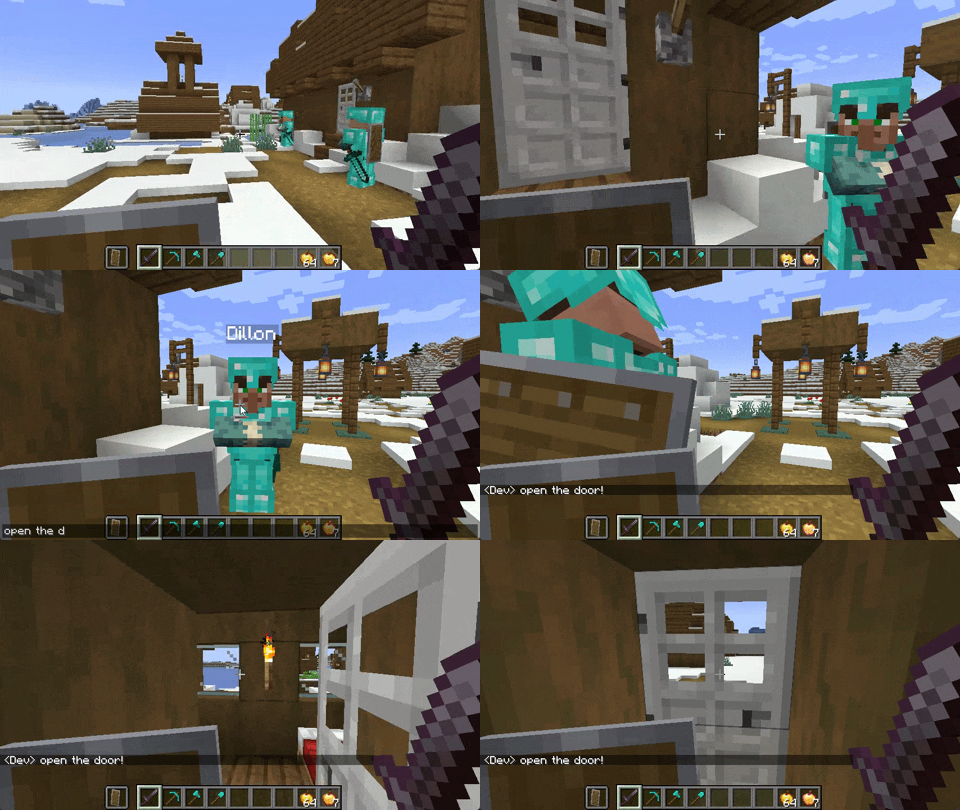
- Teach your villager to do stuff by showing them what to do
- Save the sequence of actions (like a macro) and set a chat message
- Type the chat message, if the Villager is in range it will do what you taught it
- Shout "help" or "follow" to make nearby villagers stop what they're doing and do what they're told!
Guard Features
Vitality | Agility | Strength | Armor
- Give villagers fully functioning equipment (armor, sword, shield)
- Each villager spawns with 4 randomized custom Combat stats
- Villagers return to normal jobs (like farming) when not on guard duty
- Assign patrol routes to villagers
- Tell villagers to follow you or stop moving
- Villagers eat food to regenerate HP
- Fully customize when villagers engage in combat (individually or globally)
- Customize each villager’s combat AI
Merchant features
Generosity | Timeliness| Intellect | Hoarder
- Reroll trades at any villager level in exchange for emeralds
- Lock specific trades so they won’t get rerolled
- Automatically reroll until a specific item is found while you're away (RMB on reroll button)
- Automatic trading (example: quickly trade all paper for emeralds) (CTRL+Click on a sell-type trade)
- Each villager spawns with 4 randomized custom Merchant stats
Farming Features
Motivation | Efficiency | Plant Whisperer | Ranger
- Manual Farming mode: smarter than vanilla farming, works with any modded item that requires Farmland (Nether Wart + Soul Sand is supported too, though)
- Instruct your villager to only farm one specific thing. It will ignore everything else
- Villager can use Hoe (with Fortune enchant)
- Register a deposit and withdrawal chest for each villager
- Villager's will place/take items in the registered chest, based on its settings
- Register a "workstation" and a range in which the villager works (around its workstation, which can be any block)
- Villagers will turn Dirt into Farmland within their working range (if you turn that on in Farm Settings GUI)
- Configure when/what to deposit/withraw
- Configure what items to pick up
- Villagers will take Bonemeal from Withdraw chest and use it on crops
- Planting seeds gives EXP
- Villager auto-crafting is disabled (e.g. turning Wheat into Bread)
- Each villager spawns with 4 randomized custom Farming stats
General Features
- Turn off/on any of this mod's modules completely: Merchants, Guards, Farmers.
- Villagers can be respawned
- Other players cannot run commands, rerolls, etc. on villagers you recruited
- Villager information GUI showing stats, history, attributes, and more
- Localized chat with shouting and whisper function, due to incompatibility with the popular (and very cool) mod.
- Server config is hot-loaded — no server restart required
How to Use
- 📝 Read the wiki! 😉
- 👪 Find a villager (or breed one)
- 💎 Right-click to recruit it (if you like its stats)
- 🖱️ Right-click it again — the mod’s buttons will now appear
- 📊 Configure
villageroverhaul-server.tomlto rebalance everything - ⚙️ Press K to set default villager combat AI settings
- 👻 Perfect villager died? Right-click a Respawn Anchor while holding an emerald
Important incompatibilities
- Localized Chat (hence, this mod adds the same features)
Available Versions
How to Install Villager Overhaul on Your Server
Order Server
Order a Minecraft Java server with at least 3 GB RAM (4 GB recommended).
Set neoforge Loader
In the panel under "Egg", select the neoforge loader and matching Minecraft version (1.21.1).
Install Mod
Open the mod browser in the dashboard and search for "Villager Overhaul". Click "Install" – done! Alternatively, upload the .jar via SFTP to the /mods folder.
Compatibility
Mod Loaders
Minecraft Versions
1.21.1
Server-side
✓ RequiredRecommended RAM
4 GB(min. 3 GB)Frequently Asked Questions
Villager Overhaul server crashes on startup – what to do?
Most common cause: wrong neoforge version or insufficient RAM. Check the server log (latest.log) for "OutOfMemoryError" or "Mixin" errors. With Mado Hosting: ensure at least 3 GB RAM is allocated and the loader matches the mod version (1.21.1). You can switch loaders with one click in the panel.
Is Villager Overhaul compatible with neoforge?
Villager Overhaul officially supports neoforge for Minecraft 1.21.1. The Mado dashboard automatically detects incompatible loader combinations.
Server lagging with Villager Overhaul – how to optimize performance?
Recommended RAM: 4 GB (per 8 players). Use /spark profiler to check if Villager Overhaul consumes the most tick time. Common fixes: reduce server view-distance to 8-10, install "performant" or "starlight" as supplementary mods on Forge. With Mado Hosting, your server runs on NVMe SSDs with dedicated CPU cores for minimal latency.
Similar Mods




Rent Modded Server
Install Villager Overhaul with just one click on your server.