
Vinyl Revival
Craft blank music discs from plastic, burn them into vanilla records, and play them on animated turntables. Explore the Nether, smelt Raw Plastic, and bring immersive audio to your world! Turntables must be placed 10+ blocks apart.
Screenshots

About this Mod
🎵 Vinyl Revival – Bring music to life in Minecraft
Vinyl Revival introduces a new, immersive way to create and play Minecraft’s vanilla music discs using real-world inspired materials and machines.
🧪 How it works
Explore the Nether to find a new resource: Raw Plastic.
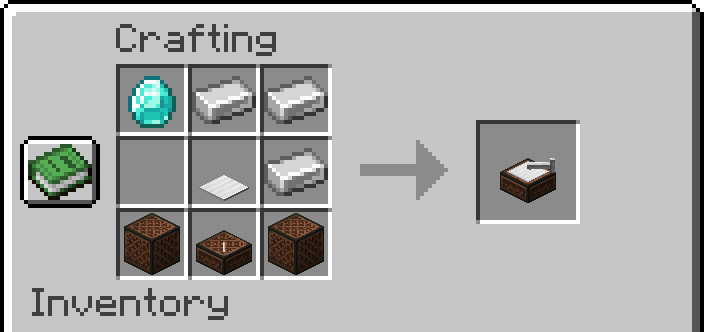
Smelt Raw Plastic into refined Plastic, which is used to craft a blank Music Disc.
Insert the blank disc into the Disc Burner to engrave it into one of Minecraft’s vanilla music discs.
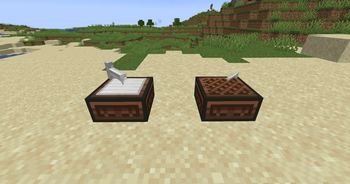
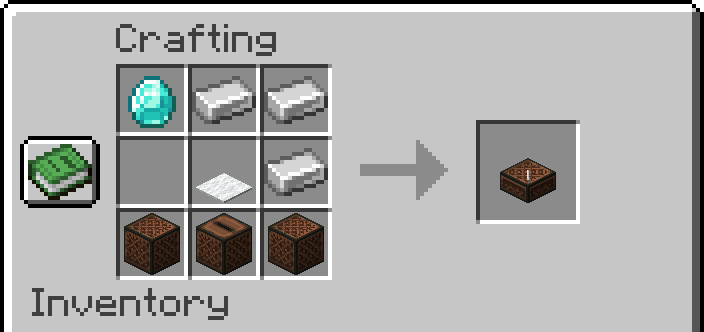
Play the discs using either the classic Jukebox or the new Turntable, which features a fully animated spinning vinyl.
⚠️ Important note
- It is recommended to place Turntables at least 8 blocks apart. Otherwise, minor audio issues or slight sound overlap may occur. These are not critical, but maintaining distance helps avoid them.
🛠️ Current Features
New Nether resource: Raw Plastic
Crafting system for vanilla music discs
Disc Burner block to engrave blank discs
Animated Turntable that plays vanilla records
Fully compatible with Minecraft’s record sound system
👨💻 Developed with passion
- Created by a 15-year-old developer from Italy who loves Minecraft, music and modding — Vinyl Revival is a unique project combining creativity, technical skill and love for detail.
Available Versions
How to Install Vinyl Revival on Your Server
Order Server
Order a Minecraft Java server with at least 3 GB RAM (4 GB recommended).
Set fabric Loader
In the panel under "Egg", select the fabric loader and matching Minecraft version (1.21.10).
Install Mod
Open the mod browser in the dashboard and search for "Vinyl Revival". Click "Install" – done! Alternatively, upload the .jar via SFTP to the /mods folder.
Compatibility
Mod Loaders
Minecraft Versions
1.21.10, 1.21.9, 1.21.8 (+2 more)
Server-side
~ OptionalRecommended RAM
4 GB(min. 3 GB)Frequently Asked Questions
Vinyl Revival server crashes on startup – what to do?
Most common cause: wrong fabric version or insufficient RAM. Check the server log (latest.log) for "OutOfMemoryError" or "Mixin" errors. With Mado Hosting: ensure at least 3 GB RAM is allocated and the loader matches the mod version (1.21.10). You can switch loaders with one click in the panel.
Is Vinyl Revival compatible with fabric and neoforge?
Vinyl Revival officially supports fabric, neoforge for Minecraft 1.21.10, 1.21.9, 1.21.8. The Mado dashboard automatically detects incompatible loader combinations.
Server lagging with Vinyl Revival – how to optimize performance?
Recommended RAM: 4 GB (per 8 players). Use /spark profiler to check if Vinyl Revival consumes the most tick time. Common fixes: reduce server view-distance to 8-10, install "performant" or "starlight" as supplementary mods on Forge. With Mado Hosting, your server runs on NVMe SSDs with dedicated CPU cores for minimal latency.
Similar Mods

![[ETF] Entity Texture Features](https://cdn.modrinth.com/data/BVzZfTc1/af683d206d50b05258d865b0d6e4aa2f2cee12f2_96.webp)
![[EMF] Entity Model Features](https://cdn.modrinth.com/data/4I1XuqiY/6e5bbd0d06b1741bfdab6c0cfab6de8fdaf0064c_96.webp)



Rent Modded Server
Install Vinyl Revival with just one click on your server.