
Visual Blueprint Materials
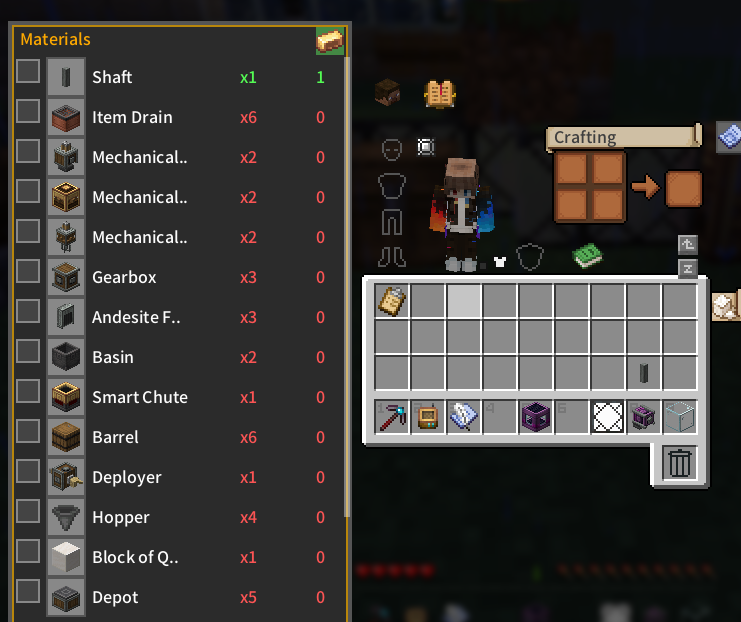
Displays a visual material list and inventory tracking for Create blueprints directly on container and inventory screens.
About this Mod
Mod Introduction
This project includes code developed with AI assistance and manually reviewed by the author.
Visual Blueprint Materials is a Create add-on that parses blueprint clipboard NBT data to display a visual material list and current inventory counts on inventory, chest, AE2, and RS terminal screens. The side panel intelligently positions itself to avoid overlapping with item slots or JEI, allowing players to track requirements, toggle collected or ignored items directly into the clipboard NBT, and lock the panel to auto-open with containers. It supports JEI recipe lookups via R/U keys and requires Minecraft 1.20.1, Forge 47.x, and Create 0.5.x or 6.x.
Authored by AlkSur under the MIT License, this project is free for personal and non-profit server use, while any commercial application, including paid modpacks or monetized servers, requires explicit written authorization.
Screenshots
Available Versions
How to Install Visual Blueprint Materials on Your Server
Order Server
Order a Minecraft Java server with at least 3 GB RAM (4 GB recommended).
Set forge Loader
In the panel under "Egg", select the forge loader and matching Minecraft version (1.21.1).
Install Mod
Open the mod browser in the dashboard and search for "Visual Blueprint Materials". Click "Install" – done! Alternatively, upload the .jar via SFTP to the /mods folder.
Compatibility
Mod Loaders
Minecraft Versions
1.21.1, 1.20.1
Server-side
✗ UnsupportedRecommended RAM
4 GB(min. 3 GB)Frequently Asked Questions
Visual Blueprint Materials server crashes on startup – what to do?
Most common cause: wrong forge version or insufficient RAM. Check the server log (latest.log) for "OutOfMemoryError" or "Mixin" errors. With Mado Hosting: ensure at least 3 GB RAM is allocated and the loader matches the mod version (1.21.1). You can switch loaders with one click in the panel.
Is Visual Blueprint Materials compatible with forge and neoforge?
Visual Blueprint Materials officially supports forge, neoforge for Minecraft 1.21.1, 1.20.1. The Mado dashboard automatically detects incompatible loader combinations.
Server lagging with Visual Blueprint Materials – how to optimize performance?
Recommended RAM: 4 GB (per 8 players). Use /spark profiler to check if Visual Blueprint Materials consumes the most tick time. Common fixes: reduce server view-distance to 8-10, install "performant" or "starlight" as supplementary mods on Forge. With Mado Hosting, your server runs on NVMe SSDs with dedicated CPU cores for minimal latency.
Similar Mods




![[ETF] Entity Texture Features](https://cdn.modrinth.com/data/BVzZfTc1/af683d206d50b05258d865b0d6e4aa2f2cee12f2_96.webp)
![[EMF] Entity Model Features](https://cdn.modrinth.com/data/4I1XuqiY/6e5bbd0d06b1741bfdab6c0cfab6de8fdaf0064c_96.webp)
Rent Modded Server
Install Visual Blueprint Materials with just one click on your server.
Details
- License
- LicenseRef-MIT-License-with-Additional-Non-Commercial-Terms
- Server-side
- Unsupported