Visual HUD
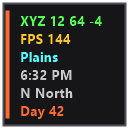
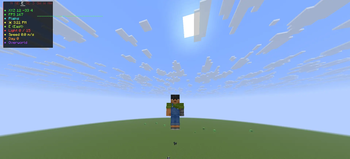
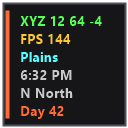
A clean, fully customizable client-side HUD overlay for Minecraft 1.21.11 Fabric — shows coordinates, FPS, biome, time, direction, light level, speed, day count, dimension, compass, and FPS sparkline with an in-game config screen.
Screenshots
About this Mod
Visual HUD
A clean, fully customizable HUD overlay for Minecraft 1.21.11 Fabric. Client-side only — no server-side install needed.
Features
- Coordinates — XYZ position with green highlighting
- FPS Counter — with color-coded bar sparkline graph
- Biome — current biome name (nicely formatted)
- Time — 12-hour clock with AM/PM and day/night icon
- Direction — compass direction with full name
- Light Level — block/sky light levels
- Speed — real-time movement speed in m/s
- Day Counter — current in-game day
- Dimension — shows Overworld / Nether / The End
- Compass Strip — interactive compass bar showing all 8 directions
- FPS Sparkline — real-time bar graph of recent FPS history
Controls
| Key | Action |
|---|---|
| H | Toggle HUD visibility (animated) |
| C | Open configuration screen |
| ALT + Left Click | Drag to reposition anywhere on screen |
All controls are rebindable in Minecraft's Controls settings.
Configuration
Press C in-game to open the config screen where you can:
- Toggle each HUD element on/off individually
- Toggle all elements at once
- Pick from 10 accent colors
- Reset HUD position to default
The HUD fades in/out smoothly when toggled and remembers your settings in config/visualhud.json.
Visual
- Semi-transparent dark panel with accent color strip
- Color-coded text for readability at a glance
- Text shadows for visibility on any background
- Smooth fade animation on toggle
- Draggable anywhere on screen
- Resets on game restart — no persistence unless you save via config
Requirements
- Minecraft 1.21.11
- Fabric Loader >=0.18.2
- Fabric API
- Java >=21
Installation
- Install Fabric Loader for Minecraft 1.21.11
- Download Fabric API and place in
.minecraft/mods - Download Visual HUD and place in
.minecraft/mods - Launch and press H to toggle the HUD, C to configure
License
MIT
Available Versions
How to Install Visual HUD on Your Server
Order Server
Order a Minecraft Java server with at least 3 GB RAM (4 GB recommended).
Set fabric Loader
In the panel under "Egg", select the fabric loader and matching Minecraft version (1.21.11).
Install Mod
Open the mod browser in the dashboard and search for "Visual HUD". Click "Install" – done! Alternatively, upload the .jar via SFTP to the /mods folder.
Compatibility
Mod Loaders
Minecraft Versions
1.21.11
Server-side
✗ UnsupportedRecommended RAM
4 GB(min. 3 GB)Frequently Asked Questions
Visual HUD server crashes on startup – what to do?
Most common cause: wrong fabric version or insufficient RAM. Check the server log (latest.log) for "OutOfMemoryError" or "Mixin" errors. With Mado Hosting: ensure at least 3 GB RAM is allocated and the loader matches the mod version (1.21.11). You can switch loaders with one click in the panel.
Is Visual HUD compatible with fabric?
Visual HUD officially supports fabric for Minecraft 1.21.11. The Mado dashboard automatically detects incompatible loader combinations.
Server lagging with Visual HUD – how to optimize performance?
Recommended RAM: 4 GB (per 8 players). Use /spark profiler to check if Visual HUD consumes the most tick time. Common fixes: reduce server view-distance to 8-10, install "performant" or "starlight" as supplementary mods on Forge. With Mado Hosting, your server runs on NVMe SSDs with dedicated CPU cores for minimal latency.
Similar Mods




Rent Modded Server
Install Visual HUD with just one click on your server.