
Visual Recipe Edit-Create
Visual Recipe Edit-Create is a Create add-on that provides a visual GUI for creating new recipes and editing or disabling certain existing Create recipes. Recipe changes take effect after leaving and re-entering the world.
Screenshots
About this Mod
Introduction
Visual Recipe Edit-Create is a Create add-on that provides a visual GUI for creating new recipes and editing or disabling certain existing Create recipes. Recipe changes take effect after leaving and re-entering the world.
Detailed Description
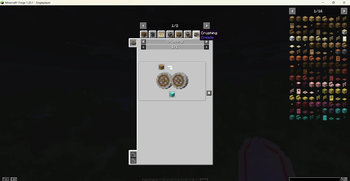
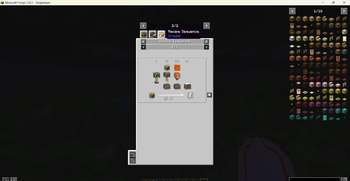
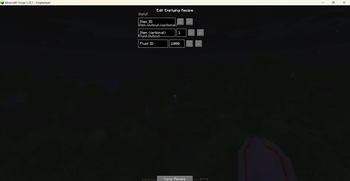
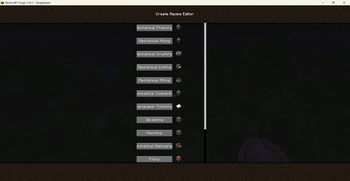
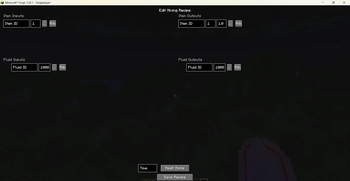
Use /vre create gui to open the main screen and browse all 14 recipe types: Pressing, Mixing, Crushing, Cutting, Milling, Compacting, Sandpaper Polishing, Splashing, Haunting, Deploying, Filling, Emptying, Mechanical Crafting, and Sequenced Assembly. Click any type to enter its dedicated editing page, which offers fields for item inputs, fluid inputs, output items with probabilities, processing time, and heat requirements, along with convenient item/fluid pickers and a tag picker.
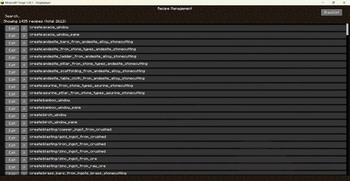
In the Recipe Management screen (/vre create manage), you can search all registered Create recipes and click “Edit” to modify those that are editable. You can also add any recipe to a blacklist to temporarily disable it, and restore blacklisted recipes.
All created or modified recipes are saved as JSON files in the config/visual_recipe_edit_create/ directory.
The mod fully supports both Chinese and English, with the UI language automatically following the game setting.
Commands
/vre create gui – Opens the recipe type selection screen to create new recipes.
/vre create manage – Opens the recipe management screen to edit, disable, or restore existing recipes.
Note
This is a Create add-on; please use it with Create 6.0.8 or later.
Not all vanilla Create recipes support visual editing: pure Create processing recipes (e.g., those under “Mixed Mixing”) can be fully edited, while “Auto‑Stirring” and “Auto‑Brewing” recipes that inherit from crafting/brewing systems do not have dedicated editing pages (you can still disable them in the management screen).
Recipe changes only take effect after leaving and re-entering the current world.
Available Versions
How to Install Visual Recipe Edit-Create on Your Server
Order Server
Order a Minecraft Java server with at least 4 GB RAM (6 GB recommended).
Set forge Loader
In the panel under "Egg", select the forge loader and matching Minecraft version (1.21.1).
Install Mod
Open the mod browser in the dashboard and search for "Visual Recipe Edit-Create". Click "Install" – done! Alternatively, upload the .jar via SFTP to the /mods folder.
Compatibility
Mod Loaders
Minecraft Versions
1.21.1, 1.20.1
Server-side
✓ RequiredRecommended RAM
6 GB(min. 4 GB)Frequently Asked Questions
Visual Recipe Edit-Create server crashes on startup – what to do?
Most common cause: wrong forge version or insufficient RAM. Check the server log (latest.log) for "OutOfMemoryError" or "Mixin" errors. With Mado Hosting: ensure at least 4 GB RAM is allocated and the loader matches the mod version (1.21.1). You can switch loaders with one click in the panel.
Is Visual Recipe Edit-Create compatible with forge and neoforge?
Visual Recipe Edit-Create officially supports forge, neoforge for Minecraft 1.21.1, 1.20.1. The Mado dashboard automatically detects incompatible loader combinations.
Server lagging with Visual Recipe Edit-Create – how to optimize performance?
Recommended RAM: 6 GB (per 5 players). Use /spark profiler to check if Visual Recipe Edit-Create consumes the most tick time. Common fixes: reduce server view-distance to 8-10, install "performant" or "starlight" as supplementary mods on Forge. With Mado Hosting, your server runs on NVMe SSDs with dedicated CPU cores for minimal latency.
Similar Mods




![[ETF] Entity Texture Features](https://cdn.modrinth.com/data/BVzZfTc1/af683d206d50b05258d865b0d6e4aa2f2cee12f2_96.webp)

Rent Modded Server
Install Visual Recipe Edit-Create with just one click on your server.