
Visual Health
Add visible damage to hurt mobs and players!
Screenshots


About this Mod
Visual Health 🩸
Clientside mod adding visible damage to hurt mobs and players!
Damage works in tiers, not based on hits. The tiers are based on how much health the mob has. The idea is that
at a glance a player can have a rough idea of how much health is left. A heavily damaged creeper will only need 1
more hit whereas a lightly hurt baby zombie is going to take a much greater beating.
Default Tier Summary
| Tier | Health % | Condition |
|---|---|---|
| 0 | 100% | Full health (no wounds) |
| 1 | 99% - 80% | Minor damage |
| 2 | 79% - 60% | Light damage |
| 3 | 59% - 40% | Moderate damage |
| 4 | 39% - 20% | Heavy damage |
| 5 | 19% - 0% | Critical damage |
Features
Per-Weapon Damage
Different weapons apply different damage textures depending on what was used to knock the entity's health down a tier. There are individual textures for sword, axe, trident, and spear damage. There is also a generic damage texture used for punches, fire, falls, etc.
Entity-Specific Damage
Many mobs have specific colored damage to aid immersion. For instance, spider damage is a light blue to match real life, creeper damage is a dark green to match the grassiness, etc.
Emissives
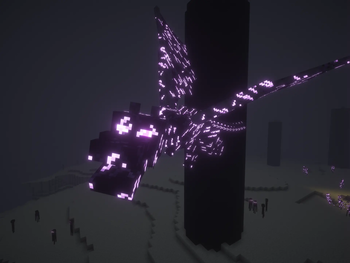
On Endermen, damage will glow like their eyes in the dark! (shaders supported)
(2.0.0+) Similarly, the Enderdragon will have glowing damage as it gets lower in health!
Resource Pack Support
This mod should be compatible with most resource packs. Tested extensively with Fresh Animations and its extensions. Also compatible with EMF model variants (like the creepers found in FA: Creepers).
This improved drastically with the 2.0.0 update, so if something didn't work before, it might work now!
Mod Support
Should work with modded mobs, as long as they use standard Minecraft rendering methods.
This was also significantly improved in 2.0.0+ :)
Configuration
- How much damage will be shown ranging from a multiplier of 10 to 100%. At 100% a low-health mob will be almost entirely covered in wounds.
- How many damage tiers to use (defaults to 5, ranges from 2 to 10). Density will be the same at a given health level and equivalent tier
- Configurable damage colors (red, black, white, only affects mobs without specific damage colors)
- Passive mob damage (defaults to true, whether to show damage on passive mobs or not, things like cows, pigs, polar bears, etc)
- Villager damage (defaults to false, only can be enabled if passive mob damage is true)
- Custom player and entity-specific damage color overrides! Input any hex color with the CUSTOM setting in the
config screen (also has EMISSVE and DISABLED options) - And more! (check out the "Extras" screen in the config menu!)
Mod Menu is required on Fabric to change settings in-game.
Actively Supported Versions
1.20.1, 1.21.1, 1.21.10, 1.21.11, 26.1+
Contact
For any questions/issues/ideas, feel free to contact me on Discord or Matrix :)
Available Versions
How to Install Visual Health on Your Server
Order Server
Order a Minecraft Java server with at least 3 GB RAM (4 GB recommended).
Set fabric Loader
In the panel under "Egg", select the fabric loader and matching Minecraft version (26.1.2).
Install Mod
Open the mod browser in the dashboard and search for "Visual Health". Click "Install" – done! Alternatively, upload the .jar via SFTP to the /mods folder.
Compatibility
Mod Loaders
Minecraft Versions
26.1.2, 26.1.1, 26.1 (+4 more)
Server-side
✗ UnsupportedRecommended RAM
4 GB(min. 3 GB)Frequently Asked Questions
Visual Health server crashes on startup – what to do?
Most common cause: wrong fabric version or insufficient RAM. Check the server log (latest.log) for "OutOfMemoryError" or "Mixin" errors. With Mado Hosting: ensure at least 3 GB RAM is allocated and the loader matches the mod version (26.1.2). You can switch loaders with one click in the panel.
Is Visual Health compatible with fabric and forge and neoforge?
Visual Health officially supports fabric, forge, neoforge for Minecraft 26.1.2, 26.1.1, 26.1. Note: Forge and Fabric mods are NOT cross-compatible – pick one loader and stick with it. The Mado dashboard automatically detects incompatible loader combinations.
Server lagging with Visual Health – how to optimize performance?
Recommended RAM: 4 GB (per 8 players). Use /spark profiler to check if Visual Health consumes the most tick time. Common fixes: reduce server view-distance to 8-10, install "performant" or "starlight" as supplementary mods on Forge. With Mado Hosting, your server runs on NVMe SSDs with dedicated CPU cores for minimal latency.
Similar Mods
![[EMF] Entity Model Features](https://cdn.modrinth.com/data/4I1XuqiY/6e5bbd0d06b1741bfdab6c0cfab6de8fdaf0064c_96.webp)


Rent Modded Server
Install Visual Health with just one click on your server.