
VisualKube
Visual recipe and loot table editor for Minecraft
Screenshots
About this Mod

Visual Kube
Visual Kube is a Forge 1.20.1 mod that brings KubeJS-style datapack editing into an in-game visual interface. Instead of writing recipe and loot table JSON by hand, you can open a UI, select loaded content from Minecraft or any installed mod, edit it visually, and save generated overrides into a datapack.
Developer: w3nnacry
What It Does
Visual Kube is designed as a universal visual editor for modpack creators.
- Edit crafting recipes from Minecraft, datapacks, and loaded mods.
- Read shaped, shapeless, furnace-like, smithing-like, and many custom recipe formats.
- Display recipe ingredients as item icons in a grid.
- Edit recipe ingredients by selecting an item and clicking a slot.
- Change recipe result and result count.
- Disable existing recipes.
- Save recipe replacements into a generated datapack.
- Edit entity loot tables and add new item drops.
- Edit block loot tables and add new item drops.
- Create starter recipe templates.
- Review generated override files.
- Keep all generated changes inside
visualkube_overrides.
Supported Version
- Minecraft: 1.20.1
- Mod Loader: Forge
- Java: 17
How To Install
- Install Minecraft Forge for 1.20.1.
- Download the Visual Kube
.jar. - Put the
.jarinto your Minecraftmodsfolder. - Start the game.
- Open a singleplayer world.
- Press K to open the Visual Kube editor.
How To Use
Open the editor with K while inside a world.
Visual Kube works best in singleplayer or an integrated server because it writes generated datapack files into the current world folder.
Recipes Tab
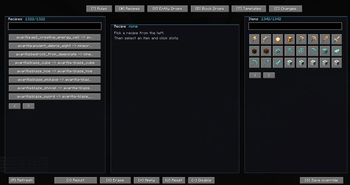
The Recipes tab scans every loaded recipe from Minecraft, datapacks, and mods.
- Search for a recipe on the left.
- Click a recipe to select it.
- Search/select an item on the right.
- Click a slot in the recipe grid to place the selected item.
- Use Erase to clear slots.
- Use Result <- item to set the recipe output to the selected item.
- Click Apply to apply visual changes in memory.
- Click Save override to write the recipe override.
- Run
/reloadin-game.
Visual Kube saves replacements into:
world/datapacks/visualkube_overrides/data/<namespace>/recipes/<recipe>.json
Entity Drops Tab
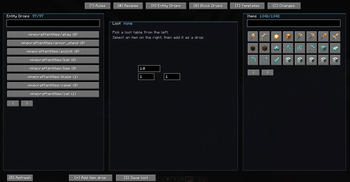
The Entity Drops tab scans entity loot tables.
- Pick an entity loot table on the left.
- Pick an item on the right.
- Set chance and count.
- Click Add item drop.
- Click Save loot.
- Run
/reload.
Generated loot table overrides are saved into:
world/datapacks/visualkube_overrides/data/<namespace>/loot_tables/entities/<entity>.json
Block Drops Tab
The Block Drops tab works like Entity Drops, but for block loot tables.
Generated block loot overrides are saved into:
world/datapacks/visualkube_overrides/data/<namespace>/loot_tables/blocks/<block>.json
Templates Tab
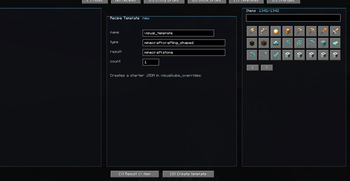
The Templates tab creates starter recipe JSON files.
Use it when you want to create a new recipe from scratch, then edit it further after reloading.
Generated templates are saved into:
world/datapacks/visualkube_overrides/data/visualkube/recipes/<name>.json
Changes Tab
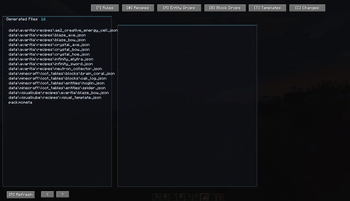
The Changes tab lists generated files inside the visualkube_overrides datapack. This helps you see what Visual Kube has already written to your world.
Important Notes
Visual Kube edits datapack data. After saving changes, run:
/reload
Some heavily custom mod recipes may store their visual layout in code instead of JSON. Visual Kube combines raw JSON parsing with Minecraft's loaded RecipeManager data to support as many recipes as possible, but very unusual serializers may still need dedicated adapters.
Current Limitations
- Loot editing currently supports adding item drops. Full visual editing of existing loot pools, conditions, and functions is planned.
- Some complex custom recipes may display as a simplified grid.
- Server use is experimental; world datapack writing is currently focused on singleplayer/integrated server worlds.
For Modpack Creators
Visual Kube is useful when you want to quickly prototype balance changes:
- replace expensive recipe ingredients;
- disable duplicate mod recipes;
- add custom mob drops;
- add custom block drops;
- create starter recipes without hand-writing JSON.
All changes are saved as datapack overrides, so they can be inspected, backed up, copied, or shipped with a modpack.
Available Versions
How to Install VisualKube on Your Server
Order Server
Order a Minecraft Java server with at least 3 GB RAM (4 GB recommended).
Set forge Loader
In the panel under "Egg", select the forge loader and matching Minecraft version (1.20.6).
Install Mod
Open the mod browser in the dashboard and search for "VisualKube". Click "Install" – done! Alternatively, upload the .jar via SFTP to the /mods folder.
Compatibility
Mod Loaders
Minecraft Versions
1.20.6, 1.20.5, 1.20.4 (+3 more)
Server-side
✗ UnsupportedRecommended RAM
4 GB(min. 3 GB)Frequently Asked Questions
VisualKube server crashes on startup – what to do?
Most common cause: wrong forge version or insufficient RAM. Check the server log (latest.log) for "OutOfMemoryError" or "Mixin" errors. With Mado Hosting: ensure at least 3 GB RAM is allocated and the loader matches the mod version (1.20.6). You can switch loaders with one click in the panel.
Is VisualKube compatible with forge?
VisualKube officially supports forge for Minecraft 1.20.6, 1.20.5, 1.20.4. The Mado dashboard automatically detects incompatible loader combinations.
Server lagging with VisualKube – how to optimize performance?
Recommended RAM: 4 GB (per 8 players). Use /spark profiler to check if VisualKube consumes the most tick time. Common fixes: reduce server view-distance to 8-10, install "performant" or "starlight" as supplementary mods on Forge. With Mado Hosting, your server runs on NVMe SSDs with dedicated CPU cores for minimal latency.
Similar Mods




Rent Modded Server
Install VisualKube with just one click on your server.