
Screenshots
About this Mod
VisualOres
"VisualProspecting but for 1.12"
A mod that adds various overlays to map mods.
Requires CodeChickenLib and MixinBooter
Supports Journeymap and Xaero's Minimap and World Map.
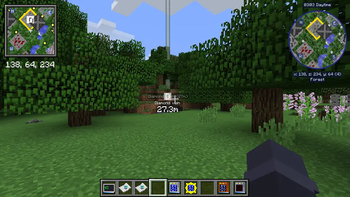
Overlays can be toggled by either a button on the world map or by pressing a keybind in-game (unbound by default - check the controls settings)
The location and order of the buttons can be customized in the config:
- The order of the buttons can be changed either by a list or just reversing the order
- Reversing the order does not require restarting minecraft, while modifying the list does
- Changes to the order list will also affect what order layers render in if multiple are enabled
- Journeymap users can put the buttons either next to the main map types or in their own toolbar on the right of the screen
- Xaero's World Map users can put the buttons anywhere!
- The default location was chosen to not interfere with any other map controls
Prospection data can be shared to other players with /vo share <player name>. This requires VisualOres to be installed on the server and both clients.
Your client-side cache folder can be opened with /vo openCacheFolder, and all client-side prospection data can be reset with /vo resetClientCache. Resetting the cache is not reversible!
Current overlays
GregTech CEu
Requires GTCEu version 2.7.3
Requires VisualOres to be installed on both the client and server
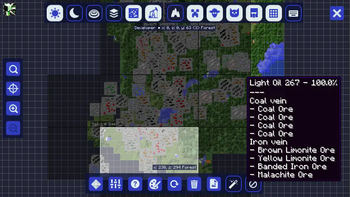
Ore vein overlay
Displays ore veins you have discovered. Pick up surface rocks, right-click ore blocks, or use an electric prospector on ore mode to discover veins.
Press the "action key" (default: delete) while hovering over a vein to mark it as depleted (or not depleted).
Double-click a vein to mark it as a waypoint, and again to unmark it.
VisualOres will attempt to generate ore vein locations for worlds that were generated before it was added, but it will generate some inaccurate vein positions!
Veins may be missing, and veins that do not exist may be marked.
(Still better than nothing, though. Most veins should be accurate.)
Underground fluid overlay
Displays underground fluid fields you have discovered. Use an electric prospector on fluid mode to discover fields.
(Yes, fields being shown as larger around x=0 and z=0 is correct. Underground fluid veins generated with GTCEu 2.7.2 and earlier have a bug with generation that causes this.)
Immersive Engineering
Also contains integration with Immersive Petroleum
Excavator vein overlay
Displays excavator veins you have discovered. Pick up a core sample to add its data to your map.
Double click on a vein to toggle it as a waypoint.
Thaumcraft
Aura/flux level overlay
Displays aura/flux levels you have seen in chunks. Hold a thaumometer to add the levels shown in the hud to your map.
Astral Sorcery
Starlight level overlay
Displays starlight concentration levels. Hold a fosic resonator to add nearby starlight levels to your map.
Lighter blue means higher concentration (the areas shown in-world with white sparkles).
Neromantic Prime fluid vein overlay
Displays fluid veins you have discovered. Hold an ichosic resonator to add veins to your map as the particle effects spawn.
(This means veins are only discovered when a particle effect spawns in their chunk, so it can take some time before the fluid in a specific chunk is discovered! Be patient.)
Available Versions
How to Install VisualOres on Your Server
Order Server
Order a Minecraft Java server with at least 3 GB RAM (4 GB recommended).
Set forge Loader
In the panel under "Egg", select the forge loader and matching Minecraft version (1.12.2).
Install Mod
Open the mod browser in the dashboard and search for "VisualOres". Click "Install" – done! Alternatively, upload the .jar via SFTP to the /mods folder.
Compatibility
Mod Loaders
Minecraft Versions
1.12.2
Server-side
✓ RequiredRecommended RAM
4 GB(min. 3 GB)Frequently Asked Questions
VisualOres server crashes on startup – what to do?
Most common cause: wrong forge version or insufficient RAM. Check the server log (latest.log) for "OutOfMemoryError" or "Mixin" errors. With Mado Hosting: ensure at least 3 GB RAM is allocated and the loader matches the mod version (1.12.2). You can switch loaders with one click in the panel.
Is VisualOres compatible with forge?
VisualOres officially supports forge for Minecraft 1.12.2. The Mado dashboard automatically detects incompatible loader combinations.
Server lagging with VisualOres – how to optimize performance?
Recommended RAM: 4 GB (per 8 players). Use /spark profiler to check if VisualOres consumes the most tick time. Common fixes: reduce server view-distance to 8-10, install "performant" or "starlight" as supplementary mods on Forge. With Mado Hosting, your server runs on NVMe SSDs with dedicated CPU cores for minimal latency.
Similar Mods




![[ETF] Entity Texture Features](https://cdn.modrinth.com/data/BVzZfTc1/af683d206d50b05258d865b0d6e4aa2f2cee12f2_96.webp)
![[EMF] Entity Model Features](https://cdn.modrinth.com/data/4I1XuqiY/6e5bbd0d06b1741bfdab6c0cfab6de8fdaf0064c_96.webp)
Rent Modded Server
Install VisualOres with just one click on your server.