
VMD Animation Cache
Per-frame cache for SlashBlade MMD animation
Screenshots
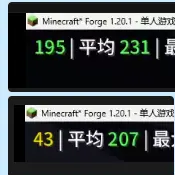
About this Mod
Overview
VMD Animation Cache eliminates redundant MMD motion computation in SlashBlade Resharped, giving you ~3.8x FPS improvement (50 → 190 FPS) when SlashBlade entities are on screen.
When SlashBlade renders MMD-based blade animations, VmdAnimation.setupAnim() is called 60–120 times per entity per frame — once for every bone, every time a transform is queried. But the tick and partialTick don't change within a frame. All 120 calls produce identical results, wasting ~20% of the render thread.
This mod adds a tiny per-frame cache: if setupAnim is called again with the same tick and partialTick, the entire MMD pipeline is skipped. 120 calls → 1 call per entity per frame.
Performance
| Scenario | Before | After |
|---|---|---|
| Third-person FPS (SlashBlade visible) | ~50 | ~190 |
Tested on Minecraft 1.20.1, Forge 47, SlashBlade Resharped 1.9.65. Single SlashBlade entity in view.
Requirements
- Minecraft 1.20.1
- Forge 47+
- SlashBlade Resharped 1.9.65
Installation
- Download the jar and drop it into your
mods/folder - Launch the game
Compatibility
Do not use with AntiEntropyCore — both mods inject into the same Mixin target (VmdAnimation) and will conflict.
How It Works
A single Mixin injects at the head of VmdAnimation.setupAnim(). It remembers the last (currentTick, partialTick) pair. Cache hit → method cancelled. Cache miss → update cache, run normally.
Only 32 lines of code. Client-side only. No coremod hacks.
Links
- Source: GitHub
- License: MIT
Available Versions
How to Install VMD Animation Cache on Your Server
Order Server
Order a Minecraft Java server with at least 3 GB RAM (4 GB recommended).
Set forge Loader
In the panel under "Egg", select the forge loader and matching Minecraft version (1.20.1).
Install Mod
Open the mod browser in the dashboard and search for "VMD Animation Cache". Click "Install" – done! Alternatively, upload the .jar via SFTP to the /mods folder.
Compatibility
Mod Loaders
Minecraft Versions
1.20.1
Server-side
✗ UnsupportedRecommended RAM
4 GB(min. 3 GB)Frequently Asked Questions
VMD Animation Cache server crashes on startup – what to do?
Most common cause: wrong forge version or insufficient RAM. Check the server log (latest.log) for "OutOfMemoryError" or "Mixin" errors. With Mado Hosting: ensure at least 3 GB RAM is allocated and the loader matches the mod version (1.20.1). You can switch loaders with one click in the panel.
Is VMD Animation Cache compatible with forge?
VMD Animation Cache officially supports forge for Minecraft 1.20.1. The Mado dashboard automatically detects incompatible loader combinations.
Server lagging with VMD Animation Cache – how to optimize performance?
Recommended RAM: 4 GB (per 8 players). Use /spark profiler to check if VMD Animation Cache consumes the most tick time. Common fixes: reduce server view-distance to 8-10, install "performant" or "starlight" as supplementary mods on Forge. With Mado Hosting, your server runs on NVMe SSDs with dedicated CPU cores for minimal latency.
Similar Mods


Rent Modded Server
Install VMD Animation Cache with just one click on your server.