
VNNhatTruongneee's Crosshair Addons
A sophisticated, combat-focused utility that dynamically enhances crosshair feedback for precision PvP, developed by VNNhatTruongneee to optimize player engagement and reach accuracy in Minecraft.
Screenshots
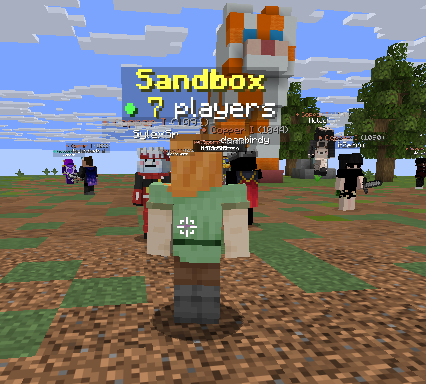
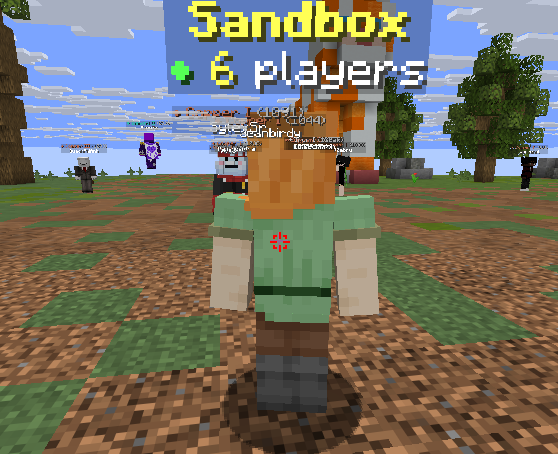

About this Mod
🎯 VNNhatTruongneee's Crosshair Addons



A powerful extension for crosshairs, optimizing observation and reflexes in PvP matches.
🌟 Introduction
VNNhatTruongneee's Crosshair Addons is developed by VNNhatTruongneee. This mod focuses on improving the user experience through intelligent visual feedback directly on the crosshair, helping you better control distance and targets.
🔥 Key Features
⚔️ Smart Combat Indicator
This is the main feature that helps you never miss a decisive shot:
Automatic color change: The crosshair will turn bright red when you look at another player.
Reach Check: Red only appears when the target is within attack range.
Benefit: Helps you know exactly when to click without having to guess the distance.
⚙️ System Requirements
For optimal mod performance on version 1.21.11, you need to install the following dependencies:
- Fabric Loader (Required)
- VNNhatTruongneeeLib (Required)
- Fabric Kotlin Language (Required)
- Fabric API (Required)
📜 License
This project uses the CC-BY-NC-SA 4.0 license.
Attribution: You must credit VNNhatTruongneee as the author.
Non-Commercial: Not for commercial use.
ShareAlike: Modifications must be shared under this license.
Developed by VNNhatTruongneee with a passion for the Vietnamese Minecraft community.
Available Versions
How to Install VNNhatTruongneee's Crosshair Addons on Your Server
Order Server
Order a Minecraft Java server with at least 3 GB RAM (4 GB recommended).
Set fabric Loader
In the panel under "Egg", select the fabric loader and matching Minecraft version (26.1.2).
Install Mod
Open the mod browser in the dashboard and search for "VNNhatTruongneee's Crosshair Addons". Click "Install" – done! Alternatively, upload the .jar via SFTP to the /mods folder.
Compatibility
Mod Loaders
Minecraft Versions
26.1.2, 26.1.1, 26.1 (+1 more)
Server-side
✗ UnsupportedRecommended RAM
4 GB(min. 3 GB)Frequently Asked Questions
VNNhatTruongneee's Crosshair Addons server crashes on startup – what to do?
Most common cause: wrong fabric version or insufficient RAM. Check the server log (latest.log) for "OutOfMemoryError" or "Mixin" errors. With Mado Hosting: ensure at least 3 GB RAM is allocated and the loader matches the mod version (26.1.2). You can switch loaders with one click in the panel.
Is VNNhatTruongneee's Crosshair Addons compatible with fabric?
VNNhatTruongneee's Crosshair Addons officially supports fabric for Minecraft 26.1.2, 26.1.1, 26.1. The Mado dashboard automatically detects incompatible loader combinations.
Server lagging with VNNhatTruongneee's Crosshair Addons – how to optimize performance?
Recommended RAM: 4 GB (per 8 players). Use /spark profiler to check if VNNhatTruongneee's Crosshair Addons consumes the most tick time. Common fixes: reduce server view-distance to 8-10, install "performant" or "starlight" as supplementary mods on Forge. With Mado Hosting, your server runs on NVMe SSDs with dedicated CPU cores for minimal latency.
Similar Mods




Rent Modded Server
Install VNNhatTruongneee's Crosshair Addons with just one click on your server.
Details
- License
- Creative Commons Attribution Non Commercial Share Alike 4.0 International
- Server-side
- Unsupported