
Voice Commands
Voice Command brings true voice control to Minecraft. Execute commands with your voice — all fully offline, private, and fast.
Screenshots
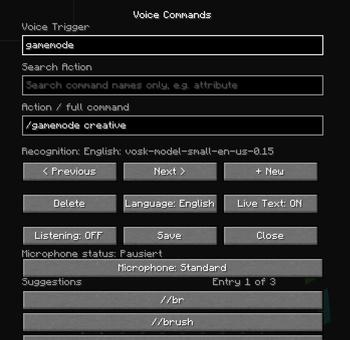

About this Mod
🎤 Voice Command – Control Minecraft with your Voice
Voice Command adds local voice control to Minecraft.
You can create custom voice triggers that automatically execute Minecraft commands — with no cloud, no accounts, and no internet connection required.
Speech recognition runs completely offline on your PC.
✨ Features
🗣️ Local Offline Speech Recognition
Powered by the Vosk Speech Recognition Engine
Works completely offline
No data is uploaded
Very low latency
🧠 Hands-Free Gameplay
Needs this mod: https://modrinth.com/mod/controlcommands
Perfect for:
Immersion & roleplay
Accessibility
Streamers & content creators
Comfort & quality-of-life
Play Minecraft without touching your keyboard while building, fighting, or exploring.
Supported languages:
🇬🇧 English
🇩🇪 German
⚙️ Create Custom Voice Commands
Create your own voice triggers, for example:
Spoken phrase Executes command
“Teleport home” /tp home
“Give me food” /give @p bread
“Make it daytime” /time set day
You can connect any Minecraft command to a voice trigger.
Perfect for:
Immersion & roleplay
Accessibility
Streamers & content creators
Comfort & quality-of-life
🖥️ In-Game Menu & Overlay
The mod includes a built-in interface:
Voice command manager
Status overlay
Keybind to open the menu
🌐 Multiplayer Support
Works in singleplayer and multiplayer
🔒 Privacy First
This mod is 100% offline:
No internet connection required
No telemetry
No cloud services
Your voice stays on your computer.
📦 Requirements
Minecraft (show versions)
Fabric Loader ≥ 0.18.1
Fabric API
Java 21+
WARNING: the mod is may forbidden on a few servers. be carefull with it. And its only execute commands. it cannot let you walk or hit or something. maybe it comes in a update.
You can report bugs on my Discord server
Discord: https://discord.gg/th6fGzE2f
Available Versions
How to Install Voice Commands on Your Server
Order Server
Order a Minecraft Java server with at least 3 GB RAM (4 GB recommended).
Set fabric Loader
In the panel under "Egg", select the fabric loader and matching Minecraft version (1.21.11).
Install Mod
Open the mod browser in the dashboard and search for "Voice Commands". Click "Install" – done! Alternatively, upload the .jar via SFTP to the /mods folder.
Compatibility
Mod Loaders
Minecraft Versions
1.21.11
Server-side
✗ UnsupportedRecommended RAM
4 GB(min. 3 GB)Frequently Asked Questions
Voice Commands server crashes on startup – what to do?
Most common cause: wrong fabric version or insufficient RAM. Check the server log (latest.log) for "OutOfMemoryError" or "Mixin" errors. With Mado Hosting: ensure at least 3 GB RAM is allocated and the loader matches the mod version (1.21.11). You can switch loaders with one click in the panel.
Is Voice Commands compatible with fabric?
Voice Commands officially supports fabric for Minecraft 1.21.11. The Mado dashboard automatically detects incompatible loader combinations.
Server lagging with Voice Commands – how to optimize performance?
Recommended RAM: 4 GB (per 8 players). Use /spark profiler to check if Voice Commands consumes the most tick time. Common fixes: reduce server view-distance to 8-10, install "performant" or "starlight" as supplementary mods on Forge. With Mado Hosting, your server runs on NVMe SSDs with dedicated CPU cores for minimal latency.
Similar Mods




Rent Modded Server
Install Voice Commands with just one click on your server.