
VoiceAttackAPI
A Minecraft mod to integrate VoiceAttack with specific aspects of the game.
Screenshots
About this Mod
Minecraft VoiceAttack Integration Mod
Important! This mod will not work without the companion plugin for VoiceAttack, which can be found here.
Overview
The Minecraft VoiceAttack Integration Mod is a client-side utility designed to enhance accessibility and gameplay experience by allowing VoiceAttack to communicate directly with Minecraft. This mod enables players to execute keybind actions using voice commands, making it easier to navigate the game without relying solely on traditional input methods. It is particularly beneficial for players using controller mods, as it eliminates the need to remember complex button combinations to access various mods and UIs.
Features
- Seamless Integration: Works out of the box with controller mods, allowing for easy access to game functions without the need for complicated button combinations.
- Voice Command Execution: Use VoiceAttack to trigger keybind actions in Minecraft, enhancing accessibility for players with different needs.
- Automatic Port Configuration: The mod automatically establishes a connection to VoiceAttack on a specific static port, generating a unique port for communication during the handshake process.
How It Works
Connection Establishment: Upon launching Minecraft with the mod, it attempts to connect to VoiceAttack on a predefined static port.
Handshake Process: The mod sends a handshake request to VoiceAttack, along with a randomly generated port number for future communication.
Key Command Execution: Once the handshake is successful, VoiceAttack will use the provided port to send key commands to the mod, allowing for real-time execution of keybind actions.
Keybinds for Socket Management:
- Restart Socket Server: A keybind to restart the socket server, ensuring a stable connection with VoiceAttack. Default key is
R. - Update Mappings: A keybind to export a
voiceattack_translation_keys.jsonfile to the configs folder, which contains the translation keys for any bound key at the time of export. Default key isU.
Setup Instructions
Minecraft Mod
- No Setup Required: Simply install the mod in your Minecraft client, and it will automatically handle the connection to VoiceAttack.
VoiceAttack Configuration
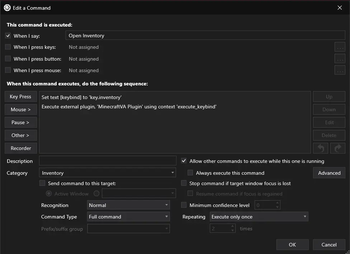
To set up VoiceAttack for use with this mod, you need to configure each command with the following parameters:
Translation Key: Create a text variable named
keybindthat corresponds to the action you want to trigger in Minecraft. This variable should hold the translation key for the desired keybind.Execute Command: Use the Minecraft plugin for VoiceAttack to execute the command. Pass the context
execute_keybindalong with thekeybindvariable you created earlier.
Example Command Setup
- Create a new command in VoiceAttack.
- Add a text variable named
keybindwith the value of the desired Minecraft action (e.g.,key.inventory). - Add an action to execute the Minecraft plugin with the context
execute_keybindand reference thekeybindvariable.
Exporting Translation Keys
To export the translation keys for any bound key:
- Use the designated keybind to export the
voiceattack_translation_keys.jsonfile. - Locate the exported file in the configs folder.
- Reference this file to accurately send data to Minecraft via VoiceAttack.
Use Cases
- Accessibility: Ideal for players with mobility challenges who may find traditional controls difficult to use.
- Hands-Free Gameplay: Allows players to execute commands without needing to use their hands, making it easier to multitask or play in a more relaxed position.
- Enhanced Gameplay: Streamlines the process of accessing various mods and UIs, improving overall gameplay efficiency.
Limitations
- The mod does not support all keybind methods, including:
- Player movement controls (e.g., walking, running).
- Mouse look functionality.
- Keybinds that require holding down a key (e.g., zooming into a world map).
VoiceAttack logo used with permission from owner.
Available Versions
How to Install VoiceAttackAPI on Your Server
Order Server
Order a Minecraft Java server with at least 3 GB RAM (4 GB recommended).
Set fabric Loader
In the panel under "Egg", select the fabric loader and matching Minecraft version (1.20.4).
Install Mod
Open the mod browser in the dashboard and search for "VoiceAttackAPI". Click "Install" – done! Alternatively, upload the .jar via SFTP to the /mods folder.
Compatibility
Mod Loaders
Minecraft Versions
1.20.4, 1.20.3, 1.20.2 (+1 more)
Server-side
✗ UnsupportedRecommended RAM
4 GB(min. 3 GB)Frequently Asked Questions
VoiceAttackAPI server crashes on startup – what to do?
Most common cause: wrong fabric version or insufficient RAM. Check the server log (latest.log) for "OutOfMemoryError" or "Mixin" errors. With Mado Hosting: ensure at least 3 GB RAM is allocated and the loader matches the mod version (1.20.4). You can switch loaders with one click in the panel.
Is VoiceAttackAPI compatible with fabric?
VoiceAttackAPI officially supports fabric for Minecraft 1.20.4, 1.20.3, 1.20.2. The Mado dashboard automatically detects incompatible loader combinations.
Server lagging with VoiceAttackAPI – how to optimize performance?
Recommended RAM: 4 GB (per 8 players). Use /spark profiler to check if VoiceAttackAPI consumes the most tick time. Common fixes: reduce server view-distance to 8-10, install "performant" or "starlight" as supplementary mods on Forge. With Mado Hosting, your server runs on NVMe SSDs with dedicated CPU cores for minimal latency.
Similar Mods




Rent Modded Server
Install VoiceAttackAPI with just one click on your server.