
VoiceChatModerator
A Mod to moderate a Server with SimpleVoiceChat. Includes Speaking Overlay, VoiceChatRecordings, live transcripts and more
Screenshots
About this Mod
VoiceChatModerator
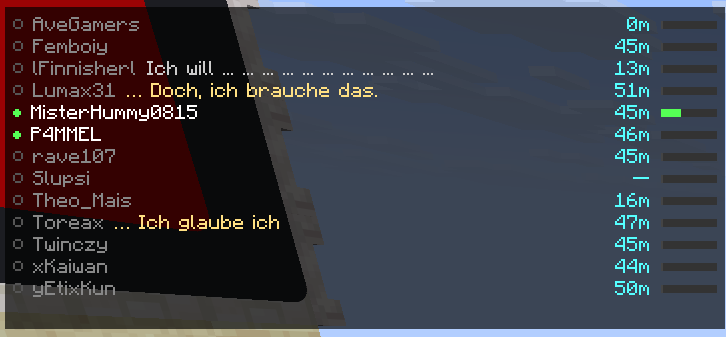
VoiceChatModerator is a client-side Fabric mod for Simple Voice Chat that shows you who is currently speaking, can optionally display spoken text, and archives conversations locally as audio and text.
The mod is designed for server moderation, event support, documentation, and anyone who wants to review or search voice chat sessions later.
Highlights
- Live speaker overlay in the HUD
- Transcript above player name tags
- Local recordings as audio and text
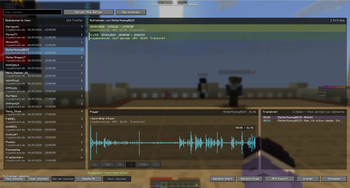
- In-game browser for saved sessions
- Export feature for individual recordings
- Optional speech-to-text
- Client-side – no server-side mod required
What the mod does
While you are using Simple Voice Chat, the mod detects incoming voice activity and can make it visible in several ways:
Speaker Overlay
A clean HUD overlay shows which players are currently speaking. Depending on your configuration, it can display things like:
- player names
- distance
- volume
- short transcript snippets
Name Tag Transcript
If speech-to-text is enabled, spoken text can be displayed above the player's head.
Recording & Archive
Conversations are saved locally, split by hour and organized by:
- server
- player
- date
- hour
Depending on your settings, this creates:
.wavor.mp3files- matching
.txtfiles with transcript content
Browser & Export
The built-in browser lets you search through your recordings directly in-game and export them when needed.
Who is this mod for?
VoiceChatModerator is especially useful for:
- moderation teams on community servers
- event or roleplay organization
- documenting conversations
- reviewing incidents
- players who want a better overview of voice chat activity
Speech-to-Text
Speech-to-text is optional and can be turned off completely.
At the moment, the mod mainly supports these approaches:
- DIRECT – directly local inside the mod
- API – through an external compatible service
If you only want the overlay and recordings, you can simply leave speech-to-text disabled.
Hotkeys
- F6 – toggle overlay
- F7 – open recording browser
- F8 – toggle recording
Requirements
- Minecraft 1.21.11
- Fabric Loader
- Fabric API
- Simple Voice Chat
- Java 21+
- ModMenu optional, but recommended
Installation
- Install Fabric Loader
- Put Fabric API into your
modsfolder - Put Simple Voice Chat into your
modsfolder - Put VoiceChatModerator into your
modsfolder - Optionally install ModMenu for easier configuration
Quick Start
Without Speech-to-Text
If you only want the moderation and recording features at first:
- Start the game
- Disable STT in the settings
- Enable recording
- Use F7 later to browse saved recordings
With Speech-to-Text
Enable STT in the configuration and choose a supported method. Spoken content can then appear in the overlay, as name tag text, and in saved transcript files depending on your settings.
Recording Location
Recordings are stored locally in your Minecraft directory:
.minecraft/VoiceChatRecord/
Important Notes
- This mod is client-side.
- It does not replace Simple Voice Chat; it extends it.
- Audio and transcripts are stored locally on your computer.
- Speech-to-text quality may vary depending on language, audio quality, and background noise.
In Short
If you want to see who is speaking, what was said, and keep a local record of voice conversations in Minecraft, VoiceChatModerator is made for exactly that.
Available Versions
How to Install VoiceChatModerator on Your Server
Order Server
Order a Minecraft Java server with at least 3 GB RAM (4 GB recommended).
Set fabric Loader
In the panel under "Egg", select the fabric loader and matching Minecraft version (1.21.11).
Install Mod
Open the mod browser in the dashboard and search for "VoiceChatModerator". Click "Install" – done! Alternatively, upload the .jar via SFTP to the /mods folder.
Compatibility
Mod Loaders
Minecraft Versions
1.21.11
Server-side
✗ UnsupportedRecommended RAM
4 GB(min. 3 GB)Frequently Asked Questions
VoiceChatModerator server crashes on startup – what to do?
Most common cause: wrong fabric version or insufficient RAM. Check the server log (latest.log) for "OutOfMemoryError" or "Mixin" errors. With Mado Hosting: ensure at least 3 GB RAM is allocated and the loader matches the mod version (1.21.11). You can switch loaders with one click in the panel.
Is VoiceChatModerator compatible with fabric?
VoiceChatModerator officially supports fabric for Minecraft 1.21.11. The Mado dashboard automatically detects incompatible loader combinations.
Server lagging with VoiceChatModerator – how to optimize performance?
Recommended RAM: 4 GB (per 8 players). Use /spark profiler to check if VoiceChatModerator consumes the most tick time. Common fixes: reduce server view-distance to 8-10, install "performant" or "starlight" as supplementary mods on Forge. With Mado Hosting, your server runs on NVMe SSDs with dedicated CPU cores for minimal latency.
Similar Mods




![[ETF] Entity Texture Features](https://cdn.modrinth.com/data/BVzZfTc1/af683d206d50b05258d865b0d6e4aa2f2cee12f2_96.webp)

Rent Modded Server
Install VoiceChatModerator with just one click on your server.