
Voxelized Furniture
this mod adds chairs, tables, kitchen sets, sinks, and small land pieces you can use in your builds. It’s mainly for decorating houses, rooms, and custom areas, and gives you more basic objects to work with when building or roleplaying.
Screenshots


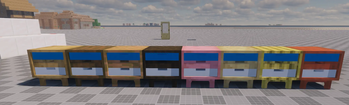


About this Mod
After a long time and starting development since 2025. okil6 is introducing a new mod voxelized furniture. this mods adds unique features that has almost never been seen beffore in other furniture mods. this is what it adds:
- Sittable chairs
- Cabinets
- Wardrobes
- Geodes
- Lights and light switches
- Miniture pieces of land
- Plants
- Working Tvs and Laptops
- Kitchen Sets
- Decor beds
Features:
- Working light switches this light switch can turn on/off any light in 20 blocks!
- Working shower this shower can be powered by redstone!
- Sittable chairs the chairs are sittable and can be rotated by shift + right clicking
Models made in 
Coded in 
Bugs
Report them on the github page
Voxelized Furniture Source Code
Other
Images in gallery tab
Crafting recipes can be viewed with jei mod
Available Versions
How to Install Voxelized Furniture on Your Server
Order Server
Order a Minecraft Java server with at least 3 GB RAM (4 GB recommended).
Set neoforge Loader
In the panel under "Egg", select the neoforge loader and matching Minecraft version (1.21.8).
Install Mod
Open the mod browser in the dashboard and search for "Voxelized Furniture". Click "Install" – done! Alternatively, upload the .jar via SFTP to the /mods folder.
Compatibility
Mod Loaders
Minecraft Versions
1.21.8, 1.21.1
Server-side
✓ RequiredRecommended RAM
4 GB(min. 3 GB)Frequently Asked Questions
Voxelized Furniture server crashes on startup – what to do?
Most common cause: wrong neoforge version or insufficient RAM. Check the server log (latest.log) for "OutOfMemoryError" or "Mixin" errors. With Mado Hosting: ensure at least 3 GB RAM is allocated and the loader matches the mod version (1.21.8). You can switch loaders with one click in the panel.
Is Voxelized Furniture compatible with neoforge?
Voxelized Furniture officially supports neoforge for Minecraft 1.21.8, 1.21.1. The Mado dashboard automatically detects incompatible loader combinations.
Server lagging with Voxelized Furniture – how to optimize performance?
Recommended RAM: 4 GB (per 8 players). Use /spark profiler to check if Voxelized Furniture consumes the most tick time. Common fixes: reduce server view-distance to 8-10, install "performant" or "starlight" as supplementary mods on Forge. With Mado Hosting, your server runs on NVMe SSDs with dedicated CPU cores for minimal latency.
Similar Mods

![[ETF] Entity Texture Features](https://cdn.modrinth.com/data/BVzZfTc1/af683d206d50b05258d865b0d6e4aa2f2cee12f2_96.webp)
![[EMF] Entity Model Features](https://cdn.modrinth.com/data/4I1XuqiY/6e5bbd0d06b1741bfdab6c0cfab6de8fdaf0064c_96.webp)



Rent Modded Server
Install Voxelized Furniture with just one click on your server.