
vProxyManager
VortexProxy is a client-side proxy manager for Fabric. It lets you import and manage SOCKS/HTTP proxies, organize them into groups, test their status, and assign specific proxy rules per multiplayer server. You can choose no proxy, a fixed proxy, rotating
Screenshots
About this Mod
vProxyManager

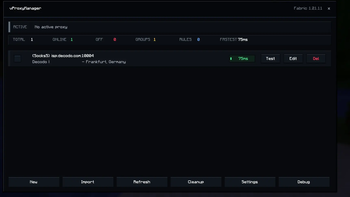
vProxyManager is a client-side proxy manager for Fabric, built to make proxy routing in Minecraft simple, clean, and controllable.
Instead of constantly changing system settings or guessing which proxy is active, vProxyManager lets you manage everything directly inside the client. Add your proxies, organize them into groups, test their health, and decide exactly how each multiplayer server should be joined.
Use one active proxy globally, assign a specific proxy to a server, rotate through a group, pick the fastest tested proxy, or disable proxy usage for selected servers entirely.
Features
- Client-side proxy routing for Minecraft multiplayer
- SOCKS5, SOCKS4, and HTTP proxy support
- Global active proxy mode
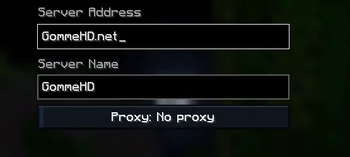
- Per-server proxy rules
- Fixed proxy selection per server
- Rotate mode for all proxies or specific groups
- Fastest-proxy mode based on health checks
- Proxy groups for better organization
- Built-in proxy testing with status and latency
- IP and location display after testing
- Import support for common proxy formats
- Server-list proxy badges
- Join overlay showing the selected route
- Cleanup tool for duplicates and invalid entries
- Delete confirmation to avoid mistakes
- Debug info button for easier support
- Mod Menu support
- Dark custom UI made to fit Minecraft menus
Server Rules
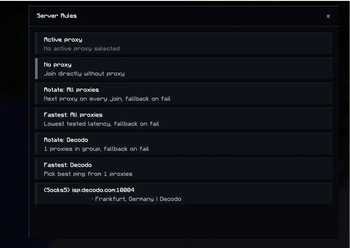
Each server can use its own proxy behavior:
- Active Proxy: uses the currently enabled proxy from the manager
- No Proxy: joins directly without proxy routing
- Fixed Proxy: always uses one selected proxy
- Rotate All: switches proxy on each join
- Fastest All: uses the best tested proxy
- Rotate Group: rotates only inside one proxy group
- Fastest Group: picks the best proxy inside one group
Supported Import Formats
host:port:user:pass
user:pass@host:port
socks5://user:pass@host:port
(Socks5) host:port:user:pass
Available Versions
How to Install vProxyManager on Your Server
Order Server
Order a Minecraft Java server with at least 3 GB RAM (4 GB recommended).
Set fabric Loader
In the panel under "Egg", select the fabric loader and matching Minecraft version (26.1.2).
Install Mod
Open the mod browser in the dashboard and search for "vProxyManager". Click "Install" – done! Alternatively, upload the .jar via SFTP to the /mods folder.
Compatibility
Mod Loaders
Minecraft Versions
26.1.2, 26.1.1, 26.1 (+12 more)
Server-side
✗ UnsupportedRecommended RAM
4 GB(min. 3 GB)Frequently Asked Questions
vProxyManager server crashes on startup – what to do?
Most common cause: wrong fabric version or insufficient RAM. Check the server log (latest.log) for "OutOfMemoryError" or "Mixin" errors. With Mado Hosting: ensure at least 3 GB RAM is allocated and the loader matches the mod version (26.1.2). You can switch loaders with one click in the panel.
Is vProxyManager compatible with fabric?
vProxyManager officially supports fabric for Minecraft 26.1.2, 26.1.1, 26.1. The Mado dashboard automatically detects incompatible loader combinations.
Server lagging with vProxyManager – how to optimize performance?
Recommended RAM: 4 GB (per 8 players). Use /spark profiler to check if vProxyManager consumes the most tick time. Common fixes: reduce server view-distance to 8-10, install "performant" or "starlight" as supplementary mods on Forge. With Mado Hosting, your server runs on NVMe SSDs with dedicated CPU cores for minimal latency.
Similar Mods





Rent Modded Server
Install vProxyManager with just one click on your server.