
VR Getting Over It
This is a mod made by Mafuyu33, attempting to simulate the movement method of the classic 2D game "Getting Over It With Bennett Foddy" in VR, changing the way you move. You can use a hammer to move.
Screenshots


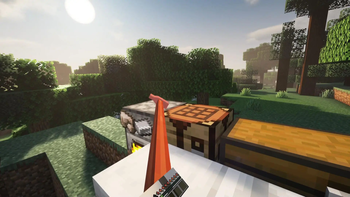

About this Mod
This is a mod created by Mafuyu33, allowing VR players to experience the movement style of the famous game "Getting Over It With Bennett Foddy". When players join the game, they will be given an item. When it is detected that the player holding this item is a VR player, they can automatically enter the mode of moving with a hammer. The movement mode is very intuitive, allowing players to push themselves by interacting with various blocks using the hammer. Switching the item between left and right hands can change the main hand of the hammer.
这是一个马夫鱼33制作的,让VR玩家可以体验著名游戏“Getting Over It With Bennett Foddy”的移动方式的Mod。当玩家加入游戏的时候,会被给予一个物品,当检测到持有此物品的玩家为VR玩家时,即可自动进入使用锤子移动的方式。移动模式非常直观,通过锤子与各种方块进行互动即可推动玩家自身移动。将物品切换左右手可以改变锤子的主手。
Available Versions
How to Install VR Getting Over It on Your Server
Order Server
Order a Minecraft Java server with at least 3 GB RAM (4 GB recommended).
Set fabric Loader
In the panel under "Egg", select the fabric loader and matching Minecraft version (1.20.4).
Install Mod
Open the mod browser in the dashboard and search for "VR Getting Over It". Click "Install" – done! Alternatively, upload the .jar via SFTP to the /mods folder.
Compatibility
Mod Loaders
Minecraft Versions
1.20.4, 1.20.3, 1.20.2 (+1 more)
Server-side
✓ RequiredRecommended RAM
4 GB(min. 3 GB)Frequently Asked Questions
VR Getting Over It server crashes on startup – what to do?
Most common cause: wrong fabric version or insufficient RAM. Check the server log (latest.log) for "OutOfMemoryError" or "Mixin" errors. With Mado Hosting: ensure at least 3 GB RAM is allocated and the loader matches the mod version (1.20.4). You can switch loaders with one click in the panel.
Is VR Getting Over It compatible with fabric?
VR Getting Over It officially supports fabric for Minecraft 1.20.4, 1.20.3, 1.20.2. The Mado dashboard automatically detects incompatible loader combinations.
Server lagging with VR Getting Over It – how to optimize performance?
Recommended RAM: 4 GB (per 8 players). Use /spark profiler to check if VR Getting Over It consumes the most tick time. Common fixes: reduce server view-distance to 8-10, install "performant" or "starlight" as supplementary mods on Forge. With Mado Hosting, your server runs on NVMe SSDs with dedicated CPU cores for minimal latency.
Similar Mods




Rent Modded Server
Install VR Getting Over It with just one click on your server.
Details
- License
- Creative Commons Attribution Non Commercial 4.0 International
- Server-side
- Required