
Villager Workstation Link
This project adds a feature so we can see where the villager is connected to his workbench, making things faster and more efficient.
Screenshots
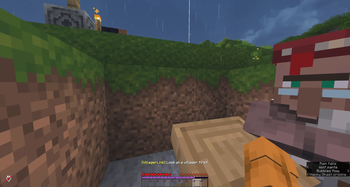
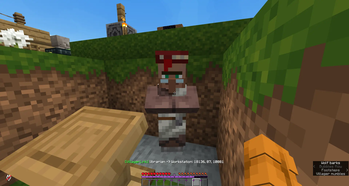
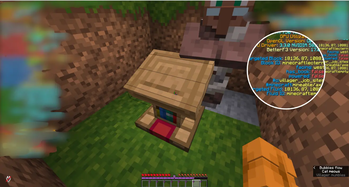
About this Mod
Villager Workstation Link
Quickly identify which workstation belongs to which villager.
Ever wondered why your villager won't restock? Or which lectern/composter that specific villager has claimed? This mod helps you find out instantly.
How to Use
- Stand in front of a villager and look directly at them
- Press G (configurable in Controls) while looking at the villager
- The villager's profession and their nearest workstation coordinates will appear on screen
- Press G again to turn it off
Features
- Instant detection — shows villager profession and workstation location in one keypress
- Configurable keybind — change the key in Options → Controls → VillagerLink
- Language support — switch between Bahasa Indonesia and English in the settings
- Adjustable search radius — configure how far to search for workstations (8–32 blocks)
- Mod Menu integration — open settings directly from the mod list
Requirements
- Minecraft 1.21.11
- Fabric Loader 0.19.2+
- Fabric API
- Mod Menu (optional, for in-game settings)
- Cloth Config (required for settings screen)
Notes
- Works in singleplayer and on servers where the mod is client-side only
- The mod searches for the nearest matching workstation block within the configured radius
- If a villager shows "no workstation", they may not have claimed one yet or it's outside the search radius
Available Versions
How to Install Villager Workstation Link on Your Server
Order Server
Order a Minecraft Java server with at least 3 GB RAM (4 GB recommended).
Set fabric Loader
In the panel under "Egg", select the fabric loader and matching Minecraft version (1.21.11).
Install Mod
Open the mod browser in the dashboard and search for "Villager Workstation Link". Click "Install" – done! Alternatively, upload the .jar via SFTP to the /mods folder.
Compatibility
Mod Loaders
Minecraft Versions
1.21.11
Server-side
✗ UnsupportedRecommended RAM
4 GB(min. 3 GB)Frequently Asked Questions
Villager Workstation Link server crashes on startup – what to do?
Most common cause: wrong fabric version or insufficient RAM. Check the server log (latest.log) for "OutOfMemoryError" or "Mixin" errors. With Mado Hosting: ensure at least 3 GB RAM is allocated and the loader matches the mod version (1.21.11). You can switch loaders with one click in the panel.
Is Villager Workstation Link compatible with fabric?
Villager Workstation Link officially supports fabric for Minecraft 1.21.11. The Mado dashboard automatically detects incompatible loader combinations.
Server lagging with Villager Workstation Link – how to optimize performance?
Recommended RAM: 4 GB (per 8 players). Use /spark profiler to check if Villager Workstation Link consumes the most tick time. Common fixes: reduce server view-distance to 8-10, install "performant" or "starlight" as supplementary mods on Forge. With Mado Hosting, your server runs on NVMe SSDs with dedicated CPU cores for minimal latency.
Similar Mods




Rent Modded Server
Install Villager Workstation Link with just one click on your server.