
Vynix Client
A lightweight Fabric utility client focused on HUD customization, performance, and clean gameplay enhancements.
Screenshots
About this Mod

Customizable HUD ✨ • Lightweight ⚡• Early Foundation Release
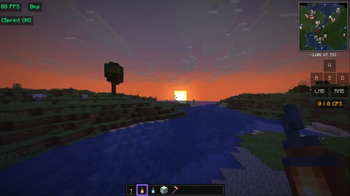
Vynix Client is a lightweight client-side Fabric mod focused on HUD customization, clean visuals, and useful gameplay utilities.
This is the very first public release of the project and currently acts as the foundation build of the client.
Right now the mod mainly focuses on HUD functionality, but many larger systems and features are planned for future updates.
The goal of Vynix Client is simple:
- Smooth performance
- Useful utilities
- Minimal clutter
- Clean and modern design
- Customizable HUD elements
Features
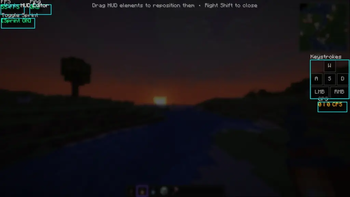
HUD Editor
- Open the HUD Editor using
Right Shift - Drag HUD elements anywhere on screen
- HUD positions save automatically
Current Modules
- FPS Counter
- CPS Counter
- Toggle Sprint
- Keystrokes
- Ping Display
Planned Features
- Better ClickGUI
- More HUD modules
- Themes & colors
- Animations
- Profiles/config presets
- More gameplay utilities
- Cleaner UI system
- Better optimizations
HUD / Utility
- Armor HUD
- Potion HUD
- Coordinates
- Direction HUD
- Session playtime
- Combo counter
- Reach display
- Item counter
- Clock
Movement
- Toggle Sneak
- Auto Sprint improvements
- Zoom
- Freelook
Render
- Fullbright
- Motion blur
- Hit color
- Crosshair editor
- Block outline customization
PvP
- Better hit feedback
- Damage particles
- Hit markers
- CPS graph
- Target HUD
Important Information
- Client-side only
- Requires Fabric Loader
- Requires Fabric API
- Safe for multiplayer servers
- Designed for Minecraft 26.1.2(more versions will come soon)
Installation
- Install Fabric Loader
- Install Fabric API
- Put the mod inside your
/modsfolder - Launch Minecraft
Keybinds
| Action | Key |
|---|---|
| Open HUD Editor | Right Shift |
| Toggle Sprint | V |
Notes
This is only the beginning of Vynix Client 🌌
The current version is a basic HUD-focused release and the full client experience will come in future updates.
Since this is my first mod release, feedback and suggestions are appreciated ❤️ (Discord Server will also launch soon)
Available Versions
How to Install Vynix Client on Your Server
Order Server
Order a Minecraft Java server with at least 3 GB RAM (4 GB recommended).
Set fabric Loader
In the panel under "Egg", select the fabric loader and matching Minecraft version (26.1.2).
Install Mod
Open the mod browser in the dashboard and search for "Vynix Client". Click "Install" – done! Alternatively, upload the .jar via SFTP to the /mods folder.
Compatibility
Mod Loaders
Minecraft Versions
26.1.2
Server-side
✗ UnsupportedRecommended RAM
4 GB(min. 3 GB)Frequently Asked Questions
Vynix Client server crashes on startup – what to do?
Most common cause: wrong fabric version or insufficient RAM. Check the server log (latest.log) for "OutOfMemoryError" or "Mixin" errors. With Mado Hosting: ensure at least 3 GB RAM is allocated and the loader matches the mod version (26.1.2). You can switch loaders with one click in the panel.
Is Vynix Client compatible with fabric?
Vynix Client officially supports fabric for Minecraft 26.1.2. The Mado dashboard automatically detects incompatible loader combinations.
Server lagging with Vynix Client – how to optimize performance?
Recommended RAM: 4 GB (per 8 players). Use /spark profiler to check if Vynix Client consumes the most tick time. Common fixes: reduce server view-distance to 8-10, install "performant" or "starlight" as supplementary mods on Forge. With Mado Hosting, your server runs on NVMe SSDs with dedicated CPU cores for minimal latency.
Similar Mods




![[ETF] Entity Texture Features](https://cdn.modrinth.com/data/BVzZfTc1/af683d206d50b05258d865b0d6e4aa2f2cee12f2_96.webp)
![[EMF] Entity Model Features](https://cdn.modrinth.com/data/4I1XuqiY/6e5bbd0d06b1741bfdab6c0cfab6de8fdaf0064c_96.webp)
Rent Modded Server
Install Vynix Client with just one click on your server.