
Water Bucket Extinguish
Semi PvP-oriented Fabric mod that enhances water bucket usage with smart placement, cobweb handling, and configurable behavior.
Screenshots
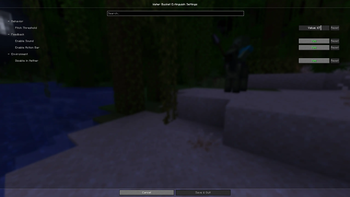

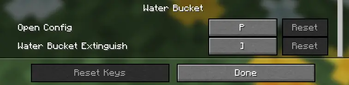
About this Mod
Water Bucket Extinguish
A lightweight client-side Fabric PvP utility mod that enhances water bucket usage for combat, clutch situations, and emergency survival.
Works on vanilla servers. No server installation required.
Overview
Water Bucket Extinguish adds a configurable panic key that improves how water buckets behave in high-pressure situations.
Whether you're on fire during PvP, stuck in cobwebs, or reacting in a clutch moment, this mod helps make water bucket usage faster, cleaner, and more consistent — without automating gameplay.
The mod is fully client-side and does not modify server mechanics.
What It Does
With a single key press, the mod can:
- Automatically switch to a water bucket in your hotbar
- Place water when conditions are met
- Pick water back up when appropriate
- Restore your previously selected item
This improves reaction speed while keeping full player control.
Use Cases
- PvP fire extinguishing
- Escaping cobweb traps
- Fast clutch reactions
- Survival emergency handling
- Combat utility enhancement
Unlike full automation or macro-based “auto MLG” mods, Water Bucket Extinguish enhances consistency without removing skill expression.
Features
- Smart fire extinguish double-click logic
- Faster fire re-pickup timing
- Cobweb escape support
- Intelligent water pickup detection
- Bucket readiness detection (hotbar / inventory / none)
- Configurable panic key
- Clean in-game command system
- HUD display (toggleable & repositionable)
- HUD position customization (Top Left / Top Right / Bottom Left / Bottom Right)
- Usage statistics tracking
- Nether restriction toggle
- Optional sound feedback
- Optional action bar feedback
- Cloth Config integration
HUD System
The HUD can display bucket readiness:
✔ Bucket Ready (in hotbar)

⚠ Bucket in Inventory

✖ No Bucket Found

Position is fully configurable.
Commands
Base:
/waterbucket
Shows mod info and version.
/waterbucket help
Shows full command list.
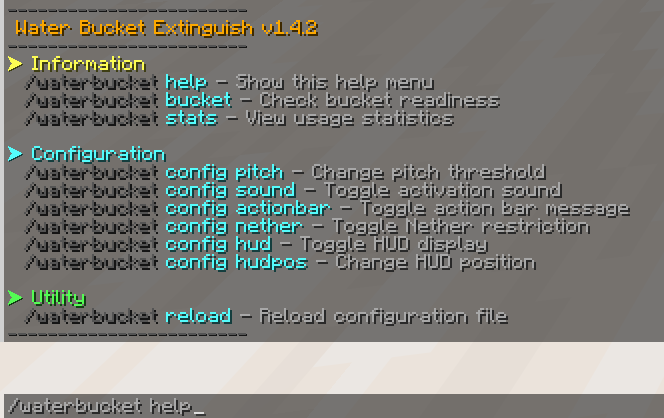
Utility
/waterbucket bucket
Check bucket readiness.
/waterbucket stats
View statistics.
/waterbucket stats reset
Reset statistics.
/waterbucket reload
Reload configuration from file.
Configuration
/waterbucket config pitch <value>/waterbucket config pitch reset
/waterbucket config sound <true|false>/waterbucket config actionbar <true|false>/waterbucket config nether <true|false>/waterbucket config hud <true|false>
/waterbucket config hudpos <top_left|top_right|bottom_left|bottom_right>/waterbucket config hudpos reset
Compatibility
- Client-side only
- Works on vanilla servers
- Does not require server installation
Requirements
Required
- Fabric Loader
- Fabric API
- Cloth Config
Optional
- Mod Menu
License
MIT License
Available Versions
How to Install Water Bucket Extinguish on Your Server
Order Server
Order a Minecraft Java server with at least 3 GB RAM (4 GB recommended).
Set fabric Loader
In the panel under "Egg", select the fabric loader and matching Minecraft version (1.21.11).
Install Mod
Open the mod browser in the dashboard and search for "Water Bucket Extinguish". Click "Install" – done! Alternatively, upload the .jar via SFTP to the /mods folder.
Compatibility
Mod Loaders
Minecraft Versions
1.21.11, 1.20.1
Server-side
✗ UnsupportedRecommended RAM
4 GB(min. 3 GB)Frequently Asked Questions
Water Bucket Extinguish server crashes on startup – what to do?
Most common cause: wrong fabric version or insufficient RAM. Check the server log (latest.log) for "OutOfMemoryError" or "Mixin" errors. With Mado Hosting: ensure at least 3 GB RAM is allocated and the loader matches the mod version (1.21.11). You can switch loaders with one click in the panel.
Is Water Bucket Extinguish compatible with fabric?
Water Bucket Extinguish officially supports fabric for Minecraft 1.21.11, 1.20.1. The Mado dashboard automatically detects incompatible loader combinations.
Server lagging with Water Bucket Extinguish – how to optimize performance?
Recommended RAM: 4 GB (per 8 players). Use /spark profiler to check if Water Bucket Extinguish consumes the most tick time. Common fixes: reduce server view-distance to 8-10, install "performant" or "starlight" as supplementary mods on Forge. With Mado Hosting, your server runs on NVMe SSDs with dedicated CPU cores for minimal latency.
Similar Mods




Rent Modded Server
Install Water Bucket Extinguish with just one click on your server.