
Watson
Updated Watson that displays LogBlock, CoreProtect or Ledger query results in 3D.
About this Mod
Watson Overview
Server side support
https://www.spigotmc.org/resources/watson-display-coreprotect-logblock-logs-in-3d.82222
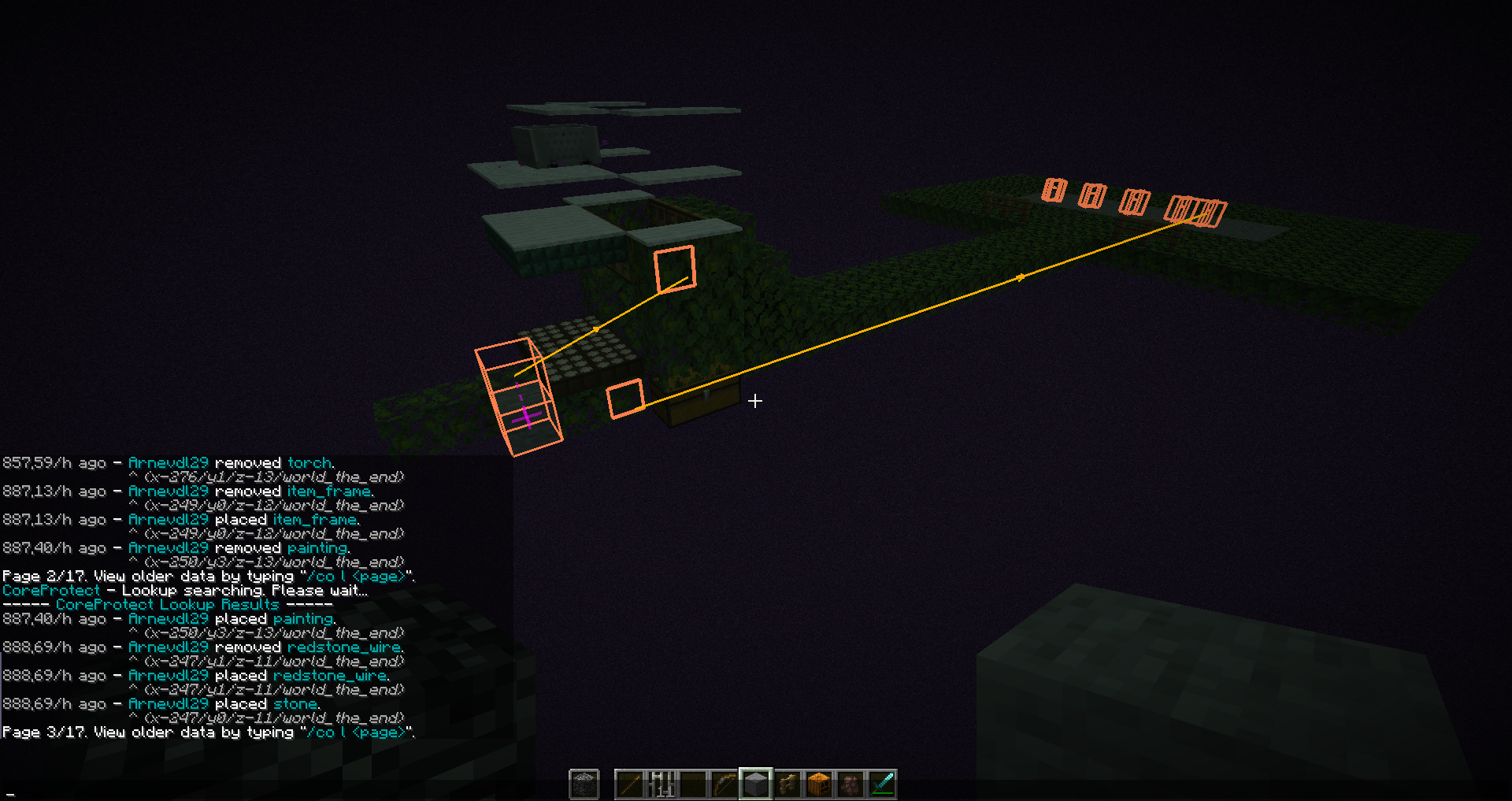
Watson is a Minecraft mod that displays LogBlock or CoreProtect or Ledger logs in 3-D. It also has some features to make moderation tasks, such as observing chat and managing screenshots, a little easier. The current features of the mod are:
- To open main menu, press L
- To open the config menu, press L + C
- It displays individual edits as wireframe 3-D boxes.
- It groups edits of ore blocks into ore deposits, numbers each deposit, shows the numbers in 3-D space and provides commands to teleport to deposits and compute a stone:diamond ratio.
- It draws vectors between edits indicating the time sequence of edits.
- It draws text annotations in 3-D space. These can act as teleport targets.
- Edits and annotations can be saved to files and loaded at a later date.
- There's a simple built-in calculator for working out stone:diamond ratios.
- It uses colour to highlight parts of chat that match regular expressions. This can be used to draw attention to banned words. It can also be used to highlight the names of people, acting as a rudimentary friends list.
- It adds player names to screenshots automatically.
- It does a
/region info regionnamefor you when you right click on a region with the wooden sword (rate limited to once every 10 seconds - the wooden sword will simply list the region name the other times). - In order to shorten coordinate displays and make them easier to read, Watson also hides the LogBlock coords lines from chat and re-echoes them in a custom, brief format, where block IDs are numeric rather than words. Re-echoed coordinates are assigned colours based on their physical proximity. This makes separate ore deposits easy to distinguish in the coordinate listing. Note that reformatting and recolouring of LogBlock query results can be controlled by the reformat_query_results and recolour_query_results configuration settings, respectively.
If you have questions or need help with something, the fastest way to get answers is to join Watson Discord, otherwise put them on my github incase of crashes/bugs click here
Want to support development?
If you want to support development, check out my Patreon! Supporting me via Patreon lets me spend more time modding, and allows me to put out more updates for everyone to enjoy.
Available Versions
How to Install Watson on Your Server
Order Server
Order a Minecraft Java server with at least 3 GB RAM (4 GB recommended).
Set fabric Loader
In the panel under "Egg", select the fabric loader and matching Minecraft version (1.21.3).
Install Mod
Open the mod browser in the dashboard and search for "Watson". Click "Install" – done! Alternatively, upload the .jar via SFTP to the /mods folder.
Compatibility
Mod Loaders
Minecraft Versions
1.21.3, 1.21.2, 1.21.1 (+19 more)
Server-side
✗ UnsupportedRecommended RAM
4 GB(min. 3 GB)Frequently Asked Questions
Watson server crashes on startup – what to do?
Most common cause: wrong fabric version or insufficient RAM. Check the server log (latest.log) for "OutOfMemoryError" or "Mixin" errors. With Mado Hosting: ensure at least 3 GB RAM is allocated and the loader matches the mod version (1.21.3). You can switch loaders with one click in the panel.
Is Watson compatible with fabric and quilt?
Watson officially supports fabric, quilt for Minecraft 1.21.3, 1.21.2, 1.21.1. The Mado dashboard automatically detects incompatible loader combinations.
Server lagging with Watson – how to optimize performance?
Recommended RAM: 4 GB (per 8 players). Use /spark profiler to check if Watson consumes the most tick time. Common fixes: reduce server view-distance to 8-10, install "performant" or "starlight" as supplementary mods on Forge. With Mado Hosting, your server runs on NVMe SSDs with dedicated CPU cores for minimal latency.
Similar Mods




![[ETF] Entity Texture Features](https://cdn.modrinth.com/data/BVzZfTc1/af683d206d50b05258d865b0d6e4aa2f2cee12f2_96.webp)
![[EMF] Entity Model Features](https://cdn.modrinth.com/data/4I1XuqiY/6e5bbd0d06b1741bfdab6c0cfab6de8fdaf0064c_96.webp)
Rent Modded Server
Install Watson with just one click on your server.