
Waypoint Compass
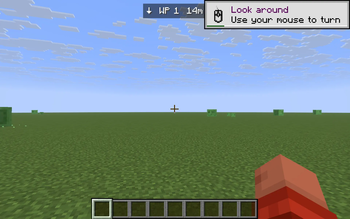
Save your current location with a keypress; a HUD compass at the top of the screen points back to it with live direction and distance — across all dimensions.
Screenshots
About this Mod
Waypoint Compass is a tiny, mixin-free, client-only Fabric mod for players who just want a "drop a pin, find your way back" tool — without installing a whole minimap suite. Press a key, the spot is saved. Walk away, and a slim compass strip at the top of your HUD shows an arrow pointing back and how far you have to go.
Features
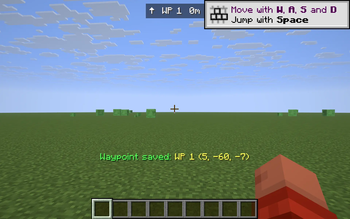
- One-key save. Press B anywhere to save your current X, Y, Z as a new waypoint. The mod confirms in the action bar (
Waypoint saved: WP 1 (123, 64, -512)). - HUD compass. A small bar at the top center of your screen shows an arrow, the waypoint name, and the live distance in meters / km. The arrow rotates as you turn, so "↑" always means "the waypoint is straight ahead".
- Cycle through saved spots. Press N to switch which waypoint the compass is tracking. Great for multi-base setups.
- Delete the current pin. Press K to remove the waypoint you're tracking. No menu required.
- Toggle the HUD. Press H to hide or re-show the compass without losing your saved points.
- Dimension-aware. Each waypoint remembers the dimension it was saved in. If you're in the Nether and the waypoint is in the Overworld, the compass shows
in Overworldinstead of a misleading distance. - Persistent. Waypoints are stored in
config/waypoints.jsonand survive restarts. - No mixins. No server install. Pure client mod — works on any server, including vanilla Realms.
Default keys
| Key | Action |
|---|---|
| B | Save current position as a new waypoint |
| N | Cycle to next saved waypoint |
| K | Delete the currently tracked waypoint |
| H | Toggle the HUD compass on/off |
Keys are read directly from the OS via GLFW, so they ignore Minecraft's input routing — but they're suppressed while a GUI (chat, sign edit, inventory) is open, so they won't fire mid-type.
Cross-version
Tested on 1.21.8, 1.21.9, 1.21.10, 1.21.11. One JAR, one install.
Notes
- The compass shows horizontal distance (XZ), which is what you actually walk — height differences don't inflate the number.
- This is intentionally NOT a minimap. There's no in-world 3D marker; the whole point is "one HUD line, zero clutter."
Available Versions
How to Install Waypoint Compass on Your Server
Order Server
Order a Minecraft Java server with at least 3 GB RAM (4 GB recommended).
Set fabric Loader
In the panel under "Egg", select the fabric loader and matching Minecraft version (1.21.11).
Install Mod
Open the mod browser in the dashboard and search for "Waypoint Compass". Click "Install" – done! Alternatively, upload the .jar via SFTP to the /mods folder.
Compatibility
Mod Loaders
Minecraft Versions
1.21.11, 1.21.10, 1.21.9 (+1 more)
Server-side
✗ UnsupportedRecommended RAM
4 GB(min. 3 GB)Frequently Asked Questions
Waypoint Compass server crashes on startup – what to do?
Most common cause: wrong fabric version or insufficient RAM. Check the server log (latest.log) for "OutOfMemoryError" or "Mixin" errors. With Mado Hosting: ensure at least 3 GB RAM is allocated and the loader matches the mod version (1.21.11). You can switch loaders with one click in the panel.
Is Waypoint Compass compatible with fabric?
Waypoint Compass officially supports fabric for Minecraft 1.21.11, 1.21.10, 1.21.9. The Mado dashboard automatically detects incompatible loader combinations.
Server lagging with Waypoint Compass – how to optimize performance?
Recommended RAM: 4 GB (per 8 players). Use /spark profiler to check if Waypoint Compass consumes the most tick time. Common fixes: reduce server view-distance to 8-10, install "performant" or "starlight" as supplementary mods on Forge. With Mado Hosting, your server runs on NVMe SSDs with dedicated CPU cores for minimal latency.
Similar Mods




![[ETF] Entity Texture Features](https://cdn.modrinth.com/data/BVzZfTc1/af683d206d50b05258d865b0d6e4aa2f2cee12f2_96.webp)
![[EMF] Entity Model Features](https://cdn.modrinth.com/data/4I1XuqiY/6e5bbd0d06b1741bfdab6c0cfab6de8fdaf0064c_96.webp)
Rent Modded Server
Install Waypoint Compass with just one click on your server.