wCombatPatternAnalyzer
Analyze your enemy's combat patterns and predict their actions in PvP!
Screenshots
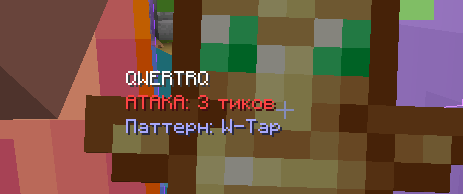
About this Mod
🎯 What does this mod do?
wCombat Pattern Analyzer is a client-side Fabric mod that tracks and analyzes your opponents' combat behavior in real-time, helping you predict their next actions.
⚔️ Key Features
- Attack Prediction - calculates average intervals between opponent's attacks and shows when they'll strike again
- Movement Analysis - detects movement patterns (W-Tap, S-Tap, Strafe)
- Shield Tracking - shows when opponent is blocking with shield
- Smart Indicators - color-coded danger levels:
- 🔴 Red - opponent attacking soon (danger!)
- 🟢 Green - safe to counter-attack
- 🟡 Yellow - neutral phase
📊 How it works
- Mod collects data about opponent's last 20 actions
- Analyzes intervals between attacks and movement patterns
- Predicts next action based on collected data
- Displays information in convenient HUD to the left of crosshair
🎮 Usage
- Install the mod in your
modsfolder - Join a game and get within 16 blocks of an opponent
- Mod automatically starts tracking the closest player
- After 3+ actions, predictions will start showing
What's displayed on screen:
Player Name
ATTACK: 5 ticks         (red - danger)
COUNTER READY           (green - attack now)
Waiting: 10             (yellow - neutral)
Pattern: W-Tap          (pattern detected)
BLOCKING SHIELD         (blue - holding shield)
⚙️ Configuration
Settings are located in config/wcombatpatternanalyzer.json:
{
  "enabled": true,
  "maxTrackedActions": 20,
  "predictionSensitivity": 0.75,
  "showAttackIndicator": true,
  "showMovementPattern": true,
  "showShieldUsage": true,
  "showCriticalJumps": true,
  "maxTrackingDistance": 16,
  "debugMode": false
}
Parameters:
enabled- enable/disable the modmaxTrackedActions- number of tracked actions (10-50)predictionSensitivity- prediction sensitivity (0.5-1.0)showAttackIndicator- show attack indicatorshowMovementPattern- show movement patternsshowShieldUsage- show shield usagemaxTrackingDistance- tracking distance in blocks (8-32)debugMode- debug mode (logs tologs/latest.log)
📋 Requirements
- Minecraft: 1.21.4
- Fabric Loader: 0.17.0+
- Fabric API: 0.119.4+1.21.4
- Java: 21+
🔧 Technical Details
What's tracked:
- ✅ Attack intervals (timing)
- ✅ Movement patterns (w-tap, s-tap, strafe)
- ✅ Shield usage
- ✅ Critical hit jumps
- ✅ Action sequences
How it analyzes:
- Collects data about last 10-20 actions
- Calculates average interval between attacks
- Identifies repeating patterns
- Predicts next action based on current pattern
🎨 Features
- Minimal UI - doesn't clutter your screen
- Closest player only - tracks one opponent at a time
- Automatic tracking - no configuration needed
- Client-side - works on any server
- Lightweight - no performance impact
📝 Notes
- Mod is client-side only
- Needs 3+ actions from opponent for accurate predictions
- More data = more accurate predictions
- Doesn't provide unfair advantages, only analyzes visible behavior
Available Versions
How to Install wCombatPatternAnalyzer on Your Server
Order Server
Order a Minecraft Java server with at least 3 GB RAM (4 GB recommended).
Set fabric Loader
In the panel under "Egg", select the fabric loader and matching Minecraft version (1.21.11).
Install Mod
Open the mod browser in the dashboard and search for "wCombatPatternAnalyzer". Click "Install" – done! Alternatively, upload the .jar via SFTP to the /mods folder.
Compatibility
Mod Loaders
Minecraft Versions
1.21.11, 1.21.10, 1.21.9 (+5 more)
Server-side
✗ UnsupportedRecommended RAM
4 GB(min. 3 GB)Frequently Asked Questions
wCombatPatternAnalyzer server crashes on startup – what to do?
Most common cause: wrong fabric version or insufficient RAM. Check the server log (latest.log) for "OutOfMemoryError" or "Mixin" errors. With Mado Hosting: ensure at least 3 GB RAM is allocated and the loader matches the mod version (1.21.11). You can switch loaders with one click in the panel.
Is wCombatPatternAnalyzer compatible with fabric?
wCombatPatternAnalyzer officially supports fabric for Minecraft 1.21.11, 1.21.10, 1.21.9. The Mado dashboard automatically detects incompatible loader combinations.
Server lagging with wCombatPatternAnalyzer – how to optimize performance?
Recommended RAM: 4 GB (per 8 players). Use /spark profiler to check if wCombatPatternAnalyzer consumes the most tick time. Common fixes: reduce server view-distance to 8-10, install "performant" or "starlight" as supplementary mods on Forge. With Mado Hosting, your server runs on NVMe SSDs with dedicated CPU cores for minimal latency.
Similar Mods




![[ETF] Entity Texture Features](https://cdn.modrinth.com/data/BVzZfTc1/af683d206d50b05258d865b0d6e4aa2f2cee12f2_96.webp)
![[EMF] Entity Model Features](https://cdn.modrinth.com/data/4I1XuqiY/6e5bbd0d06b1741bfdab6c0cfab6de8fdaf0064c_96.webp)
Rent Modded Server
Install wCombatPatternAnalyzer with just one click on your server.