
Weather Overhaul
This mod introduces a dynamic cycle of Spring, Summer, Autumn, and Winter to the game, altering foliage, weather, and block behaviors over time.
Screenshots
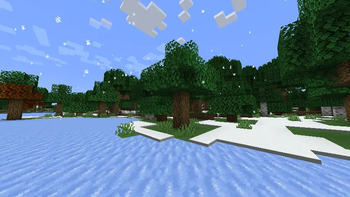
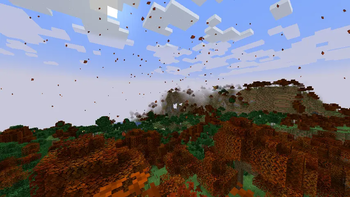
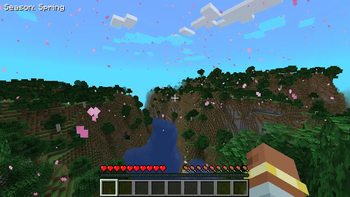
About this Mod
Seasons and Weather Overhaul
A Minecraft Forge Mod for 1.20.1
Four seasons. Real effects. Every world feels alive.
Overview
Seasons and Weather Overhaul adds a full four-season cycle to Minecraft that actually affects how you play. Crops behave differently, water freezes, snow blankets the ground, the sky shifts in color, and particles drift through the air - all tied directly to in-game time.
Features
🌸 Spring
- Cherry blossoms drift through the air
- Ice and snow from Winter melt away
- Crops return to normal growth speed
- Sky takes on a soft green tint
☀️ Summer
- Crops grow faster than usual
- Sky brightens with a warm blue hue
- The world is at its most lush
🍂 Autumn
- Custom Orange and red leaves drift down around you
- Leaf blocks on all trees change color - oak, birch, jungle, acacia, dark oak
- Crops slow down significantly
- Sky warms to an amber tint
❄️ Winter
- Snow layers accumulate on the ground around you as you move
- Water surfaces freeze to packed ice
- Crops stop growing entirely
- Snowflakes fall in the open air
- Sky shifts to a cold blue tone
Season Transitions
When a season changes you'll see a colored announcement in chat:
- Spring has arrived!
- Summer has arrived!
- Autumn has arrived!
- Winter has arrived!
HUD
The current season is displayed in the top-left corner of your screen at all times. Can be toggled off in the config.
Configuration
After loading the mod once, a config file is generated at:
saves/<worldname>/serverconfig/seasonsmod-common.toml
Here you can change things like the length of seasons, wether the water should freeze or not and the visibility of the HUD.
Requirements:
- Minecraft 1.20.1
- Forge 47.x
- Java 17
Compatibility
- Works in both singleplayer and multiplayer
- Season state is saved per world and persists across sessions
- In multiplayer, the season is synced from server to all connected clients automatically
Credits
Built from scratch using Minecraft Forge MDK 1.20.1.
Available Versions
How to Install Weather Overhaul on Your Server
Order Server
Order a Minecraft Java server with at least 4 GB RAM (6 GB recommended).
Set forge Loader
In the panel under "Egg", select the forge loader and matching Minecraft version (1.20.6).
Install Mod
Open the mod browser in the dashboard and search for "Weather Overhaul". Click "Install" – done! Alternatively, upload the .jar via SFTP to the /mods folder.
Compatibility
Mod Loaders
Minecraft Versions
1.20.6, 1.20.5, 1.20.4 (+3 more)
Server-side
✓ RequiredRecommended RAM
6 GB(min. 4 GB)Frequently Asked Questions
Weather Overhaul server crashes on startup – what to do?
Most common cause: wrong forge version or insufficient RAM. Check the server log (latest.log) for "OutOfMemoryError" or "Mixin" errors. With Mado Hosting: ensure at least 4 GB RAM is allocated and the loader matches the mod version (1.20.6). You can switch loaders with one click in the panel.
Is Weather Overhaul compatible with forge?
Weather Overhaul officially supports forge for Minecraft 1.20.6, 1.20.5, 1.20.4. The Mado dashboard automatically detects incompatible loader combinations.
Server lagging with Weather Overhaul – how to optimize performance?
Recommended RAM: 6 GB (per 5 players). Use /spark profiler to check if Weather Overhaul consumes the most tick time. Common fixes: reduce server view-distance to 8-10, install "performant" or "starlight" as supplementary mods on Forge. With Mado Hosting, your server runs on NVMe SSDs with dedicated CPU cores for minimal latency.
Similar Mods

![[ETF] Entity Texture Features](https://cdn.modrinth.com/data/BVzZfTc1/af683d206d50b05258d865b0d6e4aa2f2cee12f2_96.webp)
![[EMF] Entity Model Features](https://cdn.modrinth.com/data/4I1XuqiY/6e5bbd0d06b1741bfdab6c0cfab6de8fdaf0064c_96.webp)



Rent Modded Server
Install Weather Overhaul with just one click on your server.