
WebProfileViewer
A mod used to check hypixel player's bedwars stats in game!
About this Mod
This mod has 2 new commands: /web and /weball to help you check player's hypixel bedwars data.
1./web
Usage:
/web <playerName>
Output:
<playerName>:
Final K/D:...
Doubles Final K/D:...
4v4v4v4 Final K/D:...
Total Wins:...

2./weball
Usage:
/weball
Output:
playerName1 [1/Total online players]:
Final K/D:...
Doubles Final K/D:...
4v4v4v4 Final K/D:...
Total Wins:...
playerName2 [2/Total online players]:
...
...
...
playerName... [Total online players/Total online players]:
...
Finished fetching stats for all online players.
Dangerous Players:
...

3.Configure which stats to show in /web or /weball
Press F8 to open mod screen:
Then press "Open config" button:
Then choose "General Settings":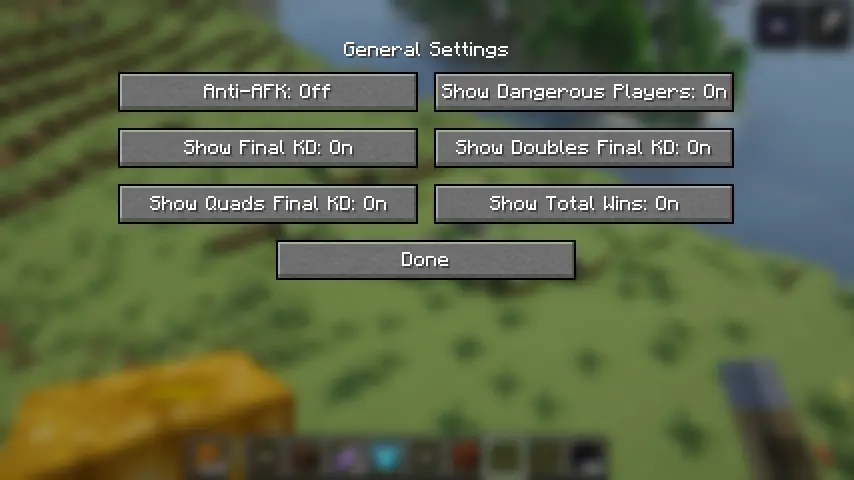
And here you can choose all stats you wanna query, and also whether you want to enable AntiAFK feature (This will be introduced later).
4.Show dangerous players
A dangerous player list is displayed after using /weball command, like this:
Players with a high FKDR or nicked players are considered dangerous.
5.Change dangerous player's final K/D threshold
If you don't think a player with 1 FKDR is dangerous, you can change the threshold FKDR by yourself! Simply use the command /weball config Dangerous_Players_Final_KD [set/get/reset] 

6.AntiAFK feature
Press F9 key to enable AntiAFK feature, the mod will take control of your game input unless you press F9 again. The mod will automatically press a key after a random interval to simulate player input to stop AFK check countdown, the move direction is random, but don't worry- you won't walk iinto the void if you are not unlucky enough! Don't be bothered you will get kicked because the wall in move direction stops the move- this mod can handle this! The feature runs perfectly in hypixel bedwars! When this feature is enabled, an indicator is shown on screen. Here is how it looks like:
Available Versions
How to Install WebProfileViewer on Your Server
Order Server
Order a Minecraft Java server with at least 3 GB RAM (4 GB recommended).
Set fabric Loader
In the panel under "Egg", select the fabric loader and matching Minecraft version (1.21.11).
Install Mod
Open the mod browser in the dashboard and search for "WebProfileViewer". Click "Install" – done! Alternatively, upload the .jar via SFTP to the /mods folder.
Compatibility
Mod Loaders
Minecraft Versions
1.21.11
Server-side
✗ UnsupportedRecommended RAM
4 GB(min. 3 GB)Frequently Asked Questions
WebProfileViewer server crashes on startup – what to do?
Most common cause: wrong fabric version or insufficient RAM. Check the server log (latest.log) for "OutOfMemoryError" or "Mixin" errors. With Mado Hosting: ensure at least 3 GB RAM is allocated and the loader matches the mod version (1.21.11). You can switch loaders with one click in the panel.
Is WebProfileViewer compatible with fabric?
WebProfileViewer officially supports fabric for Minecraft 1.21.11. The Mado dashboard automatically detects incompatible loader combinations.
Server lagging with WebProfileViewer – how to optimize performance?
Recommended RAM: 4 GB (per 8 players). Use /spark profiler to check if WebProfileViewer consumes the most tick time. Common fixes: reduce server view-distance to 8-10, install "performant" or "starlight" as supplementary mods on Forge. With Mado Hosting, your server runs on NVMe SSDs with dedicated CPU cores for minimal latency.
Similar Mods




![[ETF] Entity Texture Features](https://cdn.modrinth.com/data/BVzZfTc1/af683d206d50b05258d865b0d6e4aa2f2cee12f2_96.webp)
![[EMF] Entity Model Features](https://cdn.modrinth.com/data/4I1XuqiY/6e5bbd0d06b1741bfdab6c0cfab6de8fdaf0064c_96.webp)
Rent Modded Server
Install WebProfileViewer with just one click on your server.