
Web's Node Library
A lightweight node-based GUI library for NeoForge 1.21.1. Features visual data flow and infinite canvas.
Screenshots
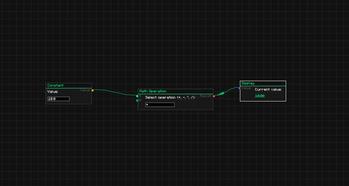
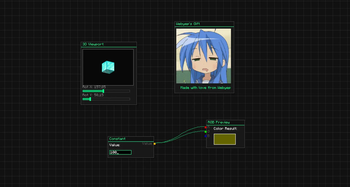
About this Mod
Web's Node Lib
Web's Node Lib is a lightweight node-based GUI library for Minecraft 1.21.1 (NeoForge).
It provides a visual framework for building logic systems, control panels, or data interfaces directly in-game.
How to Test
You can test the library immediately after installing the mod:
- Enter any world.
- Type the command:
/webu node_editor - Press Shift + A to open the node creation menu.
- Drag connections between pins to see the Topological Data Flow in action.
Features
Infinite Canvas
Smooth zooming (0.1x to 3.0x) and panning. Your node graphs scale and move without losing precision.
Visual Data Flow
A built-in topological pulse system visualizes data moving through your graph. It automatically calculates the logic chain and sends pulses between nodes.
Components
Ready-to-use elements for your nodes:
- Sliders, Checkboxes, and Buttons.
- TextFields for data input.
- Image support (PNG/GIF) and 3D Viewports.
Controls
- Shift + A: Node Search Menu.
- Ctrl + C / V: Copy and paste nodes.
- Middle Click: Pan viewport.
- Delete / X: Remove nodes.
For Developers
Integrating the library is simple:
- Register node types via NodeRegistry.
- Define evaluation logic using setEvaluator.
- Save/Load graphs using WGraphSerializer (NBT supported).
Built by webyep.
Licensed under MIT.
Available Versions
How to Install Web's Node Library on Your Server
Order Server
Order a Minecraft Java server with at least 3 GB RAM (4 GB recommended).
Set neoforge Loader
In the panel under "Egg", select the neoforge loader and matching Minecraft version (1.21.1).
Install Mod
Open the mod browser in the dashboard and search for "Web's Node Library". Click "Install" – done! Alternatively, upload the .jar via SFTP to the /mods folder.
Compatibility
Mod Loaders
Minecraft Versions
1.21.1
Server-side
✓ RequiredRecommended RAM
4 GB(min. 3 GB)Frequently Asked Questions
Web's Node Library server crashes on startup – what to do?
Most common cause: wrong neoforge version or insufficient RAM. Check the server log (latest.log) for "OutOfMemoryError" or "Mixin" errors. With Mado Hosting: ensure at least 3 GB RAM is allocated and the loader matches the mod version (1.21.1). You can switch loaders with one click in the panel.
Is Web's Node Library compatible with neoforge?
Web's Node Library officially supports neoforge for Minecraft 1.21.1. The Mado dashboard automatically detects incompatible loader combinations.
Server lagging with Web's Node Library – how to optimize performance?
Recommended RAM: 4 GB (per 8 players). Use /spark profiler to check if Web's Node Library consumes the most tick time. Common fixes: reduce server view-distance to 8-10, install "performant" or "starlight" as supplementary mods on Forge. With Mado Hosting, your server runs on NVMe SSDs with dedicated CPU cores for minimal latency.
Similar Mods




Rent Modded Server
Install Web's Node Library with just one click on your server.