
WeCode
A utility mod for coding on mcdiamondfire.com
Screenshots
About this Mod
WeCode
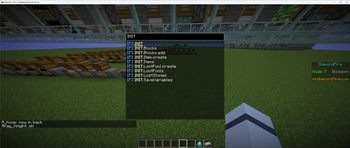
Plot Searching
- CTRL + F by default to search the entire plot for functions/processes/events
Commands
- /exp
- good way to quickly write %math expressions
- /batchtag <tag> <value> <tag2> <value2> [...]
- /pjoin <player>
- Joins the plot that player is on
- /sjoin <name>
- /speedjoin set <name> <id/handle
- /speedjoin list
- /smallcaps <text
- Gives you a qxeii'ied version of the input text
- /dev <id> OR /dev <handle>
- /build <id> OR /build <handle>
- /cs (explained later)
- /inv save AND /inv load
- /dtp <args>
- Runs /dev and then /ctp <args>
- /test (don't run, does stuff for testing)
Colorspaces (/cs)
- /cs list
- Lists your colorspaces
- /cs create <spacename>
- Creates a new colorspace under the given name
- /cs delete <spacename>
- Deletes the given colorspace
- /cs add <spacename> <colorname> <#color>
- Adds a named color to a colorspace
- /cs remove <spacename> <colorname>
- Removes a named color
- /cs setactive <spacename>
- Sets your active colorspace to the given space
- /cs export <spacename>
- Copies the given colorspace to your clipboard
- /cs importclipboard <spacename>
- Imports a colorspace from your clipboard (and saves it under the given name)
When writing in chat (or running commands) every tag in the form of <<name>> gets
replaced with the corresponding color from your active colorspace (or from the "global" colorspace)

Example:
/cs create example
/cs add example test #FFFF88
/cs setactive example
/txt <<test>>Woahie!
^^ That command gives you a /txt <#FFFF88>Woahie!
Keybinds
- Show Tags
- Pin Item Tooltip
- Pin Template Preview
- There is a template peeker and this allows you to freeze it in place
- Flight Speed Toggle Normal <==> Fast (Normal and Fast are defined in the config)
Other
- Lagslayer Display in the top left
- Custom Notifications
- Moves all DF errors and successes to a fancy display in the top right (can be toggled in config)
Available Versions
How to Install WeCode on Your Server
Order Server
Order a Minecraft Java server with at least 3 GB RAM (4 GB recommended).
Set fabric Loader
In the panel under "Egg", select the fabric loader and matching Minecraft version (1.21.11).
Install Mod
Open the mod browser in the dashboard and search for "WeCode". Click "Install" – done! Alternatively, upload the .jar via SFTP to the /mods folder.
Compatibility
Mod Loaders
Minecraft Versions
1.21.11, 1.21.8, 1.21.3
Server-side
✗ UnsupportedRecommended RAM
4 GB(min. 3 GB)Frequently Asked Questions
WeCode server crashes on startup – what to do?
Most common cause: wrong fabric version or insufficient RAM. Check the server log (latest.log) for "OutOfMemoryError" or "Mixin" errors. With Mado Hosting: ensure at least 3 GB RAM is allocated and the loader matches the mod version (1.21.11). You can switch loaders with one click in the panel.
Is WeCode compatible with fabric?
WeCode officially supports fabric for Minecraft 1.21.11, 1.21.8, 1.21.3. The Mado dashboard automatically detects incompatible loader combinations.
Server lagging with WeCode – how to optimize performance?
Recommended RAM: 4 GB (per 8 players). Use /spark profiler to check if WeCode consumes the most tick time. Common fixes: reduce server view-distance to 8-10, install "performant" or "starlight" as supplementary mods on Forge. With Mado Hosting, your server runs on NVMe SSDs with dedicated CPU cores for minimal latency.
Similar Mods




![[ETF] Entity Texture Features](https://cdn.modrinth.com/data/BVzZfTc1/af683d206d50b05258d865b0d6e4aa2f2cee12f2_96.webp)
![[EMF] Entity Model Features](https://cdn.modrinth.com/data/4I1XuqiY/6e5bbd0d06b1741bfdab6c0cfab6de8fdaf0064c_96.webp)
Rent Modded Server
Install WeCode with just one click on your server.