
Weirding Gadget
The Server Friendly Chunk Loader
Screenshots
About this Mod
Description
This is a chunk loader that was requested by a few friends of mine that allows for chunk loading to deactivate after people do not come onto the server for an extended period of time.
By default, a single Weirding Gadget will keep a 3x3 chunk area (48x48 blocks) around it loaded, for a period of 7 days. The chunk loader will not deactivate if the player is online, and the inactivity period starts after they have logged off.
If the chunk loader has deactivated it will stop spinning, anyone can re-activate it by right clicking on it.
New as of 2.0
The Weirding Gadget now supports multiple players. Each person can Right click on it. The device will become inactive when ALL players have been offline for the specified period.
Weirdly enough, you can wear the weirding gadget on your head to see where the weirding gadgets are, in case you buried them and forgot where and need to turn them back on again.
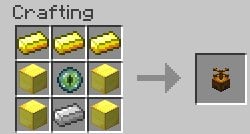
Crafting Recipe
Credits
The art for this mod was generously provided by Rorax.
Further improvements to be made in the future
- Use a redstone torch with it to show the area affected
- Support Teams
- Fix the logo
Known Issues
- Lighting on Spinner is a bit unusual. This is difficult to fix. I will investigate as time permits.
Available Versions
How to Install Weirding Gadget on Your Server
Order Server
Order a Minecraft Java server with at least 3 GB RAM (4 GB recommended).
Set forge Loader
In the panel under "Egg", select the forge loader and matching Minecraft version (1.18.1).
Install Mod
Open the mod browser in the dashboard and search for "Weirding Gadget". Click "Install" – done! Alternatively, upload the .jar via SFTP to the /mods folder.
Compatibility
Mod Loaders
Minecraft Versions
1.18.1, 1.18
Server-side
✓ RequiredRecommended RAM
4 GB(min. 3 GB)Frequently Asked Questions
Weirding Gadget server crashes on startup – what to do?
Most common cause: wrong forge version or insufficient RAM. Check the server log (latest.log) for "OutOfMemoryError" or "Mixin" errors. With Mado Hosting: ensure at least 3 GB RAM is allocated and the loader matches the mod version (1.18.1). You can switch loaders with one click in the panel.
Is Weirding Gadget compatible with forge?
Weirding Gadget officially supports forge for Minecraft 1.18.1, 1.18. The Mado dashboard automatically detects incompatible loader combinations.
Server lagging with Weirding Gadget – how to optimize performance?
Recommended RAM: 4 GB (per 8 players). Use /spark profiler to check if Weirding Gadget consumes the most tick time. Common fixes: reduce server view-distance to 8-10, install "performant" or "starlight" as supplementary mods on Forge. With Mado Hosting, your server runs on NVMe SSDs with dedicated CPU cores for minimal latency.
Similar Mods




![[ETF] Entity Texture Features](https://cdn.modrinth.com/data/BVzZfTc1/af683d206d50b05258d865b0d6e4aa2f2cee12f2_96.webp)
![[EMF] Entity Model Features](https://cdn.modrinth.com/data/4I1XuqiY/6e5bbd0d06b1741bfdab6c0cfab6de8fdaf0064c_96.webp)
Rent Modded Server
Install Weirding Gadget with just one click on your server.