
Welcome to Roblox
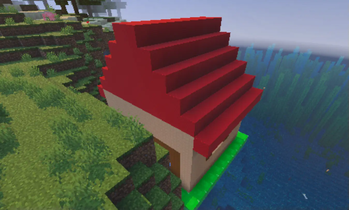
welcome to roblox is a recreation of classic minecraft and 2006 roblox!
Screenshots

About this Mod
🌐 Welcome to Roblox – A Classic Throwback to 2006!
Mod Version: Classic Edition
Minecraft Version: newsest version
Author: kalebjeter13
Step back in time and relive the golden age of online creativity.
"Welcome to Roblox" is a passion project mod that faithfully recreates the feel, look, and charm of 2006-era Roblox—right inside your Minecraft world!
📦 Features:
🧱 Classic Roblox Bricks & Parts
Build using old-school studs, rounded bricks, and classic plastic textures
Authentic materials like "Slate", "Plastic", and "Studded" blocks
👾 Retro GUIs & Menus
Interfaces inspired by early Roblox Studio
Classic loading screens and sound effects from the 2006 era
🧍♂️ Avatar Nostalgia
Play as the iconic blocky avatars—yellow heads, brick torsos, and all
Customize your look with classic hats, faces, and gear!
🎮 Interactive Places
Explore nostalgic game modes like Obbies, Brickbattle maps, and Tycoon-style mechanics
Modded redstone logic mimicking Roblox scripting tools from the past
🎵 Original Soundset
Classic Roblox UI sounds, music cues, and building ambiance reimagined for Minecraft
🎯 Why This Mod?
Whether you grew up building in Roblox circa 2006 or are curious about its origins, "Welcome to Roblox" lets you fuse two iconic sandbox worlds into one unforgettable experience. Built for classic Minecraft fans and Roblox veterans alike!
BTW most stuff isn't here yet because, it's a alpha.
Available Versions
How to Install Welcome to Roblox on Your Server
Order Server
Order a Minecraft Java server with at least 4 GB RAM (6 GB recommended).
Set neoforge Loader
In the panel under "Egg", select the neoforge loader and matching Minecraft version (1.21.6).
Install Mod
Open the mod browser in the dashboard and search for "Welcome to Roblox". Click "Install" – done! Alternatively, upload the .jar via SFTP to the /mods folder.
Compatibility
Mod Loaders
Minecraft Versions
1.21.6, 1.21.5, 1.21.4
Server-side
✓ RequiredRecommended RAM
6 GB(min. 4 GB)Frequently Asked Questions
Welcome to Roblox server crashes on startup – what to do?
Most common cause: wrong neoforge version or insufficient RAM. Check the server log (latest.log) for "OutOfMemoryError" or "Mixin" errors. With Mado Hosting: ensure at least 4 GB RAM is allocated and the loader matches the mod version (1.21.6). You can switch loaders with one click in the panel.
Is Welcome to Roblox compatible with neoforge?
Welcome to Roblox officially supports neoforge for Minecraft 1.21.6, 1.21.5, 1.21.4. The Mado dashboard automatically detects incompatible loader combinations.
Server lagging with Welcome to Roblox – how to optimize performance?
Recommended RAM: 6 GB (per 5 players). Use /spark profiler to check if Welcome to Roblox consumes the most tick time. Common fixes: reduce server view-distance to 8-10, install "performant" or "starlight" as supplementary mods on Forge. With Mado Hosting, your server runs on NVMe SSDs with dedicated CPU cores for minimal latency.
Similar Mods

![[ETF] Entity Texture Features](https://cdn.modrinth.com/data/BVzZfTc1/af683d206d50b05258d865b0d6e4aa2f2cee12f2_96.webp)
![[EMF] Entity Model Features](https://cdn.modrinth.com/data/4I1XuqiY/6e5bbd0d06b1741bfdab6c0cfab6de8fdaf0064c_96.webp)



Rent Modded Server
Install Welcome to Roblox with just one click on your server.