
Where Are You?
A survival-friendly location sharing mod that shows your friends’ positions with a clean HUD and overlay.
Screenshots
About this Mod
WhereAreYou
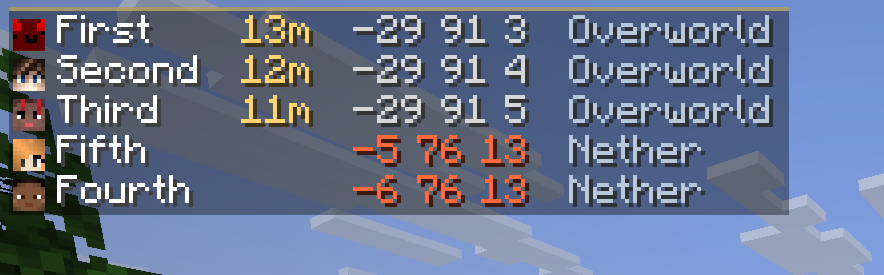
WhereAreYou is a simple location sharing mod for survival co-op.
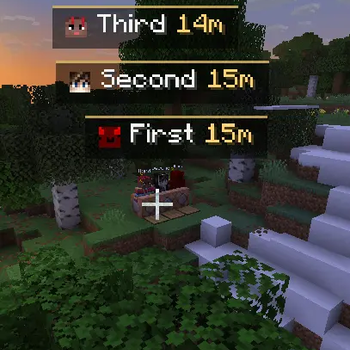
It shows where other players are through a small HUD list, name labels, and edge markers, so you can find your friends without opening a map or typing commands.
The display is kept lightweight and close to vanilla. It is useful when you need it, but it does not try to take over the screen.
Features
- Compact player location HUD
- Player name and distance labels
- Edge markers for players outside your view
- Per-player visibility settings
- Toggle your own location sharing on or off
- Optional coordinate, distance, and dimension display
- Dimension-colored coordinate text
- Configurable HUD position, scale, sorting, and player limit
- Mod Menu / Cloth Config support
- Keybind to temporarily hide or show the HUD and labels
日本語
WhereAreYou は、サバイバルの協力プレイ向けの位置共有MODです。
小さなHUD一覧、プレイヤー名と距離のラベル、画面端のマーカーを使って、マップやコマンドなしで仲間の位置を確認できます。
表示はできるだけ軽く、バニラの雰囲気に馴染むようにしています。必要な時は見つけやすく、普段は画面の邪魔になりにくい見た目です。
機能
- プレイヤーの位置をコンパクトなHUDに表示
- プレイヤー名と距離のラベル表示
- 画面外のプレイヤーを画面端マーカーで表示
- プレイヤーごとの表示設定
- 自分の位置共有をON/OFF
- 座標、距離、ディメンション表示の切り替え
- ディメンションごとに色分けされた座標表示
- HUDの位置、サイズ、並び順、最大表示人数を設定可能
- Mod Menu / Cloth Config 対応
- キー操作でHUDとラベルを一時的に表示/非表示
Available Versions
How to Install Where Are You? on Your Server
Order Server
Order a Minecraft Java server with at least 3 GB RAM (4 GB recommended).
Set fabric Loader
In the panel under "Egg", select the fabric loader and matching Minecraft version (26.1.2).
Install Mod
Open the mod browser in the dashboard and search for "Where Are You?". Click "Install" – done! Alternatively, upload the .jar via SFTP to the /mods folder.
Compatibility
Mod Loaders
Minecraft Versions
26.1.2, 26.1.1, 26.1
Server-side
✓ RequiredRecommended RAM
4 GB(min. 3 GB)Frequently Asked Questions
Where Are You? server crashes on startup – what to do?
Most common cause: wrong fabric version or insufficient RAM. Check the server log (latest.log) for "OutOfMemoryError" or "Mixin" errors. With Mado Hosting: ensure at least 3 GB RAM is allocated and the loader matches the mod version (26.1.2). You can switch loaders with one click in the panel.
Is Where Are You? compatible with fabric?
Where Are You? officially supports fabric for Minecraft 26.1.2, 26.1.1, 26.1. The Mado dashboard automatically detects incompatible loader combinations.
Server lagging with Where Are You? – how to optimize performance?
Recommended RAM: 4 GB (per 8 players). Use /spark profiler to check if Where Are You? consumes the most tick time. Common fixes: reduce server view-distance to 8-10, install "performant" or "starlight" as supplementary mods on Forge. With Mado Hosting, your server runs on NVMe SSDs with dedicated CPU cores for minimal latency.
Similar Mods




Rent Modded Server
Install Where Are You? with just one click on your server.