
WhyMap
High performance in-browser world map. Detailed texture view on zoom. Open Source.
Screenshots
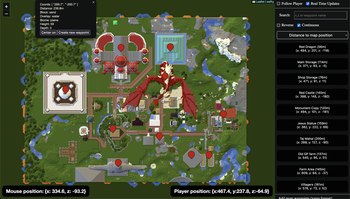
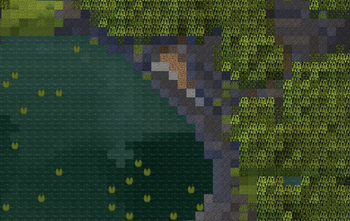
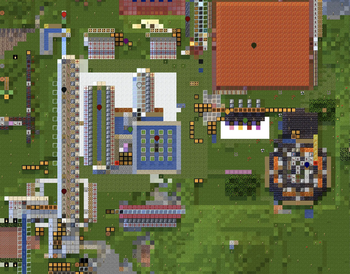
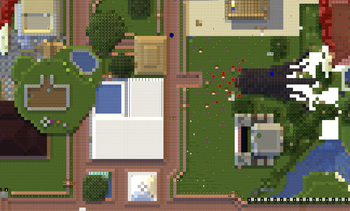
About this Mod
WhyMap

See interactive web demo on: https://wefhy.github.io/whymap-demo/map.html
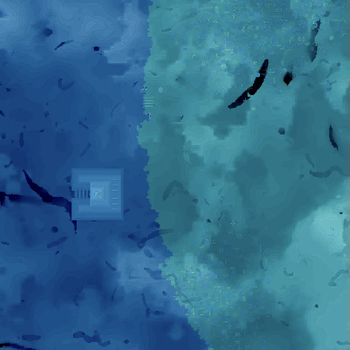
You can zoom in close enough to see the textures of blocks.
It's old 0.8 version from September 2022 but should give you hint of what it feels like to browse the map in the browser.
High performance minecraft world map with web-based interface and infinite zoom.
Your map will be presented at http://localhost:7542
Download the mod from:



Join discord for support:

How to use it?
- Install the mod and required dependencies (Fabric Language Kotlin and Fabric API)
- All keyboard shortcuts can be configured in minecraft keybind settings
Y- toggle minimapM- configuration (requires Cloth Config)B- create new waypoint- Open your browser at http://localhost:7542 to browse the map
- Zoom in to see block textures
- Click right mouse button on the map to see more options
- Click on the waypoint to center the map on it (after you add waypoints)
- You can search waypoints or coordinates
Actively supported versions:
- 1.19.3, 1.19.4
Other supported versions:
- 1.19, 1.19.1, 1.19.2
- 1.16.5
FAQ
How to use it?
- Browse your map on http://localhost:7542
How to add waypoints?
- You can import xaero's waypoints from file though browser
- Press
Bin game to create new waypoint - Right-click on the map to create new waypoint
Is the mod uploading my world to the internet?
- No, the mod is not uploading your world to the internet. It's running a local web server on your computer.
Who can access my map?
- The map can only be accessed from your computer.
- If you change it in the settings, the map can also be available to other computers and phones on your local network.
So how does it work?
- The mod is using your browser to display files that are stored on your computer.
- The mod creates a local web server that shows the tiles to your computer.
- The mod is using Leaflet to display the map.
- Nothing goes online. All data is stored in WhyMap folder in your minecraft directory. You can freely delete it or move it to another computer.
Can I browse the map on my phone?
- In order to browse the map on your phone, you need to change the settings of web server from
LOCALHOST_ONLYtoEVERYWHERE - Then you can browse the map on your phone by going to
http://[YourComputerLocalIp]:7542(assuming you're connected to the same wifi)
How is WhyMap better than other map mods?
- Incredibly detailed map that shows block textures when zoomed in.
- High performance and doesn't lag when zoomed out.
- Access your maps even when minecraft is not launched (coming soon).
- It's fully open source.
- You can browse the map on your phone.
Can I use it with Quilt?
- I only actively support Fabric, however it should work with Quilt.
- In order to run it with Quilt, you need to install Quilted Fabric API and Quilt Kotlin Libraries instead of Fabric API and Fabric Language Kotlin.
How big is the project?


Available Versions
How to Install WhyMap on Your Server
Order Server
Order a Minecraft Java server with at least 3 GB RAM (4 GB recommended).
Set fabric Loader
In the panel under "Egg", select the fabric loader and matching Minecraft version (1.21.1).
Install Mod
Open the mod browser in the dashboard and search for "WhyMap". Click "Install" – done! Alternatively, upload the .jar via SFTP to the /mods folder.
Compatibility
Mod Loaders
Minecraft Versions
1.21.1, 1.21, 1.20.6 (+10 more)
Server-side
✗ UnsupportedRecommended RAM
4 GB(min. 3 GB)Frequently Asked Questions
WhyMap server crashes on startup – what to do?
Most common cause: wrong fabric version or insufficient RAM. Check the server log (latest.log) for "OutOfMemoryError" or "Mixin" errors. With Mado Hosting: ensure at least 3 GB RAM is allocated and the loader matches the mod version (1.21.1). You can switch loaders with one click in the panel.
Is WhyMap compatible with fabric?
WhyMap officially supports fabric for Minecraft 1.21.1, 1.21, 1.20.6. The Mado dashboard automatically detects incompatible loader combinations.
Server lagging with WhyMap – how to optimize performance?
Recommended RAM: 4 GB (per 8 players). Use /spark profiler to check if WhyMap consumes the most tick time. Common fixes: reduce server view-distance to 8-10, install "performant" or "starlight" as supplementary mods on Forge. With Mado Hosting, your server runs on NVMe SSDs with dedicated CPU cores for minimal latency.
Similar Mods




![[ETF] Entity Texture Features](https://cdn.modrinth.com/data/BVzZfTc1/af683d206d50b05258d865b0d6e4aa2f2cee12f2_96.webp)
![[EMF] Entity Model Features](https://cdn.modrinth.com/data/4I1XuqiY/6e5bbd0d06b1741bfdab6c0cfab6de8fdaf0064c_96.webp)
Rent Modded Server
Install WhyMap with just one click on your server.