
Wooden Item Frames
A datapack that lets you craft Item Frames from every wood type.
Screenshots
About this Mod
About the Datapack
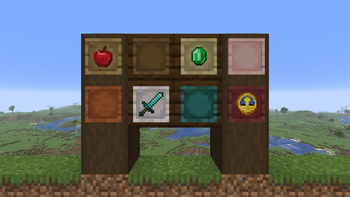
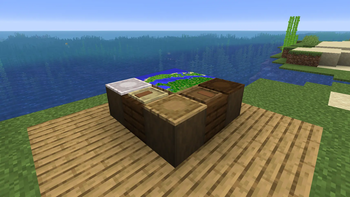
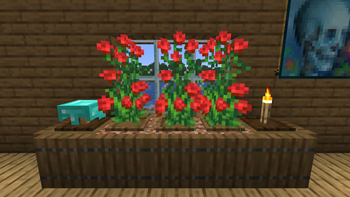
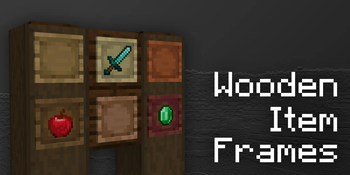
Wooden Item Frames is a datapack that adds 12 variants of the Item Frame made from all of the various wood types you can find in Minecraft.
They can be crafted by combining an Item Frame with Wooden Planks of your choosing in a Crafting Table, and can be used for decoration, item management, and more.
Wooden Item Frames is available in 22 languages. You can find them in the list below.
Supported Languages
- English (US and UK)
- Spanish (Spain and Mexico)
- Portuguese (Portugal and Brazil)
- French
- Chinese (Traditional and Simplified)
- Hindi
- Arabic
- Filipino
- Russian
- Korean
- German
- Polish
- Italian
- Ukrainian
Plus 4 Joke Languages:
- Upside Down English
- Pirate Speak
- Shakespearean English
- LOLCAT

FAQ
Q: How can I disable the "Loaded succesfully!" message?
A: Add the No HFD Load Popups datapack to your datapack/mod folder.
Q: The pack doesn't work! / I don't see the "datapack loaded succesfully!" message!
A: You're on a Minecraft version that doesn't support the pack. Check the versions tab for compatible Minecraft versions.
Q: The Item Frames have missing textures / models!
A: You don't have the resourcepack installed. You can find it in the versions tab.
Q: Will you backport the datapack to an older version such as 1.XX?
A: I can not reliably backport the datapack to versions lower than 1.20.5 because it uses the components field in recipe outputs, which was added in 1.20.5.
Q: I have multiple Item Frames of the same material that won't stack together!
A: You have used the pack on an older version of the game, and then changed your Minecraft version. You can place all Item Frames down and break them again to update their data.
Additional Info
This datapack is licensed under the CC BY-NC-SA 4.0 License.
See the LICENSE file for more details.
Using this pack in a video or modpack is fine as long as proper credit is given.
If you wish to contact me you can do so via Gmail ([email protected]), Discord (@happyfied), or the happyfied Modrinth Feedback Form.
Bugs wanted.
Available Versions
How to Install Wooden Item Frames on Your Server
Order Server
Order a Minecraft Java server with at least 3 GB RAM (4 GB recommended).
Set datapack Loader
In the panel under "Egg", select the datapack loader and matching Minecraft version (26.2).
Install Mod
Open the mod browser in the dashboard and search for "Wooden Item Frames". Click "Install" – done! Alternatively, upload the .jar via SFTP to the /mods folder.
Compatibility
Mod Loaders
Minecraft Versions
26.2, 26.1.2, 26.1.1 (+15 more)
Server-side
✓ RequiredRecommended RAM
4 GB(min. 3 GB)Frequently Asked Questions
Wooden Item Frames server crashes on startup – what to do?
Most common cause: wrong datapack version or insufficient RAM. Check the server log (latest.log) for "OutOfMemoryError" or "Mixin" errors. With Mado Hosting: ensure at least 3 GB RAM is allocated and the loader matches the mod version (26.2). You can switch loaders with one click in the panel.
Is Wooden Item Frames compatible with datapack and fabric and forge and neoforge and quilt?
Wooden Item Frames officially supports datapack, fabric, forge, neoforge, quilt for Minecraft 26.2, 26.1.2, 26.1.1. Note: Forge and Fabric mods are NOT cross-compatible – pick one loader and stick with it. The Mado dashboard automatically detects incompatible loader combinations.
Server lagging with Wooden Item Frames – how to optimize performance?
Recommended RAM: 4 GB (per 8 players). Use /spark profiler to check if Wooden Item Frames consumes the most tick time. Common fixes: reduce server view-distance to 8-10, install "performant" or "starlight" as supplementary mods on Forge. With Mado Hosting, your server runs on NVMe SSDs with dedicated CPU cores for minimal latency.
Similar Mods

![[ETF] Entity Texture Features](https://cdn.modrinth.com/data/BVzZfTc1/af683d206d50b05258d865b0d6e4aa2f2cee12f2_96.webp)
![[EMF] Entity Model Features](https://cdn.modrinth.com/data/4I1XuqiY/6e5bbd0d06b1741bfdab6c0cfab6de8fdaf0064c_96.webp)



Rent Modded Server
Install Wooden Item Frames with just one click on your server.
Details
- License
- Creative Commons Attribution Non Commercial Share Alike 4.0 International
- Server-side
- Required