
Wireless Redstone Lite
Wireless redstone for Minecraft 26.1.x. Pair transmitter and receiver blocks by channel + frequency — no wire, no spaghetti. Up to 128 blocks of range by default, configurable.
Screenshots
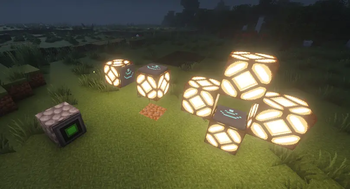
About this Mod

Wireless Redstone
Tired of running redstone wire through your whole base just to flip one lamp? Drop a transmitter next to your switch, a receiver next to your lamp, match the channel — done. No wire. No floor‑tile mazes. No accidentally powering the wrong piston.
Features
- Transmitter — takes a redstone input from any side, broadcasts on its channel.
- Receiver — outputs the strongest signal it sees on its channel, like a redstone block.
- Channel (1–128) and Frequency (0–65535) — pick any pair to keep your networks separate. Over 8 million combinations per dimension.
- Lock toggle — freezes the channel/frequency so you can't bump them by accident.
- Private toggle — binds the pair to your player, so two players can use the same channel without crossing wires on a multiplayer server.
- Item tooltips show the current config without placing the block — handy for sorting them in a chest.
- Configurable range — defaults to 128 blocks. Server admins can bump it up to 1024 or disable the limit entirely.
How it works
- Craft a transmitter and a receiver (recipes below).
- Place the transmitter and feed it redstone from any side — lever, button, comparator, whatever.
- Place the receiver anywhere in the same dimension within range.
- Right‑click either block to open the config screen. Match the channel + frequency.
- The receiver mirrors whatever signal strength the transmitter sees. Strength matters — comparator outputs travel intact.
Multiple transmitters on the same channel? The receiver picks the strongest. Multiple receivers? They all output the same. No cross‑dimension signalling (yet).
Recipes
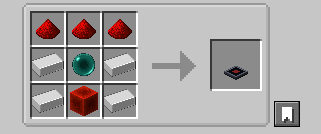
Transmitter — 4 iron + 3 redstone + 1 ender pearl + 1 redstone block
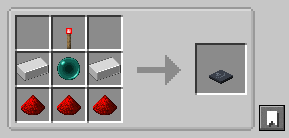
Receiver — 2 iron + 3 redstone + 1 ender pearl + 1 redstone torch
The ender pearl gates these behind your first enderman kill — far enough out that you've explored a bit, but accessible long before diamond or Nether tier.
Configuration
Config file lives at config/wirelessredstone.json (created on first launch):
{
  "rangeLocked": true,
  "maxRange": 128
}
| Key | Default | What it does |
|---|---|---|
rangeLocked |
true |
When true, receivers ignore transmitters farther than maxRange blocks. Set false for unlimited range within a dimension. |
maxRange |
128 |
Block distance. Clamped to [4, 1024]. |
Edit the file and restart Minecraft (or the dedicated server) for changes to take effect.
Requirements
- Minecraft 26.1.x
- Java 25
- Fabric Loader 0.18.4+ with Fabric API, or NeoForge 26.1+
Roadmap
Future versions may add: a "fixed strength" mode (transmitter always emits a chosen 1–15 instead of mirroring its input), Jade/WAILA tooltips for in‑world inspection, and an owner‑only Private gamerule.
Source
GitHub: kestalkayden/wireless-redstone — CC0‑1.0.
Available Versions
How to Install Wireless Redstone Lite on Your Server
Order Server
Order a Minecraft Java server with at least 3 GB RAM (4 GB recommended).
Set fabric Loader
In the panel under "Egg", select the fabric loader and matching Minecraft version (26.1.2).
Install Mod
Open the mod browser in the dashboard and search for "Wireless Redstone Lite". Click "Install" – done! Alternatively, upload the .jar via SFTP to the /mods folder.
Compatibility
Mod Loaders
Minecraft Versions
26.1.2, 26.1.1, 26.1
Server-side
✓ RequiredRecommended RAM
4 GB(min. 3 GB)Frequently Asked Questions
Wireless Redstone Lite server crashes on startup – what to do?
Most common cause: wrong fabric version or insufficient RAM. Check the server log (latest.log) for "OutOfMemoryError" or "Mixin" errors. With Mado Hosting: ensure at least 3 GB RAM is allocated and the loader matches the mod version (26.1.2). You can switch loaders with one click in the panel.
Is Wireless Redstone Lite compatible with fabric and neoforge?
Wireless Redstone Lite officially supports fabric, neoforge for Minecraft 26.1.2, 26.1.1, 26.1. The Mado dashboard automatically detects incompatible loader combinations.
Server lagging with Wireless Redstone Lite – how to optimize performance?
Recommended RAM: 4 GB (per 8 players). Use /spark profiler to check if Wireless Redstone Lite consumes the most tick time. Common fixes: reduce server view-distance to 8-10, install "performant" or "starlight" as supplementary mods on Forge. With Mado Hosting, your server runs on NVMe SSDs with dedicated CPU cores for minimal latency.
Similar Mods




Rent Modded Server
Install Wireless Redstone Lite with just one click on your server.