
WNT
Client-side mod containing multiple utilities for extremely niche uses
Screenshots
About this Mod
WNT is a client mod containing multiple utilities for the technically-inclined and administrative-inclined. It is the successor to W95, a mod I wrote ages ago with the same goal in mind.
Features
Unlike W95, WNT is split into multiple different submodules containing various features.
Supervisor
Supervisor is the main component of WNT. It works even if the game is totally frozen. It allows you to do the following:
- Disable certain things from rendering
- Disable the processing of certain packets
- Disconnect from whatever server you are connected to
- Forcibly exit your game
Currently, there is no way to interface with it outside of the Blackbox.
Blackbox
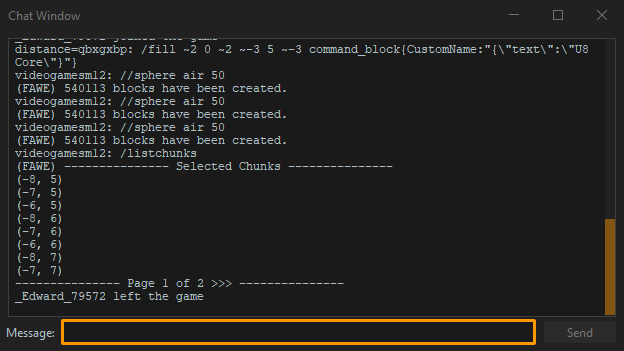
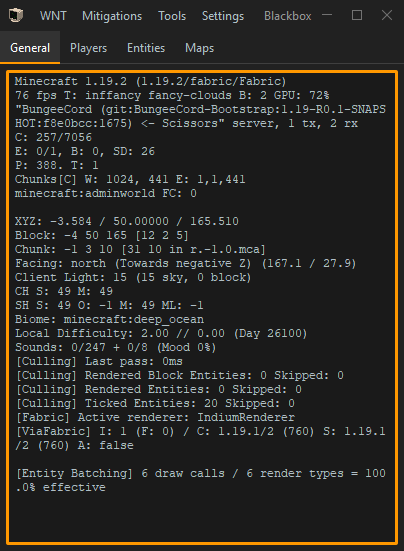
Blackbox is a separate window heavily inspired by the Windows Task Manager that provides a graphical user interface for the Supervisor. It provides details like what usually shows in the F3 screen, a list of players on the server you are connected to (along with their UUID and ping), entities that are currently in memory, and map data that is currently in memory. It also allows you to send chat messages and run commands.
For reasons unknown, this feature only works on Windows and Linux.
CFX
CFX is an anti-exploit module that actively patches multiple client-side exploits. It even patches some exploits that have yet to be fixed in the very latest version of the game. Here's a list of some of the exploits it patches or mitigates:
- Lag caused by rendering too many hearts
- Lag caused by entities with names that are too long
- Clickable text that somehow causes commands to be run or chat messages to be sent
Dumper
Dumper allows you to dump loaded map data and nearby entity data to disk. To use it, the command usage is /dump <entity [id] | entities | maps | map [id]>
Poker
Poker hooks into certain client mods in a very limited fashion to add options to the Blackbox's "Hooks" menu.
Toolbox
Toolbox is a pack of miscellaneous administrative tools and commands that don't have a place anywhere else in WNT.
Commands included in the Toolbox are:
- /dqs: Interfaces with the DataQueryStorage module
- /ltellraw: Client-side /tellraw command
- /name: Retrieves the username associated with a given UUID
- /qe: F3 + I keybind, but in a command for querying entities
- /uuid: Retrieves the UUID associated with a given username
- /wntmm: Command for managing modules in the mod
Modules included in the Toolbox are:
- DataQueryStorage: A rudimentary way of storing entity and block data obtained by using the F3 + I keybind.
- LockupProtection: A module that blocks a specific exploit one server uses where it spams the "open inventory packet".
NOTE: May interfere with plugins that open a specific size of inventory menu. Disable it with/wntmm toggle LockupProtectionif you experience issues with inventory menus.
Available Versions
How to Install WNT on Your Server
Order Server
Order a Minecraft Java server with at least 3 GB RAM (4 GB recommended).
Set fabric Loader
In the panel under "Egg", select the fabric loader and matching Minecraft version (1.20.2).
Install Mod
Open the mod browser in the dashboard and search for "WNT". Click "Install" – done! Alternatively, upload the .jar via SFTP to the /mods folder.
Compatibility
Mod Loaders
Minecraft Versions
1.20.2, 1.20.1, 1.20 (+3 more)
Server-side
✗ UnsupportedRecommended RAM
4 GB(min. 3 GB)Frequently Asked Questions
WNT server crashes on startup – what to do?
Most common cause: wrong fabric version or insufficient RAM. Check the server log (latest.log) for "OutOfMemoryError" or "Mixin" errors. With Mado Hosting: ensure at least 3 GB RAM is allocated and the loader matches the mod version (1.20.2). You can switch loaders with one click in the panel.
Is WNT compatible with fabric and quilt?
WNT officially supports fabric, quilt for Minecraft 1.20.2, 1.20.1, 1.20. The Mado dashboard automatically detects incompatible loader combinations.
Server lagging with WNT – how to optimize performance?
Recommended RAM: 4 GB (per 8 players). Use /spark profiler to check if WNT consumes the most tick time. Common fixes: reduce server view-distance to 8-10, install "performant" or "starlight" as supplementary mods on Forge. With Mado Hosting, your server runs on NVMe SSDs with dedicated CPU cores for minimal latency.
Similar Mods




![[ETF] Entity Texture Features](https://cdn.modrinth.com/data/BVzZfTc1/af683d206d50b05258d865b0d6e4aa2f2cee12f2_96.webp)
![[EMF] Entity Model Features](https://cdn.modrinth.com/data/4I1XuqiY/6e5bbd0d06b1741bfdab6c0cfab6de8fdaf0064c_96.webp)
Rent Modded Server
Install WNT with just one click on your server.