
Wood Cutter
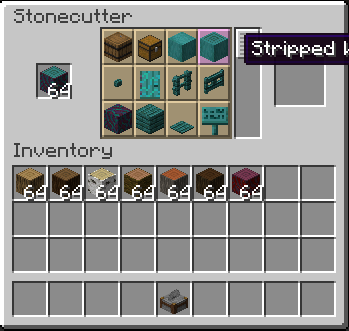
The "Wood cutter" Data Pack adds the ability to cut all wood types with the Stonecutter.
Screenshots

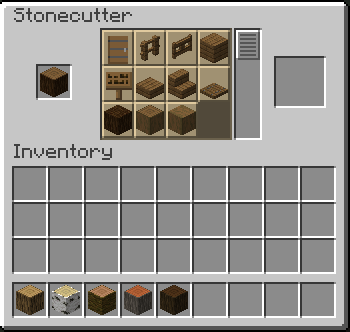
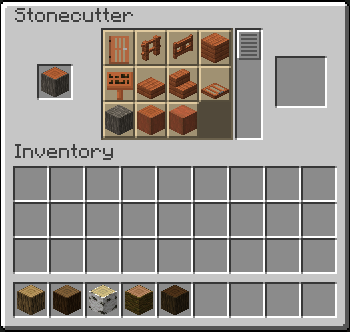
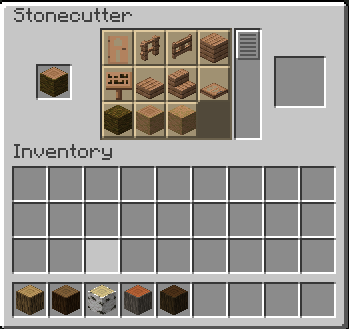
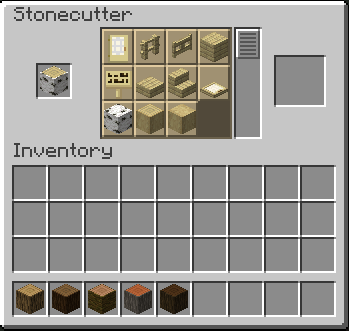
About this Mod
Join Discord for more updates.
Wood Cutter, Wood in Stonecutter
Work on Minecraft Version: 1.13.X-1.14.X
Version soon coming: 1.15.X
Download: Modrinth
Overview
Wood Cutter is a datapack that overhauls Minecraft Stonecutter, enabling it to craft wooden items like a dedicated woodworking station. Designed for players who want streamlined building without mods, it retains vanilla balance while expanding the stonecutter’s utility for all 6 classic wood types (oak, spruce, jungle, birch, dark oak, acacia).
Features
Stonecutter Woodworking:
Craft planks, slabs, stairs, fences, doors, trapdoors, and signs directly in the stonecutter.
Vanilla-friendly ratios (e.g., 1 log = 4 planks, 1 log = 4 stairs).
Customizable Recipes:
Optional config to disable vanilla crafting table recipes (e.g., force fences to be stonecutter-only).
Adjust plank/stair yields for balance.
Optimized Performance:
Minimal lag during /reload (v3.4 improvements).
No visual glitches (axes no longer “consumed”).
Compatibility
Works With:
Fabric, Forge, or Vanilla (no mods required!).
Most resource packs and performance mods (e.g., Sodium, OptiFine).
Conflicts:
Datapacks/mods that alter vanilla stonecutter behavior (e.g., Terralith, Vanilla Tweaks).
Not compatible with Minecraft 1.15+.
Installation
Download WoodCutter_v3.4.zip.
Drag into your world’s datapacks folder.
Run /reload or restart your world.
FAQ
Q: Do all vanilla wood recipes work in the stonecutter?
A: Yes! All 6 wood types (oak, spruce, jungle, birch, dark oak, acacia) are supported.
Q: Can I disable certain recipes?
A: Yes! Edit the config file to toggle specific recipes or yields.
Q: Does this work with Fresh Animations or other resource packs?
A: Yes, but use the optional texture pack for stonecutter GUI hints.
Q: Backports to newer versions?
A: This version is exclusive to 1.13.X. For 1.15+, check our updated packs!
Limitations
No support for post-1.14 blocks (e.g., Bamboo, Crimson).
Recipe book previews may require a /reload to update.
License: MIT License (open-source, edit, and share freely!).
Report Issues: Github |
Simplify your woodworking—no mods required! 🪵
Available Versions
How to Install Wood Cutter on Your Server
Order Server
Order a Minecraft Java server with at least 3 GB RAM (4 GB recommended).
Set datapack Loader
In the panel under "Egg", select the datapack loader and matching Minecraft version (1.16.5).
Install Mod
Open the mod browser in the dashboard and search for "Wood Cutter". Click "Install" – done! Alternatively, upload the .jar via SFTP to the /mods folder.
Compatibility
Mod Loaders
Minecraft Versions
1.16.5, 1.16.4, 1.16.3 (+14 more)
Server-side
✓ RequiredRecommended RAM
4 GB(min. 3 GB)Frequently Asked Questions
Wood Cutter server crashes on startup – what to do?
Most common cause: wrong datapack version or insufficient RAM. Check the server log (latest.log) for "OutOfMemoryError" or "Mixin" errors. With Mado Hosting: ensure at least 3 GB RAM is allocated and the loader matches the mod version (1.16.5). You can switch loaders with one click in the panel.
Is Wood Cutter compatible with datapack and fabric and forge and neoforge and quilt?
Wood Cutter officially supports datapack, fabric, forge, neoforge, quilt for Minecraft 1.16.5, 1.16.4, 1.16.3. Note: Forge and Fabric mods are NOT cross-compatible – pick one loader and stick with it. The Mado dashboard automatically detects incompatible loader combinations.
Server lagging with Wood Cutter – how to optimize performance?
Recommended RAM: 4 GB (per 8 players). Use /spark profiler to check if Wood Cutter consumes the most tick time. Common fixes: reduce server view-distance to 8-10, install "performant" or "starlight" as supplementary mods on Forge. With Mado Hosting, your server runs on NVMe SSDs with dedicated CPU cores for minimal latency.
Similar Mods




Rent Modded Server
Install Wood Cutter with just one click on your server.