
Working Graves
Yet another graves mod, I know. Working graves is a fabric mod that allows for the construction of graves that will be populated on player death. That means you can build a graveyard that will fill up as time goes on. Pretty cool huh?
Screenshots
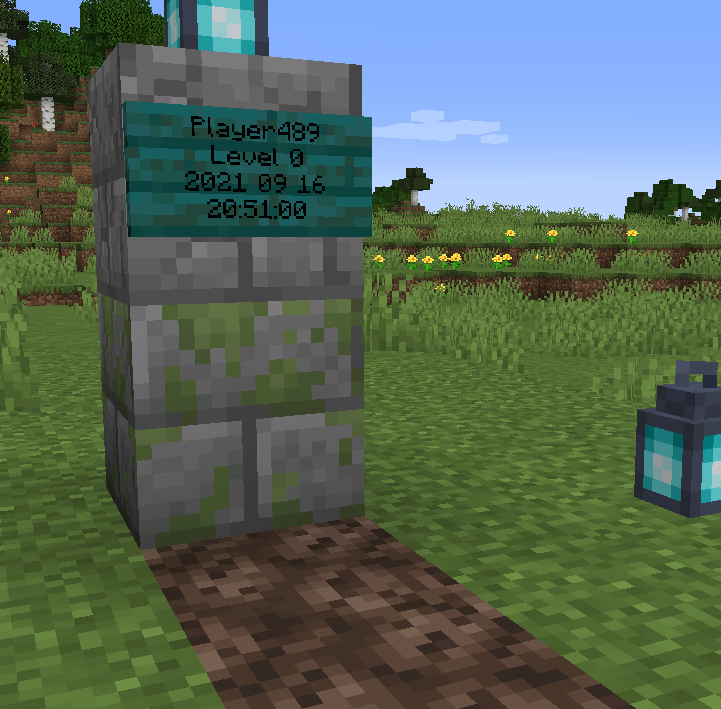
About this Mod





Working Graves
Yet another graves mod, I know. Working graves is a fabric mod that allows for the construction of graves that will be populated on player death. That means you can build a graveyard that will fill up as time goes on. Pretty cool huh?
Working graves is a server side mod. There is no need to install it on clients if you install it on your dedicated server. This means that, if installed on the server, it is completely vanilla compatible. Alternatively you can install in on the client for single player support.
How to use
Follow these steps for success.
- Place a sign with the text
hic portus animae. - Right click the sign with a soul torch to underline it.
- Place a barrel/chest under the sign (a 3x3x3 cube under the sign is checked) [optional]
- ???
- Die.
You can now go to the grave to collect your items.
Graves initially attempt to be used in the dimension where the death occurred. If no available grave is found in the current dimension, the system will iteratively search through other server dimensions in a random manner until an available grave is located. This behaviour can be toggled using gamerules.
Server operators
You can see various debug information using the /graves command.
You can also use the gravesRequireSoulTorch gamerule to specify whether the soul torch is required for create a grave. The gravesDoLightningFire gamerule can be used to toggle whether the lightning can spawn fire and graveInAllDimensions toggles wether players can be graved in other dimensions. Additionally, a permission level at least equal to gravesRequiredPermissionLevel is required to create graves (defaults to 0).
Download
License
This is free and unencumbered software released into the public domain.
Anyone is free to copy, modify, publish, use, compile, sell, or
distribute this software, either in source code form or as a compiled
binary, for any purpose, commercial or non-commercial, and by any
means.
In jurisdictions that recognize copyright laws, the author or authors
of this software dedicate any and all copyright interest in the
software to the public domain. We make this dedication for the benefit
of the public at large and to the detriment of our heirs and
successors. We intend this dedication to be an overt act of
relinquishment in perpetuity of all present and future rights to this
software under copyright law.
THE SOFTWARE IS PROVIDED "AS IS", WITHOUT WARRANTY OF ANY KIND,
EXPRESS OR IMPLIED, INCLUDING BUT NOT LIMITED TO THE WARRANTIES OF
MERCHANTABILITY, FITNESS FOR A PARTICULAR PURPOSE AND NONINFRINGEMENT.
IN NO EVENT SHALL THE AUTHORS BE LIABLE FOR ANY CLAIM, DAMAGES OR
OTHER LIABILITY, WHETHER IN AN ACTION OF CONTRACT, TORT OR OTHERWISE,
ARISING FROM, OUT OF OR IN CONNECTION WITH THE SOFTWARE OR THE USE OR
OTHER DEALINGS IN THE SOFTWARE.
For more information, please refer to http://unlicense.org/
Available Versions
How to Install Working Graves on Your Server
Order Server
Order a Minecraft Java server with at least 3 GB RAM (4 GB recommended).
Set fabric Loader
In the panel under "Egg", select the fabric loader and matching Minecraft version (1.21.4).
Install Mod
Open the mod browser in the dashboard and search for "Working Graves". Click "Install" – done! Alternatively, upload the .jar via SFTP to the /mods folder.
Compatibility
Mod Loaders
Minecraft Versions
1.21.4, 1.21.3, 1.21.2 (+12 more)
Server-side
✓ RequiredRecommended RAM
4 GB(min. 3 GB)Frequently Asked Questions
Working Graves server crashes on startup – what to do?
Most common cause: wrong fabric version or insufficient RAM. Check the server log (latest.log) for "OutOfMemoryError" or "Mixin" errors. With Mado Hosting: ensure at least 3 GB RAM is allocated and the loader matches the mod version (1.21.4). You can switch loaders with one click in the panel.
Is Working Graves compatible with fabric?
Working Graves officially supports fabric for Minecraft 1.21.4, 1.21.3, 1.21.2. The Mado dashboard automatically detects incompatible loader combinations.
Server lagging with Working Graves – how to optimize performance?
Recommended RAM: 4 GB (per 8 players). Use /spark profiler to check if Working Graves consumes the most tick time. Common fixes: reduce server view-distance to 8-10, install "performant" or "starlight" as supplementary mods on Forge. With Mado Hosting, your server runs on NVMe SSDs with dedicated CPU cores for minimal latency.
Similar Mods




Rent Modded Server
Install Working Graves with just one click on your server.