
World Corruption Fixer
Fixes corrupted save files caused by missing mods and more.
Screenshots
About this Mod
I will port the mod to other versions if this mod gets enough attention.
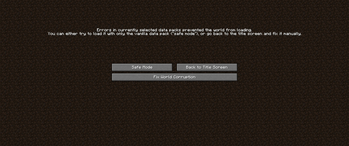
Removing world generation mods in Minecraft often breaks existing saves and dimensions, leaving worlds unable to load. This mod provides a simple one‑click “Fix World” button that automatically repairs corruption, so you don’t have to mess with manual file edits or complicated recovery steps.
V0.7 - You can now restore deleted dimensions as well.
Example: If you install a terrain mod like Terralith and later remove it, your world may **refuse to open, Even "Safe Mode" won’t help. Normally, you’d have to follow multi‑step guides online to fix this, but with this mod, you just press one button and the repair runs automatically.
This tool is especially useful for modpack authors, since it saves players from losing progress when mods are swapped in or out.
By clicking "Fix World Corruption" Your world will be probably fixed.
What does it do? (Technical Stuff)

This mod deletes the "Data" category in your level.dat This causes minecraft to forcefully create a new world seed and use level.dat.old to restore items.

Creating a new world seed doesn't mean your existing chunks are being deleted. The new ones are just generated differently.

For curious nerds: If you open your level.dat with NBT Explorer, you will see the "Data" category.
⚠️ Note: It has not been tested with NBT corruptions, so be extra cautious in those cases.

You can use this mod in your modpack freely.
Available Versions
How to Install World Corruption Fixer on Your Server
Order Server
Order a Minecraft Java server with at least 4 GB RAM (6 GB recommended).
Set forge Loader
In the panel under "Egg", select the forge loader and matching Minecraft version (1.20.1).
Install Mod
Open the mod browser in the dashboard and search for "World Corruption Fixer". Click "Install" – done! Alternatively, upload the .jar via SFTP to the /mods folder.
Compatibility
Mod Loaders
Minecraft Versions
1.20.1
Server-side
✓ RequiredRecommended RAM
6 GB(min. 4 GB)Frequently Asked Questions
World Corruption Fixer server crashes on startup – what to do?
Most common cause: wrong forge version or insufficient RAM. Check the server log (latest.log) for "OutOfMemoryError" or "Mixin" errors. With Mado Hosting: ensure at least 4 GB RAM is allocated and the loader matches the mod version (1.20.1). You can switch loaders with one click in the panel.
Is World Corruption Fixer compatible with forge?
World Corruption Fixer officially supports forge for Minecraft 1.20.1. The Mado dashboard automatically detects incompatible loader combinations.
Server lagging with World Corruption Fixer – how to optimize performance?
Recommended RAM: 6 GB (per 5 players). Use /spark profiler to check if World Corruption Fixer consumes the most tick time. Common fixes: reduce server view-distance to 8-10, install "performant" or "starlight" as supplementary mods on Forge. With Mado Hosting, your server runs on NVMe SSDs with dedicated CPU cores for minimal latency.
Similar Mods


Rent Modded Server
Install World Corruption Fixer with just one click on your server.