
World Memory
This mods add a "git like" functionnality to minecraft maps. You can undo anything that happened on a map and select a certain timestamp or reset the chunk to the seed state (without restarting the game).
Screenshots
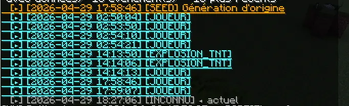
About this Mod
World Memory it is a prototype of Backup Optimization mod, It add a way to revert back the chunks where you stand and elsewhere to a previous state without having to do backups or restarting a server simply "rewinding time" to a previous iteration of the chunks in a single click.
All chunks are saved in plained strings hashed inside the world file hence reducing the space needed for a normal back up file.
What is saved by the mod ?
- States before server crash
- States before corrupted chunks ( Not fully tested but working )
- States before and after explosion with an automatic rewind in case of crash
- NBT data of Mobs that has extra data ( Wolves, villager, horses, renamed entity etc... )
- NBT data stored in blocks ( bed, chest, signs, red stone etc )
Any and all modifications is recorded (normally i hope 🙏) and can be rewinded.
What is not saved and will in the future be saved ?
Spoiler
( yaya i know i misspelled future and i added the "E" )
Player Inventories
So far only mob/entities with inventory are saved and can be restored. As for player it is currently not yet implemented given it may cause duplication dupes ( since a player CAN respawn ) for now this feature is "here" but only work for (normally) Hardcore WorldsExternal mods in general
Some future proofing was done already if a mod adds some tnt just with more power the mod can revert it back but what i like to call "special cases" are not rewindable yet ( custom explosions etc )
The mod is FOR NOW Vanilla+ Intended as a way for server owners to rewind griefed chunks and areas.
Bear in mind that this is a prototype and probably not as optimized as i wish it be. Any issue please report it on my discord or via DM's thank you so much.
Video Dev Testing by yours truly:
Short Q&A:
Q1: Will there be a version for NeoForge
A: Yes. But i'm alone so it will take time given i have 0 knowledge on Neoforge yet. And no unfortunately no Forge version in mind but it is slightly considered.
Q2: Will there be a [Insert obscure minecraft version] of the mod ?
A: 1.20.1 and higher take it or leave it. Yall can fork it and backport it i simply ask for my name in little letters at the bottom.
Q3: Will there be some version that may be skipped ?
A: Beside what's said in the previous question i will maybe make a 1.19.2 version and also if i find a version too exhausting ( According to modding summary 1.21 is a pain ) i will skip it. Keep in mind i am alone at the moment i am no team leader and i prefer it that way for now.
Q4: Does this mod have an extra scope ?
A: Yes. This mod is simply an happy coïncidence of me thinking of ways to make time travel possible in minecraft and has such will in the futur be more than simply a "back up mod"
Available Versions
How to Install World Memory on Your Server
Order Server
Order a Minecraft Java server with at least 3 GB RAM (4 GB recommended).
Set fabric Loader
In the panel under "Egg", select the fabric loader and matching Minecraft version (1.20.1).
Install Mod
Open the mod browser in the dashboard and search for "World Memory". Click "Install" – done! Alternatively, upload the .jar via SFTP to the /mods folder.
Compatibility
Mod Loaders
Minecraft Versions
1.20.1
Server-side
✓ RequiredRecommended RAM
4 GB(min. 3 GB)Frequently Asked Questions
World Memory server crashes on startup – what to do?
Most common cause: wrong fabric version or insufficient RAM. Check the server log (latest.log) for "OutOfMemoryError" or "Mixin" errors. With Mado Hosting: ensure at least 3 GB RAM is allocated and the loader matches the mod version (1.20.1). You can switch loaders with one click in the panel.
Is World Memory compatible with fabric?
World Memory officially supports fabric for Minecraft 1.20.1. The Mado dashboard automatically detects incompatible loader combinations.
Server lagging with World Memory – how to optimize performance?
Recommended RAM: 4 GB (per 8 players). Use /spark profiler to check if World Memory consumes the most tick time. Common fixes: reduce server view-distance to 8-10, install "performant" or "starlight" as supplementary mods on Forge. With Mado Hosting, your server runs on NVMe SSDs with dedicated CPU cores for minimal latency.
Similar Mods




![[ETF] Entity Texture Features](https://cdn.modrinth.com/data/BVzZfTc1/af683d206d50b05258d865b0d6e4aa2f2cee12f2_96.webp)
![[EMF] Entity Model Features](https://cdn.modrinth.com/data/4I1XuqiY/6e5bbd0d06b1741bfdab6c0cfab6de8fdaf0064c_96.webp)
Rent Modded Server
Install World Memory with just one click on your server.