
World Mirror
A client-side Fabric mod that silently mirrors the world you are playing on a multiplayer server — or even a singleplayer world — into a fully loadable local copy.
Screenshots

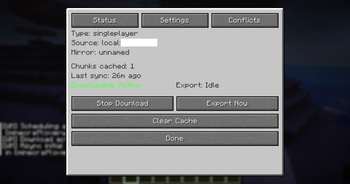
About this Mod
World Mirror
Ever wanted to take a piece of your favorite multiplayer server offline? World Mirror is a client-side Fabric mod that silently captures the world around you—including terrain, entities, and container contents—and saves it as a fully playable local singleplayer world.
Whether you're backing up a base, archiving a server before a wipe, or saving a minigame map, World Mirror works quietly in the background without lagging your game.
✨ Key Features
- Seamless Background Syncing: Exports chunk data to your disk automatically (default every 10 seconds) on a separate thread, meaning zero game freezes while you play.
- Smart "Dirty-Chunk" Tracking: Only updates chunks that have changed since the last save, keeping exports lightning fast even for massive worlds.
- Comprehensive Capture:
- Multi-Dimension: Fully supports the Overworld, Nether, End, and any custom dimensions.
- Entities: Captures mobs, animals, dropped items, armor stands (including poses!), paintings, and vehicles exactly as they appear.
- Containers: Intercepts inventory packets. Just open a chest, barrel, hopper, or furnace while the mod is active, and its contents will be saved to your mirrored world. Previously captured container items are preserved when later chunk snapshots are empty.
- Block Entities: Persists sign text, banner patterns, player heads, beacon effects, and lectern books.
- Fast Chunk Map (Window 1): Press
I→ Conflicts tab → Open Chunk Map to see a full-screen draggable grid showing every chunk's download status at a glance. The map uses a region-indexed renderer, so zoomed-out views no longer scan the entire chunk database every frame. Colour-coded green (fresh) → blue (older) for downloaded chunks, orange for third-party sources, with a red border for unresolved conflicts. - Xaero's World Map Overlay: If Xaero's World Map is installed, World Mirror can draw the same chunk status directly on Xaero's fullscreen world map. Toggle it from World Mirror Settings → Chunk Map → Xaero World Map Overlay.
- Visual Conflict Resolution: When using the Manual conflict strategy, conflicted chunks are saved to disk in MCA format. Open the Chunk Map to review them one by one or resolve all at once from the Conflicts tab.
- Export Nearby Region: Snapshot all loaded chunks within a configurable radius into a brand-new singleplayer save — ideal for archiving a specific area without touching your full mirror world.
- Smart World Mapping: Automatically maps server IPs to dedicated local folders. The same server will always export to the same folder, so you never accidentally overwrite the wrong save.
- International Support: Fully translated into English, Simplified Chinese, Traditional Chinese, and Japanese.
🎮 How to Use
- Join a multiplayer server (or singleplayer world).
- Press
Pto start a download session. You'll see an active status in your action bar. - Explore! Walk around to load terrain. Remember to open any containers if you want their contents saved.
- When you're done, press
Pagain to stop, or pressOto force an immediate export. - Play offline: Your world is saved in
<.minecraft>/downloaded_worlds/by default. (Tip: Change the save location to yourSaves Folderin the settings to play your mirrored worlds instantly from the singleplayer menu!)
*Need to clear your cache and start fresh? Just press L.*
*Open the status screen at any time with I.*
⚙️ Configuration & Conflicts
World Mirror is fully configurable via Mod Menu. Access global settings to change your save location, sync interval, and in-game logging levels.
You can handle Chunk Conflicts (when a chunk already exists on your local disk) globally or per-world using three strategies:
- Overwrite (Default): The server chunk always replaces your local copy.
- Ignore: Keeps your local copy; only brand-new chunks are written.
- Manual: Saves the incoming server chunk to
conflict_chunks/in MCA format, leaving your local copy intact. Resolve conflicts later via the Chunk Map (per-chunk) or the Conflicts tab (Overwrite All / Discard All).
📥 Installation & Requirements
- Minecraft: 26.2
- Mod Loader: Fabric (≥ 0.19.3)
- Dependencies:
- Fabric API
- LibGUI (≥ 17.0.0+26.2) — Required for the status screen
- Optional: Mod Menu (Highly recommended for accessing the settings screen)
- Optional: Xaero's World Map for fullscreen map overlay integration
Note: Because this is a client-side mod, it can only capture data the server actually sends to you. Container contents will only be saved if you physically open them, and server-side-only data (like complex mob AI paths or command block commands) will revert to defaults.
Available Versions
How to Install World Mirror on Your Server
Order Server
Order a Minecraft Java server with at least 3 GB RAM (4 GB recommended).
Set fabric Loader
In the panel under "Egg", select the fabric loader and matching Minecraft version (26.2).
Install Mod
Open the mod browser in the dashboard and search for "World Mirror". Click "Install" – done! Alternatively, upload the .jar via SFTP to the /mods folder.
Compatibility
Mod Loaders
Minecraft Versions
26.2, 26.1.2, 1.21.11
Server-side
✗ UnsupportedRecommended RAM
4 GB(min. 3 GB)Frequently Asked Questions
World Mirror server crashes on startup – what to do?
Most common cause: wrong fabric version or insufficient RAM. Check the server log (latest.log) for "OutOfMemoryError" or "Mixin" errors. With Mado Hosting: ensure at least 3 GB RAM is allocated and the loader matches the mod version (26.2). You can switch loaders with one click in the panel.
Is World Mirror compatible with fabric?
World Mirror officially supports fabric for Minecraft 26.2, 26.1.2, 1.21.11. The Mado dashboard automatically detects incompatible loader combinations.
Server lagging with World Mirror – how to optimize performance?
Recommended RAM: 4 GB (per 8 players). Use /spark profiler to check if World Mirror consumes the most tick time. Common fixes: reduce server view-distance to 8-10, install "performant" or "starlight" as supplementary mods on Forge. With Mado Hosting, your server runs on NVMe SSDs with dedicated CPU cores for minimal latency.
Similar Mods




![[ETF] Entity Texture Features](https://cdn.modrinth.com/data/BVzZfTc1/af683d206d50b05258d865b0d6e4aa2f2cee12f2_96.webp)

Rent Modded Server
Install World Mirror with just one click on your server.