
World Name Terrarified
Simple mod that adds random world name generator from Terraria
Screenshots
About this Mod
World Name Terrarified - WNT
About
WNT is a small Minecraft mod, which adds only one (for now) simple feature. Random world name generator exactly like in Terraria! (Not 100% sure, but anyway)
How it works
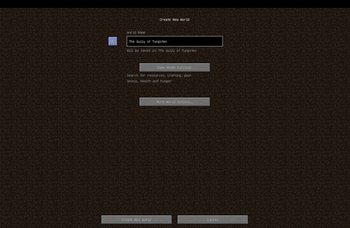
Mod adds a small square button with letter 'R' on it to the world creation screen, on the left from world name field. When you press the button it chooses 4 random entries from specific files and creates a unique name.
Compatibilities
I HAVEN'T TESTED WITH OTHER MODS YET, but until the other mod doesn't change how Minecraft renders screen it should work!
Right now it officially supports 4 languages:
- English - en_us (1 887 189 984 unique world names)
- Russian - ru_ru (944 663 616 unique world names)
- Portuguese - pt_pt (943 594 992 unique world names)
- Simplified Chinese - zh_cn (943 594 992 unique world names)
- ... more comming... maybe...
- Infinite expansion with custom resourcepacks!
Customization
Mod uses Minecraft's resource manager (simpler - Resourcepacks) to access files, so it's very simple to add your own variants/localizations!
Creating custom resourcepack
First of all you need to know how to handle resources, here is the structure of 'resourcepack':
assets/
├─ wnt/
│  ├─ LOCALE_CODE/
│  │  ├─ adjectives.txt
│  │  ├─ compositions.txt
│  │  ├─ locations.txt
│  │  ├─ nouns.txt
Important things to know about it:
LOCALE_CODEfolder (en_us, ru_ru, etc.) - MUST be lowercase. If you don't know language code you can simply google it or if locale is not supported by the mod you can found its code in the logs under 'Error while loading localization files...'- compositions.txt is the template of world names, here is its structure(example):
@- Adjective#- Location$- Noun
adjectives.txt, locations.txt, nouns.txt- are just lists with variants separated by lines, they'll replace@,#or$(examples)- Names of the files MUST be exact the same as shown above!
So to modify the original mod you simply need to create a resource pack with a suitable pack.mcmeta and directoryassets/wnt/LOCALE_CODE/where you'll put the files you'd like to modify or add. You can also override already existing resources as well as adding new locales!
Credits
Thanks!
terraria.wiki.gg for provided lists of words which this mod uses.
Available Versions
How to Install World Name Terrarified on Your Server
Order Server
Order a Minecraft Java server with at least 4 GB RAM (6 GB recommended).
Set forge Loader
In the panel under "Egg", select the forge loader and matching Minecraft version (1.12.2).
Install Mod
Open the mod browser in the dashboard and search for "World Name Terrarified". Click "Install" – done! Alternatively, upload the .jar via SFTP to the /mods folder.
Compatibility
Mod Loaders
Minecraft Versions
1.12.2
Server-side
✓ RequiredRecommended RAM
6 GB(min. 4 GB)Frequently Asked Questions
World Name Terrarified server crashes on startup – what to do?
Most common cause: wrong forge version or insufficient RAM. Check the server log (latest.log) for "OutOfMemoryError" or "Mixin" errors. With Mado Hosting: ensure at least 4 GB RAM is allocated and the loader matches the mod version (1.12.2). You can switch loaders with one click in the panel.
Is World Name Terrarified compatible with forge?
World Name Terrarified officially supports forge for Minecraft 1.12.2. The Mado dashboard automatically detects incompatible loader combinations.
Server lagging with World Name Terrarified – how to optimize performance?
Recommended RAM: 6 GB (per 5 players). Use /spark profiler to check if World Name Terrarified consumes the most tick time. Common fixes: reduce server view-distance to 8-10, install "performant" or "starlight" as supplementary mods on Forge. With Mado Hosting, your server runs on NVMe SSDs with dedicated CPU cores for minimal latency.
Similar Mods




Rent Modded Server
Install World Name Terrarified with just one click on your server.