WorldVersionBackport
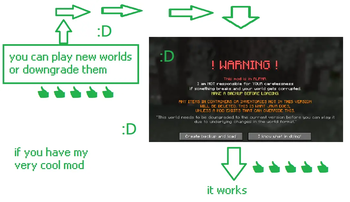
A minecraft fabric mod that allows older minecraft versions (pre 26.2) to load newer worlds that have been '''''''''upgraded''''''' and deupgrade them
Screenshots
About this Mod


THIS MOD IS IN ALPHA, I AM NOT RESPONSIBLE FOR YOUR CARELESSNESS, MAKE BACKUPS OF ANY WORLD YOU LOAD USING THIS MOD, CURRENTLY, IT DOES NOT FIX SERVERS

https://github.com/DefaultUser9148/worldversionbackport

https://modrinth.com/mod/worldversionbackport

!!! Make backups of any world before loading with this mod. Not responsible for data loss. Currently incompatible with servers.
Why use new world folder when old one do trick?
A minecraft fabric mod to allow anyone playing older versions of minecraft (pre 26.2 which dont have Vulkan option) to load and play newer worlds which feature the Vulkan renderer in the video options. And also allows to deupgrade worlds, so you can then remove this mod
Optional: ModMenu
First made for 1.21.4, this version will get the most attention from me.
| MC Version | Support Status | Priority | Tested up to | End Of Life Status |
|---|---|---|---|---|
| 1.21.5-1.21.11 | Supported | High | - | |
| 1.21.4 | Supported | Main Mod Version | 26.2-prerelease-2 | |
| 1.21.3-1.21 | Coming Soon | Low | - |
Why?
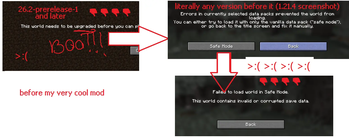
Minecraft 26.2-snapshot-1 and i think any version after 26.2 (Which introduced the Vulkan renderer) made several changes to any world that was generated in a previous version because the world generation thing is hardcoded or something, but this 'Upgrading' that happens for older worlds almost COMPLETELY making ANY OTHER VERSION unable to load the world correctly or find any of the chunks/player files as it changes a lot of stuff, most notably the regions and playerdata, moving them into subfolders and making any old version regenerate all of the chunks in the root, and unable to find the playerdata.
Incompatibilities
| Mod | Issue | Last Checked |
|---|---|---|
| Rocks and Pebbles | Crashes when loading a 26.2 world due to new version-specific data | 9th April 2026 |
Available Versions
How to Install WorldVersionBackport on Your Server
Order Server
Order a Minecraft Java server with at least 3 GB RAM (4 GB recommended).
Set fabric Loader
In the panel under "Egg", select the fabric loader and matching Minecraft version (1.21.10).
Install Mod
Open the mod browser in the dashboard and search for "WorldVersionBackport". Click "Install" – done! Alternatively, upload the .jar via SFTP to the /mods folder.
Compatibility
Mod Loaders
Minecraft Versions
1.21.10, 1.21.9, 1.21.7 (+3 more)
Server-side
✗ UnsupportedRecommended RAM
4 GB(min. 3 GB)Frequently Asked Questions
WorldVersionBackport server crashes on startup – what to do?
Most common cause: wrong fabric version or insufficient RAM. Check the server log (latest.log) for "OutOfMemoryError" or "Mixin" errors. With Mado Hosting: ensure at least 3 GB RAM is allocated and the loader matches the mod version (1.21.10). You can switch loaders with one click in the panel.
Is WorldVersionBackport compatible with fabric?
WorldVersionBackport officially supports fabric for Minecraft 1.21.10, 1.21.9, 1.21.7. The Mado dashboard automatically detects incompatible loader combinations.
Server lagging with WorldVersionBackport – how to optimize performance?
Recommended RAM: 4 GB (per 8 players). Use /spark profiler to check if WorldVersionBackport consumes the most tick time. Common fixes: reduce server view-distance to 8-10, install "performant" or "starlight" as supplementary mods on Forge. With Mado Hosting, your server runs on NVMe SSDs with dedicated CPU cores for minimal latency.
Similar Mods




Rent Modded Server
Install WorldVersionBackport with just one click on your server.