Wrapped
The cross-server playtime tracker Mojang never built. Plus blocks, deaths, biomes — and a shareable Wrapped card every Sunday.
Screenshots
About this Mod
Minecraft Wrapped — Play Time Tracker
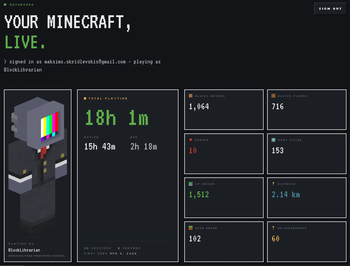
A Fabric mod that tracks your total playtime across every Minecraft world and server you've ever played, plus the detail behind it: blocks, deaths, biomes, mob kills, distance, XP, advancements.
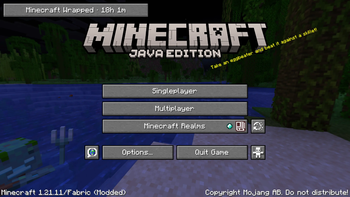
Your lifetime hours show on the title screen as a small HUD. Stats sync to minecraftwrapped.com, where you get a personal dashboard and a shareable Wrapped card every Sunday.
Features
- Lifetime playtime aggregated across every world and server you join — vanilla tracks per-world, this gives you the total.
- Active vs AFK split, with a configurable idle threshold.
- Title-screen HUD that ticks up in real time as you play.
- Retroactive import of your pre-mod single-player history from
saves/*/stats/<uuid>.jsonon first launch. - Per-event detail: block break/place include block type, tool, biome, coordinates; deaths include cause and dimension; mob kills include mob type.
- Session boundaries with server attribution for multiplayer sessions.
- Offline-resilient — events queue to a local file and sync when you reconnect.
- Web dashboard: 24h × 7-day activity heatmap, top blocks, top servers, biome wheel, playstyle radar, top death causes.
- Weekly Wrapped card auto-generated every Sunday at 00:00 UTC.
Title-screen idle time does not count toward your hours. Only time spent in a world is recorded.
How it works
The mod reads Minecraft's own ServerStatHandler and stats/*.json files on a poll — vanilla already tracks blocks mined, mobs killed, distance walked, and playtime, so there's no point re-intercepting them with mixins. A small set of mixins covers the things vanilla doesn't: per-event coordinates, biome, session boundaries, server hostname, your own chat. Fewer mixins, fewer conflicts. Tested clean against Sodium, Lithium, and FerriteCore.
Data and privacy
Play data syncs to minecraftwrapped.com. The cross-device total, the dashboard, and the Wrapped card all rely on a server-side aggregate; without sync you'd just have per-machine numbers, which is what vanilla gives you already.
Consent lives on the client. The mod stores its own Tier 1 / Tier 2 toggles locally and is the only authority for what it captures. The website cannot change those toggles remotely — there is no endpoint for it, and the mod's bytecode never reads one. Each sync attaches the mod's current local consent to the batch it's sending.
In practice that means: turning a tier off in /wrapped settings stops the mod from sending it, full stop. The Data Vault's Pause button on the website is a server-side filter — it tells the ingest endpoint to drop matching events as they arrive. The mod itself keeps capturing locally until you also turn it off there.
What's captured by default:
- Tier 1 — session start/end with server hostname, blocks broken/placed, deaths, mobs killed, distance, biome time, XP, advancements, your own chat messages.
- Tier 2 — per-event coordinates, periodic inventory snapshots, damage dealt/taken, food consumed, fishing events, breeding events.
What's never captured: IP addresses, device fingerprints, input patterns, system info beyond Minecraft + OS version, chat from other players, private messages, voice-chat audio.
The Data Vault at minecraftwrapped.com/dashboard/vault has full JSON export, delete-by-category, and a one-click wipe of every event the service has ever stored. Uninstalling the mod stops new collection. Deleting your account removes everything. Full policy: minecraftwrapped.com/privacy.
Install
- Download the jar matching your Minecraft version.
- Install Fabric API (also on CurseForge).
- Drop both into your
mods/folder. - Launch — tracking starts immediately and your lifetime hours appear on the title screen.
To see the dashboard or share Wrapped cards, sign in at minecraftwrapped.com with Microsoft and paste the one-time install code the mod prints in chat. Skip this and your stats still sync; you just won't have a dashboard or a public profile.
Compatibility
- Minecraft 1.21.11 – 1.21.x (Fabric)
- Java 21
- Requires Fabric API
- Client-only — not needed on the server
- Tested with Sodium, Lithium, FerriteCore
Forge / NeoForge are on the roadmap, not in this build.
Links
- Site & dashboard — https://minecraftwrapped.com
- Privacy policy — https://minecraftwrapped.com/privacy
- Terms — https://minecraftwrapped.com/terms
- Discord (community, bugs, feature ideas) — https://discord.gg/HqNuvhpD
- Example profile — https://minecraftwrapped.com/p/blocklibrarian
Available Versions
How to Install Wrapped on Your Server
Order Server
Order a Minecraft Java server with at least 3 GB RAM (4 GB recommended).
Set fabric Loader
In the panel under "Egg", select the fabric loader and matching Minecraft version (26.1.2).
Install Mod
Open the mod browser in the dashboard and search for "Wrapped". Click "Install" – done! Alternatively, upload the .jar via SFTP to the /mods folder.
Compatibility
Mod Loaders
Minecraft Versions
26.1.2, 26.1.1, 26.1 (+1 more)
Server-side
✗ UnsupportedRecommended RAM
4 GB(min. 3 GB)Frequently Asked Questions
Wrapped server crashes on startup – what to do?
Most common cause: wrong fabric version or insufficient RAM. Check the server log (latest.log) for "OutOfMemoryError" or "Mixin" errors. With Mado Hosting: ensure at least 3 GB RAM is allocated and the loader matches the mod version (26.1.2). You can switch loaders with one click in the panel.
Is Wrapped compatible with fabric?
Wrapped officially supports fabric for Minecraft 26.1.2, 26.1.1, 26.1. The Mado dashboard automatically detects incompatible loader combinations.
Server lagging with Wrapped – how to optimize performance?
Recommended RAM: 4 GB (per 8 players). Use /spark profiler to check if Wrapped consumes the most tick time. Common fixes: reduce server view-distance to 8-10, install "performant" or "starlight" as supplementary mods on Forge. With Mado Hosting, your server runs on NVMe SSDs with dedicated CPU cores for minimal latency.
Similar Mods




Rent Modded Server
Install Wrapped with just one click on your server.