
WSC World Save Chunks
Record and restore chunks instantly — build, destroy, reset at will.
Screenshots
About this Mod
World Save Chunks
Version 1.0 Beta Update
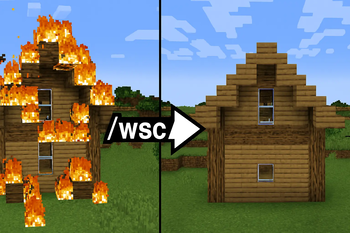
World Save Chunks (WSC) is a Forge 1.16.5 mod that introduces a GTA‑style world reset mechanic. When enabled, the mod records the original state of chunks as they load. Any changes you make—breaking blocks, building structures, or experimenting—are temporary. Once the chunk unloads or you disable WSC, the world restores itself to the saved snapshot, just like revisiting a street in GTA and finding everything reset.
✨ Features
Chunk Recording
- Use
/wsc onto start recording. - Snapshots are taken automatically when chunks load.
- Use
Restoration System
- Chunks are restored when they unload or are rewatched.
- Ideal for testing builds or destructive experiments.
Manual Commands
/wsc offrestores all recorded chunks and disables recording./wsc off nscdisables recording but keeps changes.
TileEntity Support
- Snapshots include block entities like chests and furnaces.
- Inventories and NBT data are fully restored.
Performance Optimizations
- Only changed chunks are restored.
- Multi-dimension support: Overworld, Nether, End.
Forge Compatibility
- Works with Forge 36.2.42 on Minecraft 1.16.5.
- Commands and events are registered automatically.
🛠️ Commands
/wsc on→ Start recording chunks/wsc off→ Restore all recorded chunks and stop recording/wsc off nsc→ Stop recording but no keep changes (No Save Changes)
🧠 What Makes WSC Unique
- Snapshot-based restoration — WSC records the exact block and TileEntity states when chunks load.
- Automatic rollback — Chunks revert when unloaded or rewatched, without needing manual commands.
- Dimension-aware — Prevents cross-world restoration bugs.
- No seed dependency — WSC doesn’t rely on terrain generation; it restores what was actually there.
Available Versions
How to Install WSC World Save Chunks on Your Server
Order Server
Order a Minecraft Java server with at least 3 GB RAM (4 GB recommended).
Set forge Loader
In the panel under "Egg", select the forge loader and matching Minecraft version (1.16.5).
Install Mod
Open the mod browser in the dashboard and search for "WSC World Save Chunks". Click "Install" – done! Alternatively, upload the .jar via SFTP to the /mods folder.
Compatibility
Mod Loaders
Minecraft Versions
1.16.5
Server-side
✓ RequiredRecommended RAM
4 GB(min. 3 GB)Frequently Asked Questions
WSC World Save Chunks server crashes on startup – what to do?
Most common cause: wrong forge version or insufficient RAM. Check the server log (latest.log) for "OutOfMemoryError" or "Mixin" errors. With Mado Hosting: ensure at least 3 GB RAM is allocated and the loader matches the mod version (1.16.5). You can switch loaders with one click in the panel.
Is WSC World Save Chunks compatible with forge?
WSC World Save Chunks officially supports forge for Minecraft 1.16.5. The Mado dashboard automatically detects incompatible loader combinations.
Server lagging with WSC World Save Chunks – how to optimize performance?
Recommended RAM: 4 GB (per 8 players). Use /spark profiler to check if WSC World Save Chunks consumes the most tick time. Common fixes: reduce server view-distance to 8-10, install "performant" or "starlight" as supplementary mods on Forge. With Mado Hosting, your server runs on NVMe SSDs with dedicated CPU cores for minimal latency.
Similar Mods




Rent Modded Server
Install WSC World Save Chunks with just one click on your server.