
WynnMounts
Wynnmounts – A tool to help you feed your mounts on Wynncraft with the right gathering materials based on their current level
Screenshots

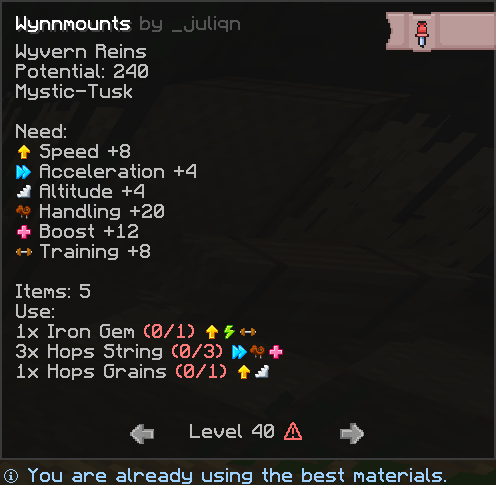
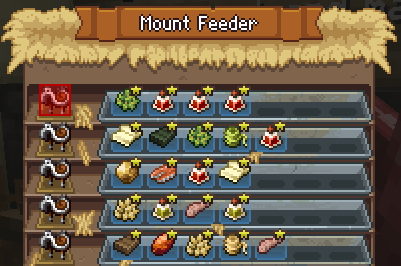
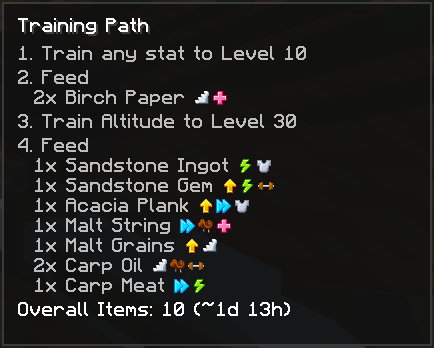

About this Mod
WynnMounts
⚠ The mod receives regular updates as well as quality-of-life updates
WynnMounts is a quality-of-life mod for Wynncraft that helps you level your mounts more efficiently.
It automatically calculates the materials required for feeding and gives you a clear in-game overview of your mount’s current progress, queued resources, and the most efficient upgrade options.
Features
- Automatic material calculation for leveling your mounts
- Supports feeding all the way up to level 115
- Clear GUI showing:
- your mount stats
- required materials
- already queued materials
- Pinned GUI mode so you can check your bank or trade market while keeping the overview visible
- Material icons for easier identification
- Efficiency indicator showing which level is currently the most efficient to upgrade
- Ability to switch between material levels to compare different feeding options
- Warning display when selected materials are not possible at the current level
Why WynnMounts?
Leveling a mount can quickly become confusing when you are trying to keep track of required materials, queued resources, and the most efficient upgrade path.
WynnMounts makes this process much easier by giving you all the important information in one place, directly in-game.
Current Highlights
- Tracks materials already in queue
- Helps compare different feeding tiers
- Shows when a selected option is inefficient or not possible
- Designed to make mount progression faster, clearer, and less frustrating
How it works
Hover over the Reins/Harness/Saddel inside the enclosure and press K to open the GUI.
The key can be changed in the settings.
You can pin the GUI by pressing [PIN] in the top-right corner.
Notes
This mod is focused on improving the mount leveling experience and may receive further updates, balance adjustments, and UI improvements over time.
Requirements
Available Versions
How to Install WynnMounts on Your Server
Order Server
Order a Minecraft Java server with at least 3 GB RAM (4 GB recommended).
Set fabric Loader
In the panel under "Egg", select the fabric loader and matching Minecraft version (1.21.11).
Install Mod
Open the mod browser in the dashboard and search for "WynnMounts". Click "Install" – done! Alternatively, upload the .jar via SFTP to the /mods folder.
Compatibility
Mod Loaders
Minecraft Versions
1.21.11
Server-side
✗ UnsupportedRecommended RAM
4 GB(min. 3 GB)Frequently Asked Questions
WynnMounts server crashes on startup – what to do?
Most common cause: wrong fabric version or insufficient RAM. Check the server log (latest.log) for "OutOfMemoryError" or "Mixin" errors. With Mado Hosting: ensure at least 3 GB RAM is allocated and the loader matches the mod version (1.21.11). You can switch loaders with one click in the panel.
Is WynnMounts compatible with fabric?
WynnMounts officially supports fabric for Minecraft 1.21.11. The Mado dashboard automatically detects incompatible loader combinations.
Server lagging with WynnMounts – how to optimize performance?
Recommended RAM: 4 GB (per 8 players). Use /spark profiler to check if WynnMounts consumes the most tick time. Common fixes: reduce server view-distance to 8-10, install "performant" or "starlight" as supplementary mods on Forge. With Mado Hosting, your server runs on NVMe SSDs with dedicated CPU cores for minimal latency.
Similar Mods




![[ETF] Entity Texture Features](https://cdn.modrinth.com/data/BVzZfTc1/af683d206d50b05258d865b0d6e4aa2f2cee12f2_96.webp)
![[EMF] Entity Model Features](https://cdn.modrinth.com/data/4I1XuqiY/6e5bbd0d06b1741bfdab6c0cfab6de8fdaf0064c_96.webp)
Rent Modded Server
Install WynnMounts with just one click on your server.