
WynnRunica
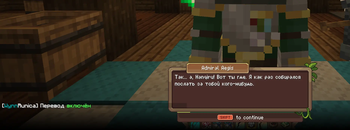
A complete Russian translation of Wynncraft dialogues in the original style. The Cyrillic characters are hand-drawn to match the server's original bitmap font. (Полноценный русский перевод диалогов Wynncraft в стиле оригинала. Кириллица нарисована вручную)
Screenshots
About this Mod
WynnRunica
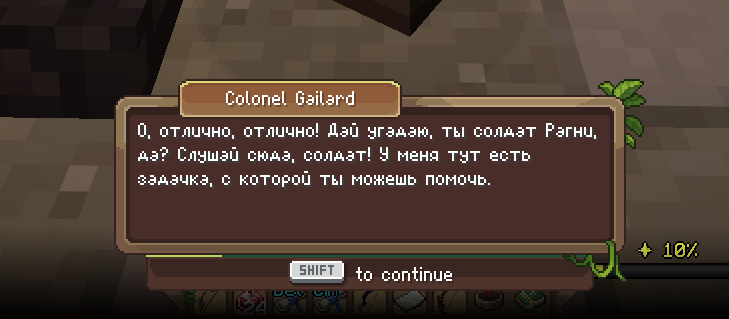
Полноценный русский перевод Wynncraft в стиле оригинала.
(Описание на английском находится ниже / English description is below)
Никакого мелкого текста поверх экрана, никаких субтитров. Русский текст отображается прямо в родном диалоговом окне Wynncraft, в той же рамке, тем же шрифтом, с той же атмосферой. Кириллица нарисована вручную в стиле оригинального bitmap-шрифта сервера, так что перевод выглядит как будто Wynncraft изначально был на русском.
Что внутри
- 🖋️ Живой перевод диалогов - не машинный, как от Google переводчика, с сохранением стиля и атмосферы оригинала
- 🔤 Кастомный кириллический шрифт, нарисованный под оригинальный стиль Wynncraft
- 🖼️ Текст отображается в родном диалоговом окне игры без лишних элементов интерфейса
- 🔄 Автообновление переводов при каждом запуске, новые квесты подтянутся сами
Установка
- Установи Fabric Loader
- Скачай Fabric API
- Скачай WynnRunica
- Запусти игру
Требования: Minecraft 1.21.11, Fabric API
Планы
- Горячая клавиша включения/выключения перевода - Сделано ✅
- Показ оригинала по зажатию клавиши - Сделано ✅
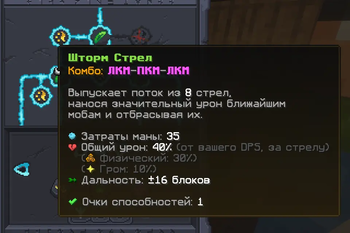
- Перевод дерева навыков и интерфейса - Сделано ✅
WynnRunica
A complete Russian translation of Wynncraft in the original style.
No tiny overlay text, no intrusive subtitles. The Russian text is displayed directly in the native Wynncraft dialogue box, using the same frame, the same font, and keeping the same atmosphere. The Cyrillic alphabet is hand-drawn to perfectly match the original server's bitmap font, making the translation look as if Wynncraft was natively in Russian.
Features
- 🖋️ Live dialogue translation - Hand-translated (not machine translation) to preserve the original style and atmosphere.
- 🔤 Custom Cyrillic font - Hand-drawn to match the original Wynncraft font style.
- 🖼️ Native integration - Text is displayed in the game's native dialogue box without any extra UI elements.
- 🔄 Auto-updates - Translations update automatically on every launch, seamlessly adding new quests.
Installation
- Install Fabric Loader
- Download Fabric API
- Download WynnRunica
- Launch the game!
Requirements: Minecraft 1.21.11, Fabric API
Roadmap
- Toggle hotkey to enable/disable translation on the fly - Done ✅
- Show the original English text by holding a specific key - Done ✅
- Skill tree and UI translation - Done ✅
Available Versions
How to Install WynnRunica on Your Server
Order Server
Order a Minecraft Java server with at least 3 GB RAM (4 GB recommended).
Set fabric Loader
In the panel under "Egg", select the fabric loader and matching Minecraft version (1.21.11).
Install Mod
Open the mod browser in the dashboard and search for "WynnRunica". Click "Install" – done! Alternatively, upload the .jar via SFTP to the /mods folder.
Compatibility
Mod Loaders
Minecraft Versions
1.21.11
Server-side
✗ UnsupportedRecommended RAM
4 GB(min. 3 GB)Frequently Asked Questions
WynnRunica server crashes on startup – what to do?
Most common cause: wrong fabric version or insufficient RAM. Check the server log (latest.log) for "OutOfMemoryError" or "Mixin" errors. With Mado Hosting: ensure at least 3 GB RAM is allocated and the loader matches the mod version (1.21.11). You can switch loaders with one click in the panel.
Is WynnRunica compatible with fabric?
WynnRunica officially supports fabric for Minecraft 1.21.11. The Mado dashboard automatically detects incompatible loader combinations.
Server lagging with WynnRunica – how to optimize performance?
Recommended RAM: 4 GB (per 8 players). Use /spark profiler to check if WynnRunica consumes the most tick time. Common fixes: reduce server view-distance to 8-10, install "performant" or "starlight" as supplementary mods on Forge. With Mado Hosting, your server runs on NVMe SSDs with dedicated CPU cores for minimal latency.
Similar Mods




Rent Modded Server
Install WynnRunica with just one click on your server.