
Xaeros playerposition
Xaero 小地图/世界地图附加mod,在地图中显示玩家具体位置,方便寻找 Xaero minimap/World map additional mod, showing the player's specific location in the map, easy to find
Screenshots
About this Mod
Xaero's Player Position 是一个基于Xaero的小地图和 Xaero的世界地图开发用于 Minecraft 的客户端实用模组。
功能是显示玩家当前坐标(X/Y/Z)并提供便捷的位置共享文本,方便联机时快速集合与导航。
主要功能
- 实时显示当前坐标
- 一键复制/发送位置文本(用于聊天或队伍沟通)
- 支持主世界、下界、末地坐标显示
适用场景
- 多人联机集合
- 据点、矿洞、传送门定位
- 日常探索中的位置记录
使用方法
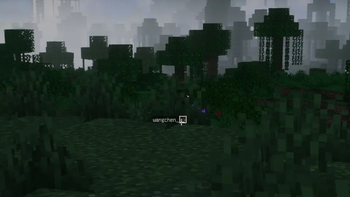
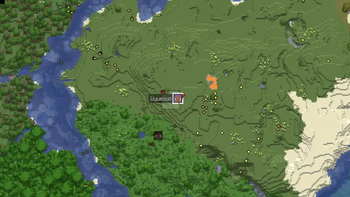
由于bug无法解决,需要按一下Tab键才能出现玩家头像。大地图的显示会出现多个重复的头像,没有白边的头像是玩家目前的位置,存在白边的是异常显示,会存在一些视觉上的问题
下载前须知
- 这是客户端功能模组,不提供作弊功能,不绕过服务器限制
- 需要安装并启用对应加载器与前置依赖(见“依赖”)
依赖
- Minecraft
- Xaero的小地图
- Xaero的世界地图
Xaero's Player Position is a client-side utility mod for Minecraft, developed based on Xaero's Minimap and Xaero's World Map.
It shows your current coordinates (X/Y/Z) and provides quick position-sharing text for fast gathering and navigation in multiplayer.
Features
- Real-time current coordinate display
- One-click copy/send location text (for chat or team communication)
- Coordinate display support for Overworld, Nether, and End
Instructions for Use
Due to an unresolved bug, player avatars will only show up after pressing the Tab key. Multiple duplicate avatars may appear on the world map: avatars without white borders indicate the player's actual location, whereas those with white borders are faulty renderings that result in visual artifacts.
Application Scenarios
- Multiplayer party gathering
- Base, mine, and portal positioning
- Location recording during daily exploration
Pre-Download Notice
- This is a client-only functional mod with no cheats or hacks and does not bypass server restrictions
- Requires a compatible mod loader and the mandatory dependencies listed below
Dependencies
- Minecraft
- Xaero's Minimap
- Xaero's World Map
Available Versions
How to Install Xaeros playerposition on Your Server
Order Server
Order a Minecraft Java server with at least 3 GB RAM (4 GB recommended).
Set fabric Loader
In the panel under "Egg", select the fabric loader and matching Minecraft version (1.21.11).
Install Mod
Open the mod browser in the dashboard and search for "Xaeros playerposition". Click "Install" – done! Alternatively, upload the .jar via SFTP to the /mods folder.
Compatibility
Mod Loaders
Minecraft Versions
1.21.11, 1.21.1, 1.20.1
Server-side
✓ RequiredRecommended RAM
4 GB(min. 3 GB)Frequently Asked Questions
Xaeros playerposition server crashes on startup – what to do?
Most common cause: wrong fabric version or insufficient RAM. Check the server log (latest.log) for "OutOfMemoryError" or "Mixin" errors. With Mado Hosting: ensure at least 3 GB RAM is allocated and the loader matches the mod version (1.21.11). You can switch loaders with one click in the panel.
Is Xaeros playerposition compatible with fabric and neoforge?
Xaeros playerposition officially supports fabric, neoforge for Minecraft 1.21.11, 1.21.1, 1.20.1. The Mado dashboard automatically detects incompatible loader combinations.
Server lagging with Xaeros playerposition – how to optimize performance?
Recommended RAM: 4 GB (per 8 players). Use /spark profiler to check if Xaeros playerposition consumes the most tick time. Common fixes: reduce server view-distance to 8-10, install "performant" or "starlight" as supplementary mods on Forge. With Mado Hosting, your server runs on NVMe SSDs with dedicated CPU cores for minimal latency.
Similar Mods




Rent Modded Server
Install Xaeros playerposition with just one click on your server.