
xkball's Auto Translate
Use AI or Google Translate to translate item tooltips and FTB Quest.
Screenshots

About this Mod
xkball's Auto Translation


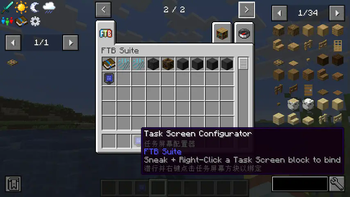
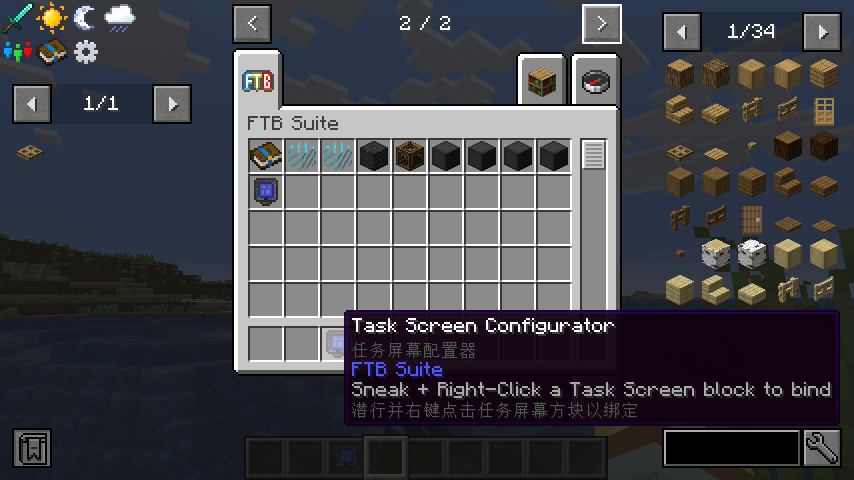
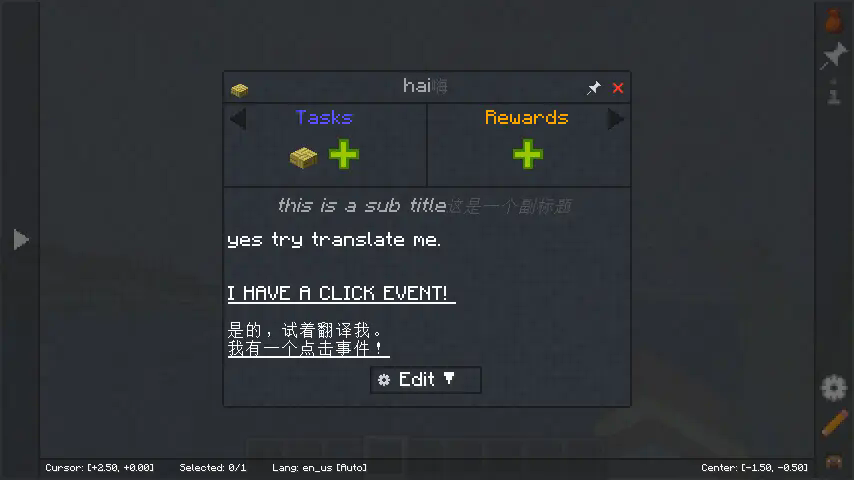
This mod add a key binding (default is T) that triggers machine translation when the mouse is over an item or when the FTB quest details screen is open.
本模组添加了一个按键绑定(默认为 T),在鼠标指向一个物品或者打开 FTB 任务详情界面时按下按键绑定触发机器翻译。
Now this mod have three translators:
- Default: Self-built llm translation relay server.
- Google Translate: Use google translate web service.Don't need api key, and also cannot set an api key.
- Large language model: Use openAI api, user need set the api endpoint , api key and model to use.
目前有三个可用翻译器:
- 默认:作者自建的大语言模型翻译中转;
- 谷歌翻译:使用谷歌翻译,注意根据网络环境,可能需要在配置文件中配置网络代理(全局网络代理可能不起作用)才能使用;
- 大语言模型翻译:按 OpenAI API 的方式调用大语言模型进行翻译。需要在配置文件中填写 API 提供者的 URL、KEY 和所使用的模型。
Feature List 功能列表
| Minecraft Version | Mod Version | Config Screen | External Cache | Translate Item Tooltip | Translate FTBQ | Translate Written Book | Batch Translate I18n keys | Defalut Translator works out of box. | Full Screen Translate |
|---|---|---|---|---|---|---|---|---|---|
| 26.1.2/NeoForge | 1.2.9 | ✅ | ✅ | ✅ | ✅ | ✅ | ✅ | ✅ | |
| 1.21.4/NeoForge | 1.1.4 | ✅ | ✅ | ✅ | ✅ | ✅ | |||
| 1.21.1/NeoForge | 1.0.8 | ✅ | ✅ | ✅ | ✅ | ✅ | ✅ | ✅ | |
| 1.20.1/Forge | 1.-1.8 | ✅ | ✅ | ✅ | ✅ | ||||
| 1.19.2/Forge | 1.-2.3 | ✅ | ✅ |
Demonstrate 效果展示
Some Explanation 一些说明
- Cannot translate multi-line item tooltip, and have no solution for now.
- Can translate multi-line ftg quest, but not have a good support for multi-page quest. All translation will display in the last page.
- Special thanks: https://github.com/SihenZhang/AutoTranslator
- 无法连续翻译多行的物品 Tooltip,且暂时没有解决方案;
- FTB 任务可以一次翻译多行,但是对多页任务的支持暂不完善,会把所有翻译结果放在最后一页;
- 批量翻译键值对功能暂时只有在配置LLM翻译器后才可以真正批量翻译, 使用默认翻译服务会一条条进行翻译, 很慢;
- 特别感谢: https://github.com/SihenZhang/AutoTranslator
Available Versions
How to Install xkball's Auto Translate on Your Server
Order Server
Order a Minecraft Java server with at least 3 GB RAM (4 GB recommended).
Set forge Loader
In the panel under "Egg", select the forge loader and matching Minecraft version (26.1.2).
Install Mod
Open the mod browser in the dashboard and search for "xkball's Auto Translate". Click "Install" – done! Alternatively, upload the .jar via SFTP to the /mods folder.
Compatibility
Mod Loaders
Minecraft Versions
26.1.2, 1.21.4, 1.21.1 (+9 more)
Server-side
✗ UnsupportedRecommended RAM
4 GB(min. 3 GB)Frequently Asked Questions
xkball's Auto Translate server crashes on startup – what to do?
Most common cause: wrong forge version or insufficient RAM. Check the server log (latest.log) for "OutOfMemoryError" or "Mixin" errors. With Mado Hosting: ensure at least 3 GB RAM is allocated and the loader matches the mod version (26.1.2). You can switch loaders with one click in the panel.
Is xkball's Auto Translate compatible with forge and neoforge?
xkball's Auto Translate officially supports forge, neoforge for Minecraft 26.1.2, 1.21.4, 1.21.1. The Mado dashboard automatically detects incompatible loader combinations.
Server lagging with xkball's Auto Translate – how to optimize performance?
Recommended RAM: 4 GB (per 8 players). Use /spark profiler to check if xkball's Auto Translate consumes the most tick time. Common fixes: reduce server view-distance to 8-10, install "performant" or "starlight" as supplementary mods on Forge. With Mado Hosting, your server runs on NVMe SSDs with dedicated CPU cores for minimal latency.
Similar Mods




![[ETF] Entity Texture Features](https://cdn.modrinth.com/data/BVzZfTc1/af683d206d50b05258d865b0d6e4aa2f2cee12f2_96.webp)
![[EMF] Entity Model Features](https://cdn.modrinth.com/data/4I1XuqiY/6e5bbd0d06b1741bfdab6c0cfab6de8fdaf0064c_96.webp)
Rent Modded Server
Install xkball's Auto Translate with just one click on your server.