
XP Simplifier
A mod focused on providing full control over XP, customizing XP values for every source independently with seamless support for both vanilla and modded content.
Screenshots

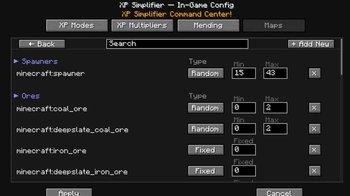
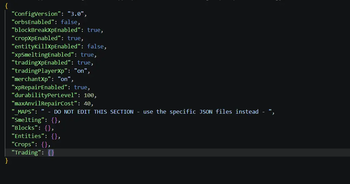

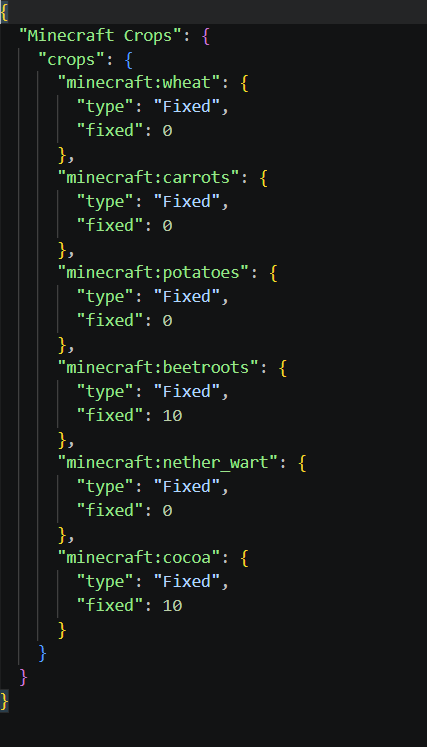
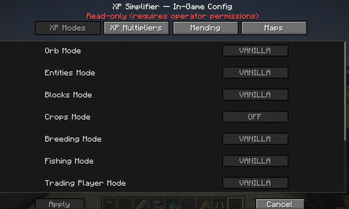
About this Mod
🧪 XP Simplifier
A mod focused on providing full control over XP, customizing XP values for every source independently with seamless support for both vanilla and modded content.
💡 Why Use XP Simplifier?
Perfect for:
- 🎮 Modpacks that need XP rebalancing
- ⚔️ Hardcore servers with punishment systems
- 🌾 Economy/progression servers
- 🧩 Heavy modpacks with inconsistent XP rewards
- 🛠 Players who want full control over progression
🎯 Prime Goals
- Control over XP behaviour (2 modes):
- Direct xp gaining (no orbs)
- Vanilla xp gaining (with orbs)
- Full control over:
- XP sources
- XP values
- Multipliers since v.2.0.5
- User-friendly config (all split into sources)
🧪 Features
Version 2.0.5+:
- In-game config via menu/mods (Fabric requires Mod Menu / NeoForge uses built-in config screen).
- Config changes apply instantly — no restart required.
- Client is optional, but required for in-game config menu, recommended for OPS.
- Config Sync (config changes via in-game menu are synced across all server players so modded player = config view).
- 2FA verification for config changes -> OP permissions (level 2+) + User flag.
- If
null+OP (level 2+)-> access denied. - If
true+OP (level 2+)-> access granted. - If
true+non-OP-> access denied. - If
false+OP (level 2+)-> access denied. - If
false+non-OP-> access denied. - Commands access for OP players (level 2+) can be revoked via LuckyPerms.
- Per world instance config (config changes via in-game menu affect only current world instance).
- Translation support.
🛠 Commands
| Command | Description |
|---|---|
/xps add <player> <true/false> |
Adds player to config change list (true = allow, false = deny) |
/xps edit <player> <true/false> |
Edits player in config change list (true = allow, false = deny) |
/xps delete <player> |
Deletes player from config change list |
/xps list |
Lists all players in config change list |
/xps mapview <true/false> |
Toggles map view for config categories (true = show, false = hide); affects all players globally unless per-player editing is enabled. |
🧩 Configuration Categories
All sources are split into categories, each with its own config file:
- Blocks.json
- Entities.json
- Crops.json
- Smelting.json
- Trading.json
- Breeding.json
- Fishing.json
- Grindstone.json
(no achievements)
Each category contains subcategories.
Subcategories exist purely to keep the config clean and tidy.
Multipliers since v.2.0.5
- Each source has a
multiplierfield that multiplies the final XP value by the specified amount. - Multipliers are applied after all other calculations, so they can be used to adjust the final XP values without changing the base values for each source.
- Multipliers affects both per-source modes ->
ONandVANILLA. - Multipliers are set as a float value, so you can use values like
0.5for half XP or2.0for double XP.
🎲 XP Calculation Types
Two XP calculation methods are supported:
supports negative values in "simple" OrbMode
- Random
- Grants a random amount of XP between
minandmax
- Grants a random amount of XP between
- Fixed
- Grants a fixed amount of XP
0means no XP is granted
🔧 Mending Rework (Anvil-Based)
Mending has been reworked to function without them while remaining balanced mainly due to OrbMode -> "simple".
🔨 How Mending Works
- Items with Mending can be repaired in an Anvil
- No additional items are required
- Repair cost is XP only
Default formula:
Since ver.2.0.5, the XP cost formula takes XP Points instead of XP Levels, so the cost is more granular and allows for more precise balancing.
_can be changed via Config file or via In-Game Menu since v.2.0.5.
- DEFAULT:
1 durability point = 2 XP_Points (min. 1lvl always)
- Example:
- Diamond Sword durability: 1561
1561 * 2 = 3122 XP_Points
Level amount required depends on player level
📉 Max Cap Behavior
maxAnvilRepairCost limits the maximum XP levels required for a full repair.
For higher caps like >30, to avoid To expensive! message, ANTE mod is recommended.
Lower values cap the total XP cost for full repairs.
⚠️ Important
- Setting
"xpRepairEnabled": false- Disables Mending completely if orbs are canceled
🧩 Compatibility
- Minecraft 1.20-1.21.1
- Fabric / NeoForge (v. 2.0.5)
- Server-side friendly
- Client is optional (only for in-game config menu -> v.2.0.5)
- Compatible with modded blocks/entities/etc
WIKI:
Do you want to know more? Visit wiki -> HERE
TL;DR
VERSIONS 1.0.+ :
- Once updated to newer version -> create a backup of your existing configs and delete whole folder. Let the mod initialize the defaults and then replace all new maps with yours but be careful, few changes were made to versions 1.+ :)
VERSIONS 2.0.+ :
- No map JSON file structure changes, but new fields were added to the main config. Once initialized -> all defaults load to memory, if any change made, config appears.
KNOWN ISSUE:
Create's experience nuggets don't work
XP Storage books - NO COMPATIBILITY ->
Use Tomes of Experience insteadRightClickHarvest - NO COMPATIBILITY
If you found a bug/no compatibility issue, let me know HERE
📜 License
This project is licensed under the GNU General Public License since ver. 2.0.5.
Feel free to use and include it in modpacks.
⭐ If you find this mod useful, consider following the mod!
FAQ
Q: Do I need to restart for config changes?
- A: Since ver.2.0.5, no restart is needed for config changes to take effect.
- For older versions -> configuration files are editable only manually and require a restart to take effect.
Q: Can I use decimal XP for mining?
- A: No, only smelting supports decimal values. Blocks/Entities/Fishing/Breeding/Trading must be integers.
Q: How do I prevent XP duplication?
- A: Since the mod supports only 2 modes ->
"simple"and"vanilla", there's no XP duplication.
Q: What about negative values while breaking blocks/killing entities?
- A: If
"OrbMode"->"simple", all actions (except smelting and merchants) accept negative values so players can be punished for killing entities like villagers or so.
Keep in mind that while setting up negative values ->"min"must be lower than"max".
Q: Do experience bottles work without entity XP enabled?
- A: No, experience bottles are treated as entities, so they require
entityXpMode: "vanilla" || "on".
Q: What about modded content?
- A: All default/vanilla fallbacks exist, so once all options set to ->
on||vanilla, all sources should work fine.
Available Versions
How to Install XP Simplifier on Your Server
Order Server
Order a Minecraft Java server with at least 3 GB RAM (4 GB recommended).
Set fabric Loader
In the panel under "Egg", select the fabric loader and matching Minecraft version (1.21.1).
Install Mod
Open the mod browser in the dashboard and search for "XP Simplifier". Click "Install" – done! Alternatively, upload the .jar via SFTP to the /mods folder.
Compatibility
Mod Loaders
Minecraft Versions
1.21.1, 1.21, 1.20.6 (+6 more)
Server-side
✓ RequiredRecommended RAM
4 GB(min. 3 GB)Frequently Asked Questions
XP Simplifier server crashes on startup – what to do?
Most common cause: wrong fabric version or insufficient RAM. Check the server log (latest.log) for "OutOfMemoryError" or "Mixin" errors. With Mado Hosting: ensure at least 3 GB RAM is allocated and the loader matches the mod version (1.21.1). You can switch loaders with one click in the panel.
Is XP Simplifier compatible with fabric and neoforge?
XP Simplifier officially supports fabric, neoforge for Minecraft 1.21.1, 1.21, 1.20.6. The Mado dashboard automatically detects incompatible loader combinations.
Server lagging with XP Simplifier – how to optimize performance?
Recommended RAM: 4 GB (per 8 players). Use /spark profiler to check if XP Simplifier consumes the most tick time. Common fixes: reduce server view-distance to 8-10, install "performant" or "starlight" as supplementary mods on Forge. With Mado Hosting, your server runs on NVMe SSDs with dedicated CPU cores for minimal latency.
Similar Mods




Rent Modded Server
Install XP Simplifier with just one click on your server.