
XP Synthesiser
XP Synthesiser is a mod that lets you synthesise XP from power. The main goal of this mod is to provide those on multiplayer and singleplayer with a simple, lag-less alternative to mobfarms that provides solely experience.
Screenshots
About this Mod
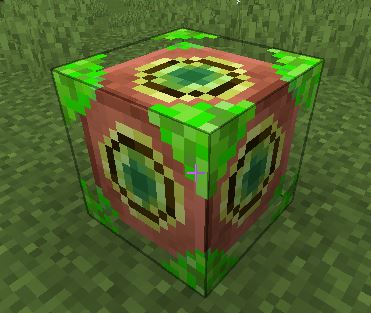
The mod contains a block (the XP Synthesiser) and an item (the Kill Recorder).
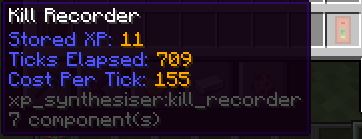
After crafting the Kill Recorder, you can toggle (shift + right click) it to let it start recording any mobs you kill. It will tally the gained experience from the kills, and then you can toggle it again to store that recording. Any future recordings on the same Kill Recorder will overwrite any previous ones. It will only register XP gain from kills, and no other sources.
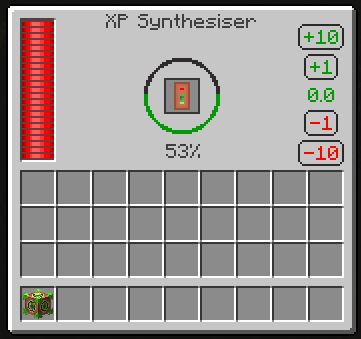
A Kill Recorder with a saved recording can be placed inside the XP Synthesiser. The Synthesiser, with a valid recording, will start to generate XP. It will generate the amount of XP that you stored in the recording in the amount of time it took you to record that amount of XP gain. However, a power cost is applied per experience point generated, scaled harshly depending on how long it took you to record (much shorter recordings have a much higher per-tick and total power cost). XP generation is paused while there is not sufficient power.
Any XP generated can be extracted with the buttons in the XP Synthesiser's UI. XP can also be stored in the block that way - but be careful! Breaking the block will lose any retained XP.
Available Versions
How to Install XP Synthesiser on Your Server
Order Server
Order a Minecraft Java server with at least 3 GB RAM (4 GB recommended).
Set neoforge Loader
In the panel under "Egg", select the neoforge loader and matching Minecraft version (1.21.4).
Install Mod
Open the mod browser in the dashboard and search for "XP Synthesiser". Click "Install" – done! Alternatively, upload the .jar via SFTP to the /mods folder.
Compatibility
Mod Loaders
Minecraft Versions
1.21.4, 1.21.3, 1.21.2 (+1 more)
Server-side
✓ RequiredRecommended RAM
4 GB(min. 3 GB)Frequently Asked Questions
XP Synthesiser server crashes on startup – what to do?
Most common cause: wrong neoforge version or insufficient RAM. Check the server log (latest.log) for "OutOfMemoryError" or "Mixin" errors. With Mado Hosting: ensure at least 3 GB RAM is allocated and the loader matches the mod version (1.21.4). You can switch loaders with one click in the panel.
Is XP Synthesiser compatible with neoforge?
XP Synthesiser officially supports neoforge for Minecraft 1.21.4, 1.21.3, 1.21.2. The Mado dashboard automatically detects incompatible loader combinations.
Server lagging with XP Synthesiser – how to optimize performance?
Recommended RAM: 4 GB (per 8 players). Use /spark profiler to check if XP Synthesiser consumes the most tick time. Common fixes: reduce server view-distance to 8-10, install "performant" or "starlight" as supplementary mods on Forge. With Mado Hosting, your server runs on NVMe SSDs with dedicated CPU cores for minimal latency.
Similar Mods




Rent Modded Server
Install XP Synthesiser with just one click on your server.